

Answer

Lines Duplicating Per Item on Transaction

  • November 15, 2025
  • 3 replies
  • 39 views

Hello All,


I have created a customization to be able to utilize package pricing to be reflected on a SO(OA)/QT printout. I am having trouble getting the report to translate to the invoicing side of the transaction process.

On the SO/QT I was able to get the lines to stop duplicating by taking away the relationship to the SOLine as the fields are not needed - it is reading the custom made fields.
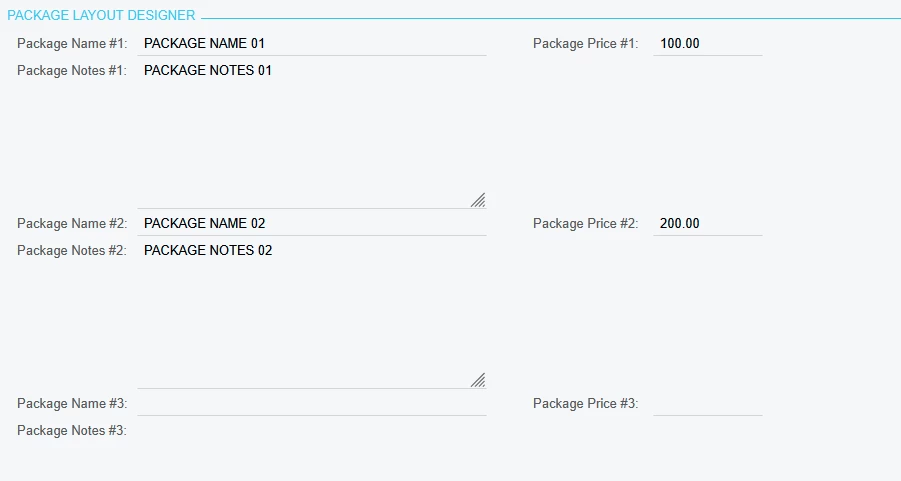
 

Package 1 and 2 filled in, Packages 3 - 6 are empty.


However, to get the AR Invoice to read the SO fields, I need to join AR Tran SOOrderNbr to the SO OrderNbr. It is reading this four times. I am sure it is due to the joins, but I have tried every which way I can think of (even attempting to do subreporting) and have had no luck.


I have put 4 line items on my SO and processed through invoicing. The report will put out the Package 1 and Package 2 information 4 times.
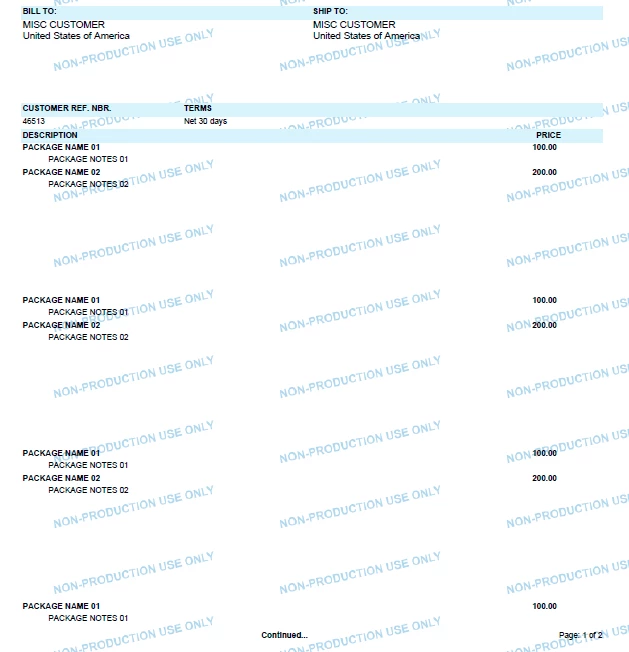
 

I appreciate any thoughts/ideas to get this report finalized!

 

Best answer by bwhite49

The ARTran table will duplicate for each row on the invoice. If all of the rows on the invoice are associated with the same order, you could add a line to the join between ARTran and SOOrder where ARTran.SortOrder = ‘1’. This way, it only joins on the first row and won’t duplicate for every ARTran line.


3 replies

bwhite49
Captain II
Forum|alt.badge.img+11
  • Captain II
  • Answer
  • November 16, 2025

The ARTran table will duplicate for each row on the invoice. If all of the rows on the invoice are associated with the same order, you could add a line to the join between ARTran and SOOrder where ARTran.SortOrder = ‘1’. This way, it only joins on the first row and won’t duplicate for every ARTran line.


  • Author
  • Jr Varsity II
  • November 17, 2025

The ARTran table will duplicate for each row on the invoice. If all of the rows on the invoice are associated with the same order, you could add a line to the join between ARTran and SOOrder where ARTran.SortOrder = ‘1’. This way, it only joins on the first row and won’t duplicate for every ARTran line.


Thank you so much!!!

I could not figure out how to get the formula in the join on the report designer, but what I did end up doing was taking your train of thought and adding the filter “ARTran.LineNbr = 1” and that worked. You have added a new tool to my toolbox and for that I am grateful!


bwhite49
Captain II
Forum|alt.badge.img+11
  • Captain II
  • November 17, 2025

No problem. Just an FYI, sometimes the first line is not line nbr 1, sometimes it’s line 3 or another number. I wish it would always start with Line Nbr 1, but that is not always the case. For this reason, it’s better to use SortOrder vs LineNbr. Sort Order should be available in both ARTran and SOLine and will always start with 1.
