Hi everyone,
I am facing an issue with a customized ARInvoice report (Report Designer) in Haufe X360/Acumatica.
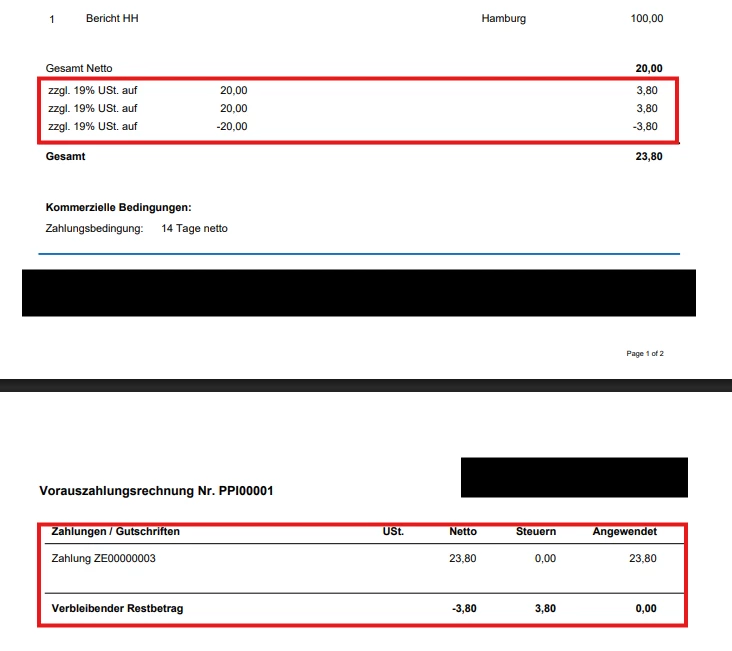
When a prepayment invoice (DocType = PP) is applied to a regular invoice, the tax section in the main report shows multiple tax lines.
Example:
-
Net amount: 30.00 €
-
Tax (19%): 5.70 €
However, in the tax section I get three lines:
-
+5.70 (invoice tax)
-
+5.70 (tax from prepayment)
-
–5.70 (adjustment/correction line from prepayment application)
The totals are technically correct, but for the customer it looks confusing because the VAT/Tax is printed three times (see attached screenshot).
What I tried so far:
-
Added a
VisibleExprin the tax section, e.g.:=IIf([ARInvoice.DocType] <> 'PP', True, False)→ Unfortunately this did not solve the issue, the duplicate tax lines are still there.
-
Checked if the issue is coming from the subreport → but it actually happens in the main report.
-
It looks like the tax section is pulling from both
ARInvoiceTaxand the adjustments (ARAdjust), so the prepayment tax is included.
My questions:
-
How can I make sure that only the actual invoice tax (
ARInvoiceTax) is displayed in the tax section, and not the prepayment tax lines? -
Should I create a separate command/data source for prepayments, instead of letting them appear in the tax block?
-
Is there a best practice for handling this scenario, so that only one tax line per TaxID appears in the main report, even if prepayments are applied?
Thanks a lot in advance for your support