Answer

Issue sorting by month number in a simple YTD dashboard chart

  • January 11, 2024
  • 2 replies
  • 180 views

kevinpopeck
Jr Varsity III
Forum|alt.badge.img

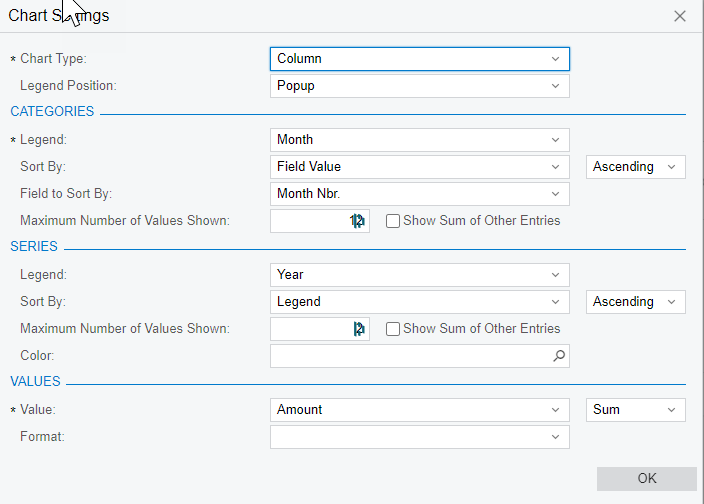
I’m trying to create a simple Year-to-date chart on a dashboard to compare 2 different series of data and am experiencing an issue when sorting on month number.

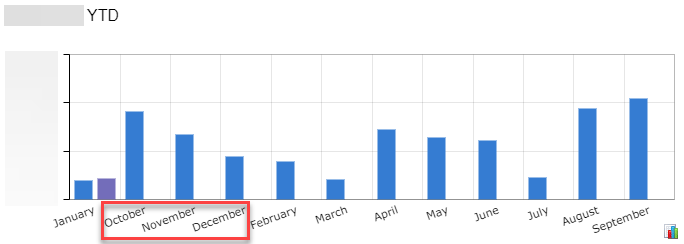
I would like the data to display in correct month order (i.e. 1,2,3,4,5,6…) and instead it seems to be sorting differently (i.e. 1,10,11,12,2,3,4,5...). I’ve tried multiple Sort By options on the chart settings and nothing seems to change. Is the sorting issue because I don’t have a full year’s worth of data in both series? Are my sort settings wrong? Am I representing the month number in the GI the correct way? Any help would be appreciated. Thanks!

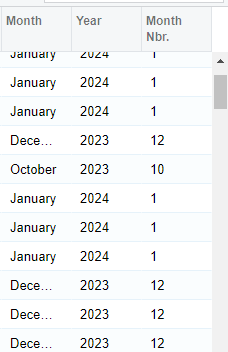
GI Datafield
GI Data
Chart Settings
Results


Best answer by craig2

Hi @kevinpopeck ,

Not sure if this is the best practice or not, but I’ve worked through the same issue by adding a “0” to the front of the single-digit month numbers.  And to do that, you have to convert the date to a string type.  So, something like this:

=IIf(Len(CStr(Month([ARInvoice.DocDate])))=1,Concat('0',CStr(Month([ARInvoice.DocDate]))),CStr(Month([ARInvoice.DocDate])))

That should then allow you to sort Ascending to achieve proper month order.  Hope it helps!

2 replies

craig2
Pro I
Forum|alt.badge.img+3
  • Pro I
  • Answer
  • January 11, 2024

Hi @kevinpopeck ,

Not sure if this is the best practice or not, but I’ve worked through the same issue by adding a “0” to the front of the single-digit month numbers.  And to do that, you have to convert the date to a string type.  So, something like this:

=IIf(Len(CStr(Month([ARInvoice.DocDate])))=1,Concat('0',CStr(Month([ARInvoice.DocDate]))),CStr(Month([ARInvoice.DocDate])))

That should then allow you to sort Ascending to achieve proper month order.  Hope it helps!


kevinpopeck
Jr Varsity III
Forum|alt.badge.img
  • Author
  • Jr Varsity III
  • January 11, 2024

Hi @kevinpopeck ,

Not sure if this is the best practice or not, but I’ve worked through the same issue by adding a “0” to the front of the single-digit month numbers.  And to do that, you have to convert the date to a string type.  So, something like this:

=IIf(Len(CStr(Month([ARInvoice.DocDate])))=1,Concat('0',CStr(Month([ARInvoice.DocDate]))),CStr(Month([ARInvoice.DocDate])))

That should then allow you to sort Ascending to achieve proper month order.  Hope it helps!

Your suggestion worked like a charm! Thank you so much for your help @craig2.