Solved

Is it possible to add more "aging days/periods" columns on report AR630500 (AR Aged Period Sensitive)

  • December 2, 2020
  • 2 replies
  • 371 views

Forum|alt.badge.img+6

Hello,

    Correct me if I am wrong, I’ve studied the AR630500.rpx, and found actually the “aging days” are soured from statement cycle setting.

 

However, on statement cycles, the split sections have been limited to 4.
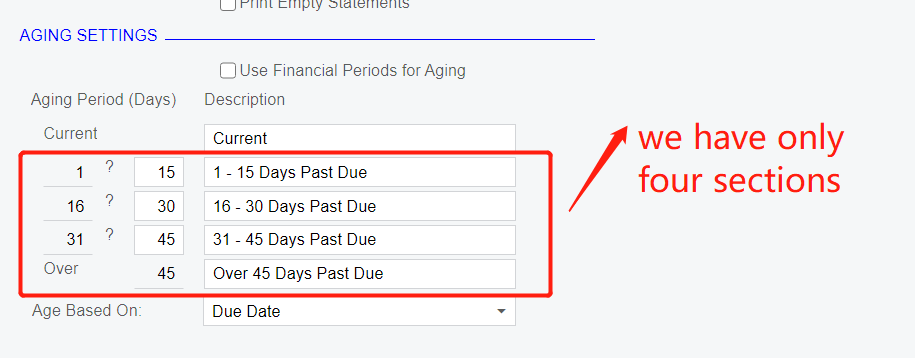
 

         Supposing I would like to show columns like

1-15 days, 16-30days, 31-45 days,  45--90days, over 90 days

       is it possible to do it?
       Thank you.

Best answer by Irina

The number of aging periods is hardcoded (3 periods and the 4th period for the documents that are past due). 

You can define only the number of days for each period. 

If you want to add an extra aging period, one can explore customization for this requirement.

2 replies

Irina
Community Manager
Forum|alt.badge.img+8
  • Acumatica Platform Analyst
  • Answer
  • December 2, 2020

The number of aging periods is hardcoded (3 periods and the 4th period for the documents that are past due). 

You can define only the number of days for each period. 

If you want to add an extra aging period, one can explore customization for this requirement.


Forum|alt.badge.img+6
  • Author
  • Captain II
  • December 3, 2020

The number of aging periods is hardcoded (3 periods and the 4th period for the documents that are past due). 

You can define only the number of days for each period. 

If you want to add an extra aging period, one can explore customization for this requirement.

@Irina  Thank you
The good news is this extra column is not a “must have” requirement from our accounting team. They accept the limitation of 4 columns now.
However, from my point of view, if they insist need more fixed columns,  I did not need to customization the screen nor the database.
The only thing I have to do is to create a new rpx file, and fix the columns using fixed calculation method. is it workable?
