Answer

INTran.InventoryID looks like a string but is actually an integer join confusion with InventoryItem.InventoryCD (string)

  • October 30, 2025
  • 2 replies
  • 35 views

Hi everyone,

I’m creating a custom report in Report Designer where my main data source is INTran.
The goal is to display item-related details from InventoryItem such as InventoryCD and PICKSEQ_Attributes.

When previewing the data, the InventoryID field in INTran looks like a string for example, it shows values like 3033-70 but technically, it’s stored as an integer foreign key (int) that points to InventoryItem.InventoryID.

This led me to think I could join using InventoryItem.InventoryCD, which is a string (nvarchar) field containing user-facing item codes like “3033-70”.

However, when I try a relation like:

<RelationRow> <ChildField>InventoryCD</ChildField> <ParentField>InventoryID</ParentField> </RelationRow>

or even attempt a conversion with:

<CalculatedField Name="INTranInventoryCD" DataType="String"> <Value>=CStr([INTran.InventoryID])</Value> </CalculatedField>

I get errors such as:

“The report cannot be opened because it includes a field (INTranInventoryCD) that does not exist.”

 What I’ve Observed

  • INTran.InventoryIDint, but the displayed value looks like a string (e.g., “3033-70”).

  • InventoryItem.InventoryIDint, true primary key.

  • InventoryItem.InventoryCDstring (nvarchar), human-readable item code.

  • Joining by InventoryCD doesn’t work due to type mismatch.


Thanks in advance!

Best answer by BenjaminCrisman

@rmore49 This is standard across all tables which link to a main entry form table. You can think of it as some tables having a UI value and a DB value. The DB value is what is stored in the database and is what you’re seeing as the INT value. The UI is what Acumatica does like when you call this value into a GI so you can more easily understand what you’re looking at, it’s converting the INT value which will make no sense to look at, into the more easy to understand value.

You can always check the DAC Schema browser for how to best join the tables or the Merged DAC Relations screen to see how the tables join. There are exceptions but typically you will always want to check the key linking fields for the table and make sure to join using these fields, it will make for the best results set

2 replies

BenjaminCrisman
Acumatica Employee
Forum|alt.badge.img+4
  • Acumatica Support Team
  • Answer
  • October 30, 2025

@rmore49 This is standard across all tables which link to a main entry form table. You can think of it as some tables having a UI value and a DB value. The DB value is what is stored in the database and is what you’re seeing as the INT value. The UI is what Acumatica does like when you call this value into a GI so you can more easily understand what you’re looking at, it’s converting the INT value which will make no sense to look at, into the more easy to understand value.

You can always check the DAC Schema browser for how to best join the tables or the Merged DAC Relations screen to see how the tables join. There are exceptions but typically you will always want to check the key linking fields for the table and make sure to join using these fields, it will make for the best results set


BenjaminCrisman
Acumatica Employee
Forum|alt.badge.img+4
  • Acumatica Support Team
  • October 30, 2025

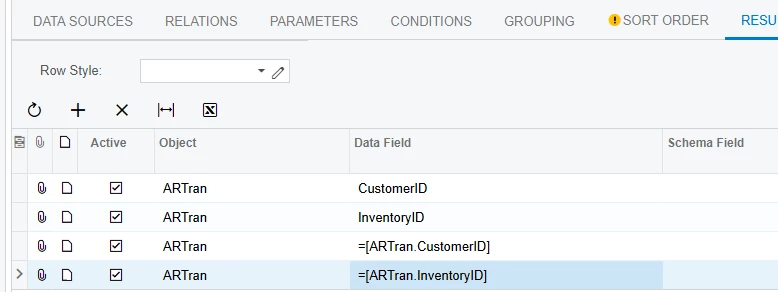
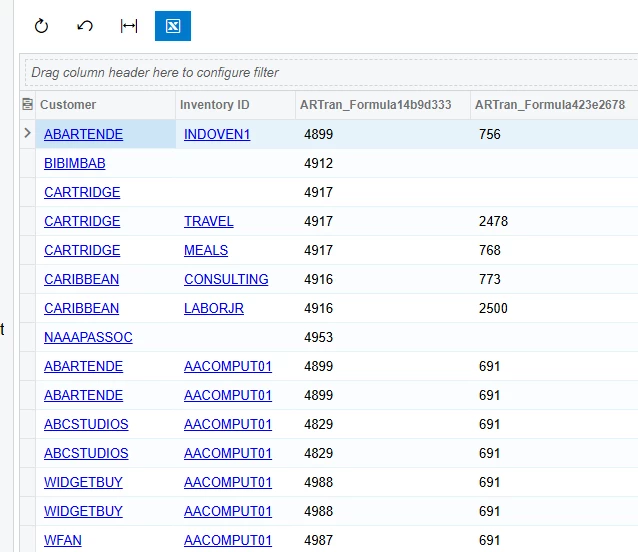
Just as a quick follow up you’ll see that in this GI using ARTran, which is not where these two values are stored, I’m calling in the UI value on the Customer and the Inventory item, and the database value for them in the next columns:

I thought the visual might be easier to understand how they can be specifically referenced