


Answer

Import Scenario error - Production Order Maintainence screen

  • July 9, 2025
  • 4 replies
  • 60 views

claudematherne24
Varsity I
Forum|alt.badge.img

Hello all, 

I’m in the process of testing our instance of Acumatica that we are upgrading from 2022 R1 to 2025 R1.  In my testing, I’m getting an error when trying to process a Import Scenario that we have been using for years related to creating new Produciton Orders and those Production Orders are released.  Here is the Import Scenario
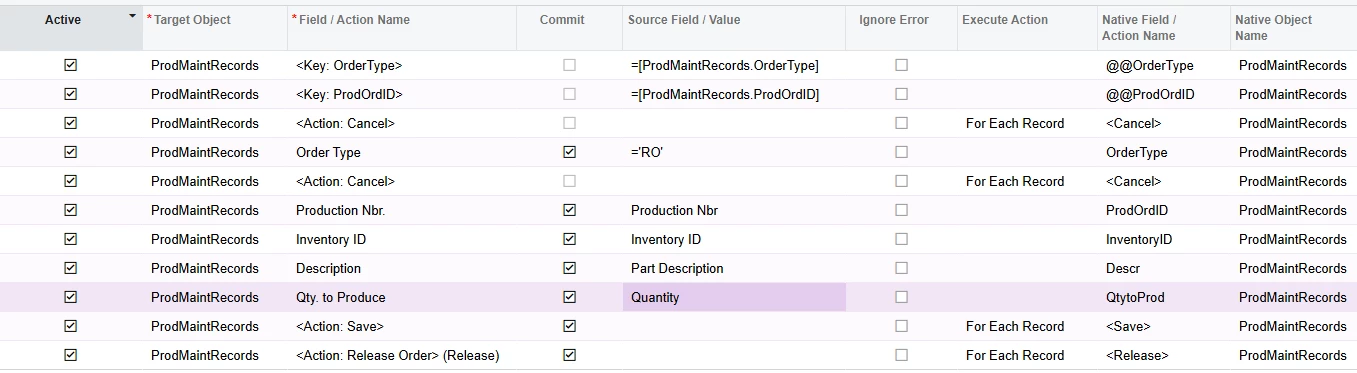
When I try to process the Import, I get an error on the first record that says ‘BaseTotalQtyRequired’ cannot be empty.

When looking at the screen, that field isn’t exposed.  Do I need to modify my screen to capture this field?  Or am I missing something in my Import Scenario?

Best answer by lauraj46

Hi ​@claudematherne24 ,

It could be related to the newer workflows, I’m not sure.  If you do need to run this as a second import scenario, you could probably run the second scenario using a data source based on a Generic Inquiry.  The inquiry could look for production orders that are on hold and have a specific CreatedByScreenID (to identify those that were created by the first import scenario).

Hope this helps!

Laura


4 replies

lauraj46
Captain II
Forum|alt.badge.img+8
  • Captain II
  • July 9, 2025

Hi ​@claudematherne24 ,

Have you tried testing the import scenario without the ‘Release’ action?  I’m not sure if it’s related to your error, but as far as I have seen that does not work and you may need to do the Release in a separate scenario.

Hope this helps!

Laura


claudematherne24
Varsity I
Forum|alt.badge.img

Interesting.  This Import worked pre update.  Must be something tied to the newer workflows of Hold maybe?  I think I’d like to play around some more, or find another solution if possible first.  Our processes have daily runs of this import sometimes and the process of creating a new DP where my operator has to find and copy over the new production order numbers seems less than ideal.


lauraj46
Captain II
Forum|alt.badge.img+8
  • Captain II
  • Answer
  • July 9, 2025

Hi ​@claudematherne24 ,

It could be related to the newer workflows, I’m not sure.  If you do need to run this as a second import scenario, you could probably run the second scenario using a data source based on a Generic Inquiry.  The inquiry could look for production orders that are on hold and have a specific CreatedByScreenID (to identify those that were created by the first import scenario).

Hope this helps!

Laura


claudematherne24
Varsity I
Forum|alt.badge.img

That’s a pretty good idea as a back up plan.  Thanks
