Answer

IIF() function giving unexpected results

  • April 5, 2022
  • 4 replies
  • 575 views

Forum|alt.badge.img

I have a function in a report that is not working as expected. 


It should only show an inventory code if the type is “Finished Good”:

=IIf(([InventoryItem.ItemType]='Finished Good'),[InventoryItem.InventoryID],'') 

This is only returning blanks for all Item types, but if I show the value in the ItemType field, it is displaying “Finished Good”.


I’m wondering if the underlying data in this field is actually something other than what displays on the screen, like maybe FG or something.  But I have no access to the DB to find out.
Best answer by Freeman Helmuth

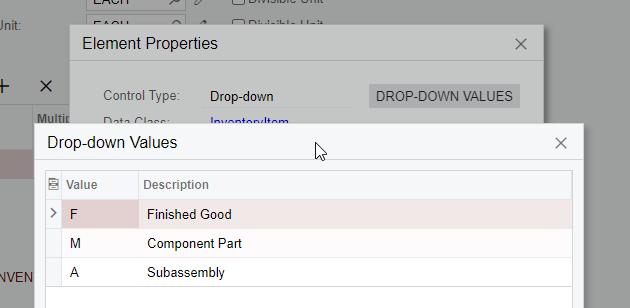
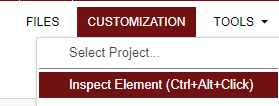
To add to the above answers, anytime you want to filter or use a formula on a dropdown in Acumatica(not to be confused with a selector) you have to examine the dropdown to get the actual field values.

  1. Click Customization>Inspect Element(Or press Ctrl+Alt)


  2. Click on the dropdown you wish to examine


  3. Click on “Dropdown Values” to see the ID values of the dropdown


4 replies

Dioris Aguilar
Jr Varsity I
Forum|alt.badge.img+2

@MarciaW You should be checking against the value stored in database instead of the one displayed in the screen. Try the following:

=IIf(([InventoryItem.ItemType]='F'),[InventoryItem.InventoryID],'')


Naveen Boga
Captain II
Forum|alt.badge.img+19
  • Captain II
  • April 5, 2022

@MarciaW  Try this!! 

=IIf(([InventoryItem.ItemType]='F'),[InventoryItem.InventoryID],'') 


Freeman Helmuth
Semi-Pro I
Forum|alt.badge.img

To add to the above answers, anytime you want to filter or use a formula on a dropdown in Acumatica(not to be confused with a selector) you have to examine the dropdown to get the actual field values.

  1. Click Customization>Inspect Element(Or press Ctrl+Alt)


  2. Click on the dropdown you wish to examine


  3. Click on “Dropdown Values” to see the ID values of the dropdown


Forum|alt.badge.img
  • Author
  • Varsity III
  • April 5, 2022

Thank you all very much, this is super helpful!  I don’t have access to our database as we are using the SAAS model, so at the moment I use inquiry screens to investigate data.

Really very much appreciated!