Solved

Identifying a specific Formula field in a GI with a GI as the source

  • April 24, 2025
  • 4 replies
  • 137 views

I have begun testing the new functionality that allows us to use an existing GI as the data source for a new GI. It seems very powerful, and will certainly solve a number of reporting challenges, but I’m struggling with the naming scheme a bit.

Specifically, in the base GI, I have a number of columns that are formulas. I need to reference those columns in the summary/child GI, but the names are simply the original base table plus a GUID to make them unique:
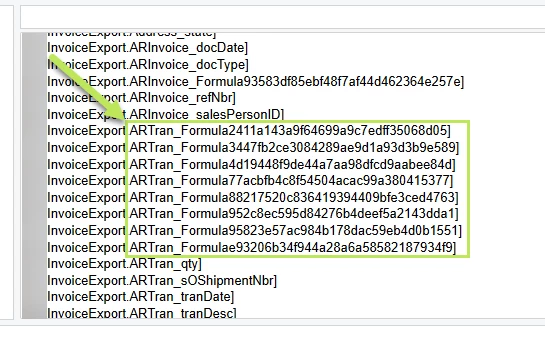
The only method I’ve found for determining which “Formula” is which column is to add each one individually, run the summary/child GI, and use the resulting data to identify the column.

Obviously, that is horribly inefficient, and I’d love to know of a better way.

Has anyone found a method of mapping these formulas names to the source column/formula in the base GI?


Best answer by BenjaminCrisman

@bmeagher In my experience if you add the child formula as an individual field on the GI results, it will pick up the Caption name from the child GI. If you click the field though, it will revert to the long function name. Here’s my child GI function:

After clicking the field:


4 replies

  • Author
  • Freshman I
  • April 24, 2025

I’m not sure why I didn’t think of this to begin with. The answer is simple: Export the base GI to XML, find the field, and look at the “RowID” element.

That said, it would be great if Acumatica helped us out here. Looking in the XML definition isn’t difficult, but it seems contrary to the goal of GI’s.

If there is a simpler way than this, I’d love to know about it.


BenjaminCrisman
Acumatica Employee
Forum|alt.badge.img+4
  • Acumatica Support Team
  • Answer
  • April 24, 2025

@bmeagher In my experience if you add the child formula as an individual field on the GI results, it will pick up the Caption name from the child GI. If you click the field though, it will revert to the long function name. Here’s my child GI function:

After clicking the field:


  • Author
  • Freshman I
  • April 24, 2025

I see what you mean; that is pretty cool. Quicker than looking through XML. Thanks for saving me a bunch of time!


jwaldron46
Freshman II
Forum|alt.badge.img+1
  • Freshman II
  • October 28, 2025

We need Acumatica to use the Field Caption as the field name in a child GI.  That would solve this.