


Answer

How to use Report Designer to display/align two columns, Paragraph title & Paragraph Content

  • August 10, 2022
  • 1 reply
  • 297 views

ChrisWeidner
Varsity I
Forum|alt.badge.img

I am attempting to create our own subcontract form in report designer. I am using the ABC Contractor -Subcontractor Agreement (CSA). Can anyone help me line up the columns so I can have each paragraph have a title and then the next paragraphs title will only display when the next paragraph appears.
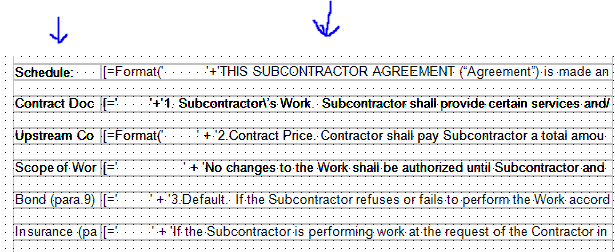
 

Title column is on left & Paragraphs are on right (there are blank text boxes between each row)

This appears not as expected and instead repeats the Left (title) column in the first paragraph. Instead of 1 title / per paragraph.
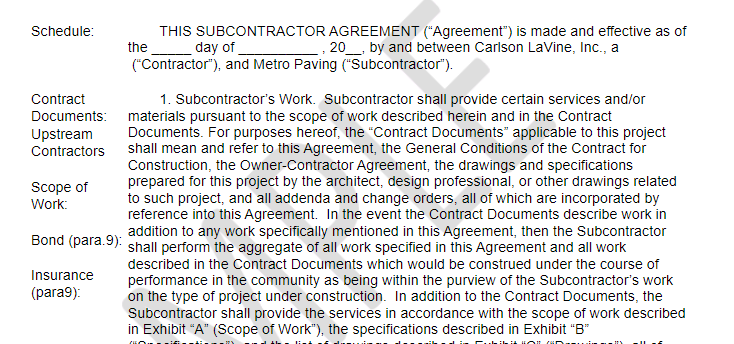
See left column, repeats 4 title rows per 1 paragraph.

Any ideas how to align the title with its corresponding paragraph??

 

Best answer by DConcannon

The best option may be to create a section for each section of the contract. Or you could manually specify the height of each corresponding field in both columns by trial and error and turn off grow/shrink. Looking forward to learn more options for this.

1 reply

DConcannon
Varsity II
Forum|alt.badge.img+2
  • Varsity II
  • Answer
  • August 10, 2022

The best option may be to create a section for each section of the contract. Or you could manually specify the height of each corresponding field in both columns by trial and error and turn off grow/shrink. Looking forward to learn more options for this.