Answer

How to use a SQL View for just one or two text boxes in Acumatica Report Designer without affecting other data

  • August 13, 2025
  • 5 replies
  • 95 views

Forum|alt.badge.img+3

I’ve created a SQL view/dac that returns exactly the values I need for two text boxes in my Acumatica report.
The main report already has multiple tables and relationships set up, and everything else is working correctly.

However, when I add my view to the Relations tab (joining it to ARTran or other tables), it changes the results in other parts of the report — likely because of how the join is multiplying rows.

What I need is:

  • To use my view standalone, so it does not interfere with the existing report data.

  • Pull values from the view into specific text boxes based on parameters (dates, etc.).

  • Ideally, avoid creating joins that will affect the main dataset.

Please guideThanks

Best answer by tahayabali

HI, This is also solved. I created a variables in subreport and then populate data in main report using varibales.

5 replies

BenjaminCrisman
Acumatica Employee
Forum|alt.badge.img+4
  • Acumatica Support Team
  • August 13, 2025

@tahayabali The best practice for something like this is to use a subreport. Whichever joins would be used to add the view to the main report, instead use them as collection parameters for the subreport and populate the fields within the subreport. Have you already tried something like this?


Forum|alt.badge.img+3
  • Author
  • Captain I
  • August 13, 2025

@BenjaminCrisman I have never work on sub reports. 

If I go with the subreport approach, can you guide me on the exact logic for passing both conditions?
For example, my main requirement is to take results from the view where t is less than 0.7576 into one text box, and where it is greater than or equal to 0.7576 into another.

How should I structure the parameters or variables so the subreport returns the correct value for each case without affecting my main report’s existing relations?


BenjaminCrisman
Acumatica Employee
Forum|alt.badge.img+4
  • Acumatica Support Team
  • August 13, 2025

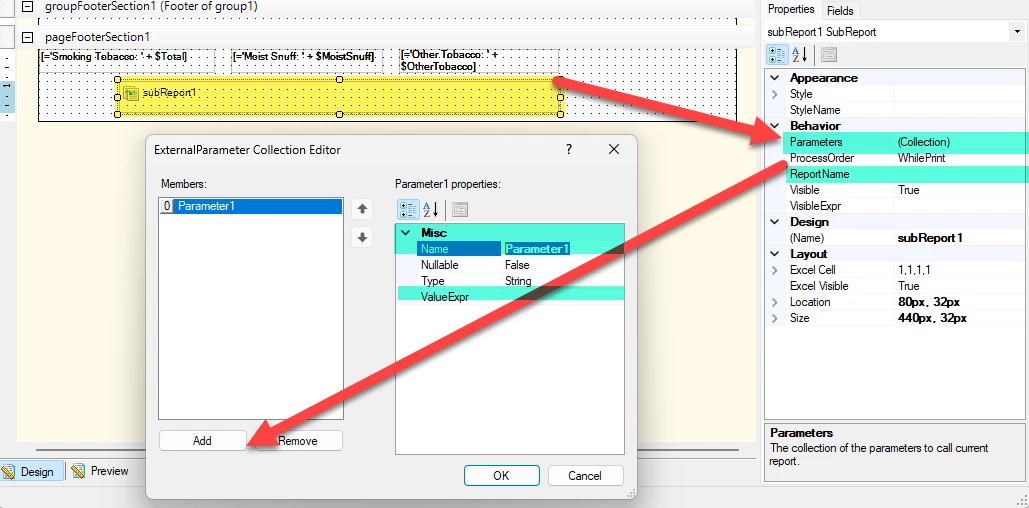
@tahayabali The subreport is just another report embedded into the main report, so you would create the separate report first, which will be the subreport, and add your SQL view/DAC to that report and setup the text boxes like you need them to return the data.

Then in the main report you would add the subreport element to the area you want to display the subreport data. The next thing would be to add the Collection Parameters which would be the joins that you would use if you were adding the view/dac to your report:

The ValueExpr would contain them like =[ARInvoice.DocType] or =[@DocType] if you want them to collect the parameter entered when the user runs the report.

Then you can add the ReportName which would be your subreport file name like ar809000sub1.rpx


Forum|alt.badge.img+3
  • Author
  • Captain I
  • August 14, 2025

@BenjaminCrisman I have created the sub report. The query is working fine in SQL and returning me data. But Report is printing empty data for the same query. 


Forum|alt.badge.img+3
  • Author
  • Captain I
  • Answer
  • September 11, 2025

HI, This is also solved. I created a variables in subreport and then populate data in main report using varibales.