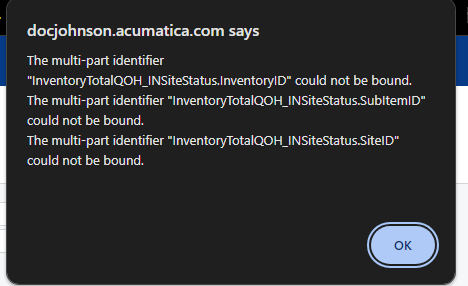
I am trying to develop a GI that shows me the main product along with its BOM and also shows the total inventory I have of each component in all warehouses. I can't get it but when I apply a filter I automatically receive the message.
Can someone help me?
The main GI is Purchase Planning Report.
Best answer by amitr70
@JavierGtz A workaround. If you are not on SAAS or if you have a local copy of DB, plus you are good in SQL queries then you can write a view by extracting the query from Traces screen and tweaking it accordingly. I personally prefer views over acumatica native GI table and joins.
Are you applying the filter as a condition within the GI or as a filter on the result grid? I don’t see the SubItemID as a field on the InventoryTotalQOH generic inquiry.
Are you applying the filter as a condition within the GI or as a filter on the result grid? I don’t see the SubItemID as a field on the InventoryTotalQOH generic inquiry.
Laura
Hi @lauraj46
What I am trying to do is display the quantity that appears in the InventoryTotalQOH GI in the Purchase Planning Report.
I was able to replicate this issue. I’m not sure about the cause. Nested subqueries in Acumatica are a new feature in 2024 R1 and there may be some caveats. I would suggest opening a case with support and let us know what you find out.
@JavierGtz A workaround. If you are not on SAAS or if you have a local copy of DB, plus you are good in SQL queries then you can write a view by extracting the query from Traces screen and tweaking it accordingly. I personally prefer views over acumatica native GI table and joins.