

How to show Google maps in a wiki and expose that Wiki on dashboard? We can add google maps script to show up in Wiki page but would like to see if we can add that wiki into dashboard Wiki component and show on the dashboard.
Solved
How to show Google maps in a wiki?



Best answer by Irina
You can embed any HTML code into the Wiki page of Html type. So creating a widget containing embedded Google Maps will consist of the following steps:
- Follow the instructions in the Google Maps Platform Developer Guide to get a Google API key and form an
iframecode with the URL of the map you need to show and specific parameters to it. - In Acumatica ERP, create a Wiki page as described in How to create a dashboard widget that opens Acumatica ERP forms or web pages Knowledge Base article, steps 1 and 2. Insert an
iframecode formed in the previous step as shown in the screenshot below: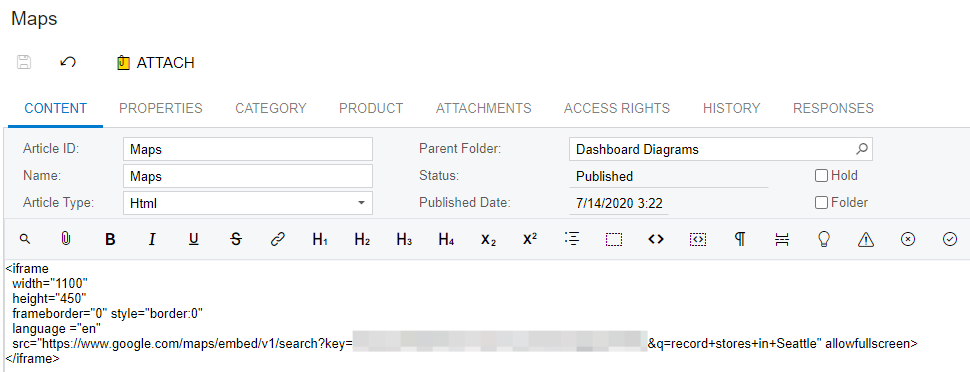
- Follow steps 9 and 10 from the article above to add the Wiki Page widget to the dashboard.
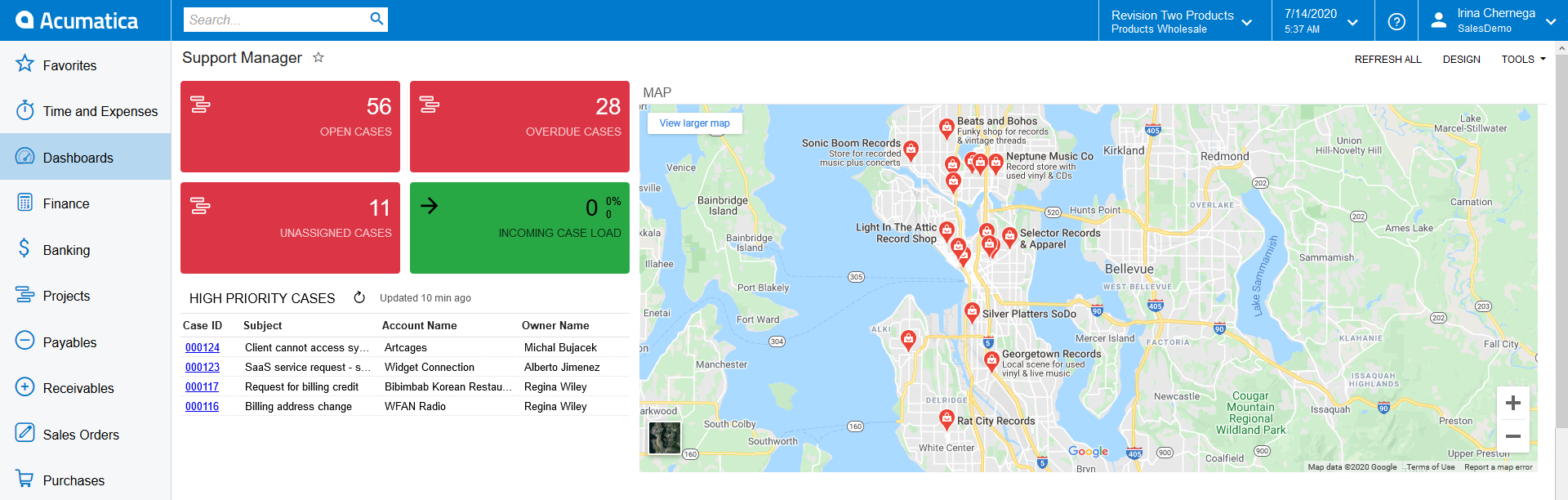
- Your Google Map is now accessible from the Acumatica dashboard!


Login to the community
No account yet? Create an account
Social Login
Login with your Acumatica accountEnter your E-mail address. We'll send you an e-mail with instructions to reset your password.