On a scheduled basis we need to send reports to each vendor of their open orders and pricing/lead time updates.. Only selected vendors will get the reports and the reports will only have their data. Is there a simple way to do this with having to create a report template and automation schedule for each vendor? There are 2 different list of vendors for 2 different reports and each has 60-75 vendors.
Solved
How to send selected vendors a report of their open purchase orders.


 +6
+6Best answer by bwhite49
You need to create these 2 reports to list open orders. Have a required parameter of vendor ID for both.
Once the reports are complete, you will need to create 2 generic inquiries. 1 GI gets report 1 and a 2nd GI that gets report 2. You could add an attribute on the vendor screen to designate which report the vendor should get and what GI list they should be a part of. Both GIs should have your vendor contact details such as vendor name, vendor ID, send to email address, etc.
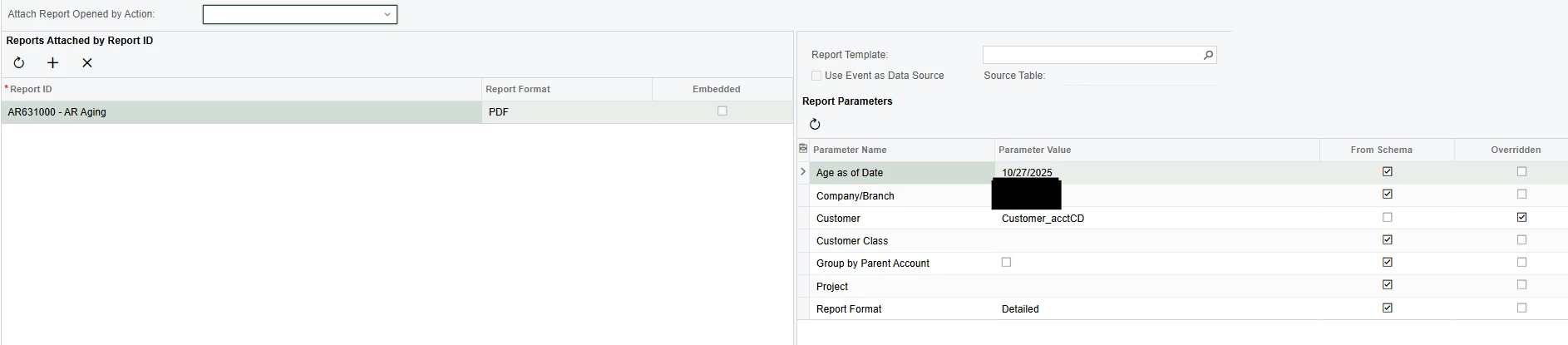
Once this is done, you need to create a business event for each GI connected to two separate notification templates. I would start the BEs as a trigger by action for testing, but you will eventually want to switch it to a trigger by schedule BE. Use the contact info from the GI in the notification template. On the “attach reports” tab of the notification template, you can add the report and pass the vendor ID parameter to the form.




Login to the community
No account yet? Create an account
Social Login
Login with your Acumatica accountEnter your E-mail address. We'll send you an e-mail with instructions to reset your password.