I need advice regarding a customization we applied on the InventoryItem DAC.
Initially, we had a custom field UsrUnitCost defined as [PXDBString], so in the database it was nvarchar.
Later, I changed it to [PXDBDecimal] and republished. This altered the DB column to decimal.
Recently, I changed it back to [PXDBString] because I wanted to show values like 20.33 BOX.
Now in production, I’m seeing errors such as:
The entry form (ID: IN202500, title: Stock Items) cannot be automated. An error occurred during processing of the field Unit Cost: Specified cast is not valid.
How can I unpublish only one customization to check whether the error goes away or not? This works fine in sandbox but in production this issue occurs 2 days after publish. I have atttached the package.
Thanks
Best answer by Abhishek Niikam
Hello Community,
I need advice regarding a customization we applied on the InventoryItem DAC.
Initially, we had a custom field UsrUnitCost defined as [PXDBString], so in the database it was nvarchar.
Later, I changed it to [PXDBDecimal] and republished. This altered the DB column to decimal.
Recently, I changed it back to [PXDBString] because I wanted to show values like 20.33 BOX.
Now in production, I’m seeing errors such as:
The entry form (ID: IN202500, title: Stock Items) cannot be automated. An error occurred during processing of the field Unit Cost: Specified cast is not valid.
How can I unpublish only one customization to check whether the error goes away or not? This works fine in sandbox but in production this issue occurs 2 days after publish. I have atttached the package.
Thanks
Hello @tahayabali As mentioned you changed [PXDBDecimal] to [PXDBString]- then you have to alter column again in DB - (Decimal-To-String)
and for your 2nd query to unpublish 1 package is quite reverse thing
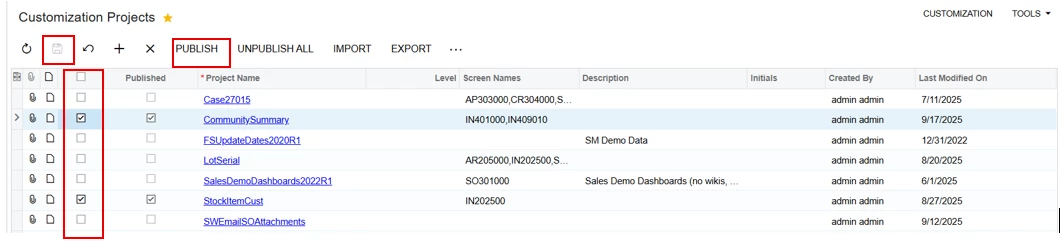
Like above image those package you want to unpublish just uncheck the checkbox of that package & check the checkbox of rest packages that need to published as it is Press Save & click on Publish.
I need advice regarding a customization we applied on the InventoryItem DAC.
Initially, we had a custom field UsrUnitCost defined as [PXDBString], so in the database it was nvarchar.
Later, I changed it to [PXDBDecimal] and republished. This altered the DB column to decimal.
Recently, I changed it back to [PXDBString] because I wanted to show values like 20.33 BOX.
Now in production, I’m seeing errors such as:
The entry form (ID: IN202500, title: Stock Items) cannot be automated. An error occurred during processing of the field Unit Cost: Specified cast is not valid.
How can I unpublish only one customization to check whether the error goes away or not? This works fine in sandbox but in production this issue occurs 2 days after publish. I have atttached the package.
Thanks
Hello @tahayabali As mentioned you changed [PXDBDecimal] to [PXDBString]- then you have to alter column again in DB - (Decimal-To-String)
and for your 2nd query to unpublish 1 package is quite reverse thing
Like above image those package you want to unpublish just uncheck the checkbox of that package & check the checkbox of rest packages that need to published as it is Press Save & click on Publish.