Answer

How to mass update IsPublic on file attachments in File Maintenance Screen

  • March 20, 2025
  • 4 replies
  • 65 views

robgriffin00
Jr Varsity II
Forum|alt.badge.img

I am looking for a way to do a mass update to file attachments that orginate from AP and update the checkbox of Is Public to true.  I am not finding a screen accessible in a GI to do a mass update.  Has anyone tried this or have experience with a mass update such as this?


Best answer by bwhite49

Thank you both, I had not thought of this angle.  I suppose this could then be setup to run on a schedule so it would continuously be updating the specified records. 

Yes, you can add a condition to the GI to filter out files that already have the field checked as true. This way, you don’t end up creating an endless loop of updating the files.

You can add a schedule to the import scenario through the process import scenarios screen or by adding a business event to the GI that is trigger by schedule. Be careful using the process import scenarios screen - You want to make sure the schedule has all of the appropriate conditions to only run this import scenario. If you don’t add conditions, you will end up running every import scenario in the system.


4 replies

hkabiri
Acumatica Moderator
Forum|alt.badge.img+8
  • Acumatica Support Team
  • March 20, 2025

@robgriffin00 This probably can be done using import scenario. Generic Inquiry is not an option.


bwhite49
Captain II
Forum|alt.badge.img+10
  • Captain II
  • March 20, 2025

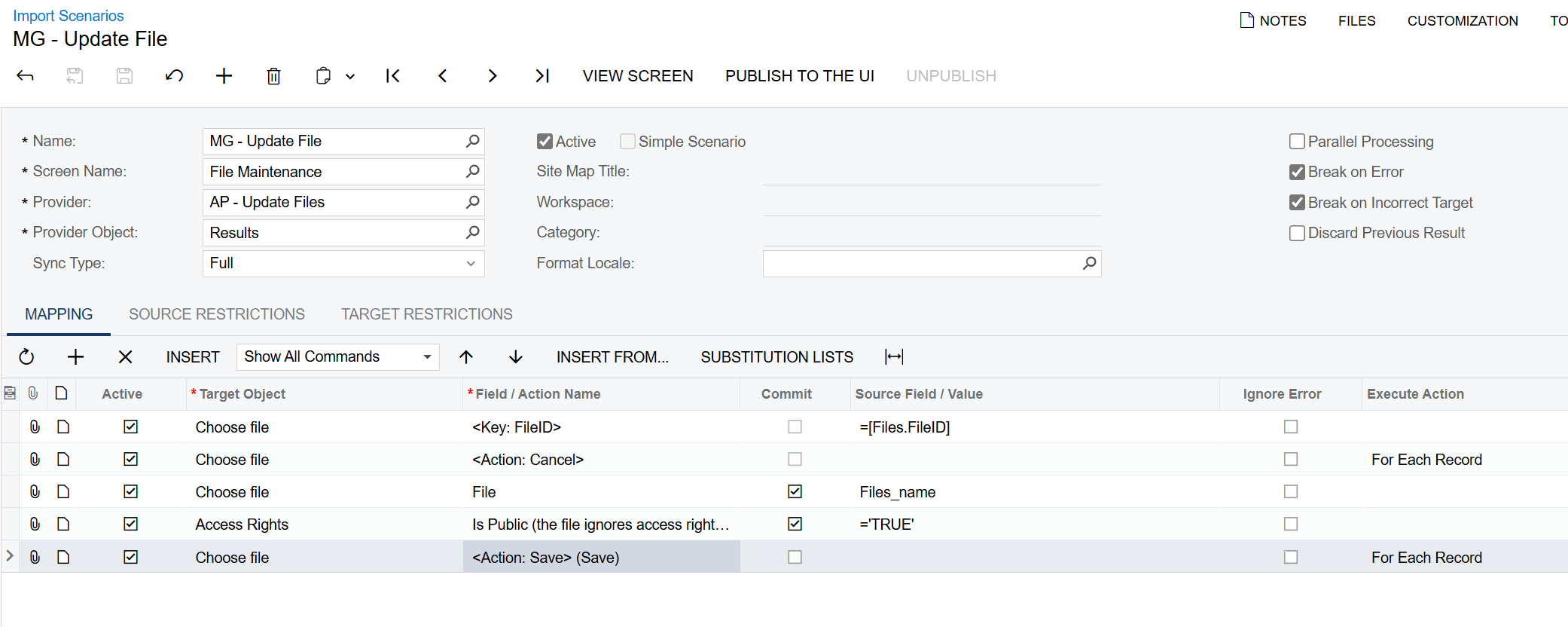
Yeah, but the import scenario is pretty simple. It would look like this…

I’ve attached a GI (AP Files) that pulls all files from the bills and adjustments screen as well as an import scenario that would use that GI to update those files (Update File)


robgriffin00
Jr Varsity II
Forum|alt.badge.img
  • Author
  • Jr Varsity II
  • March 20, 2025

Thank you both, I had not thought of this angle.  I suppose this could then be setup to run on a schedule so it would continuously be updating the specified records. 


bwhite49
Captain II
Forum|alt.badge.img+10
  • Captain II
  • Answer
  • March 21, 2025

Thank you both, I had not thought of this angle.  I suppose this could then be setup to run on a schedule so it would continuously be updating the specified records. 

Yes, you can add a condition to the GI to filter out files that already have the field checked as true. This way, you don’t end up creating an endless loop of updating the files.

You can add a schedule to the import scenario through the process import scenarios screen or by adding a business event to the GI that is trigger by schedule. Be careful using the process import scenarios screen - You want to make sure the schedule has all of the appropriate conditions to only run this import scenario. If you don’t add conditions, you will end up running every import scenario in the system.