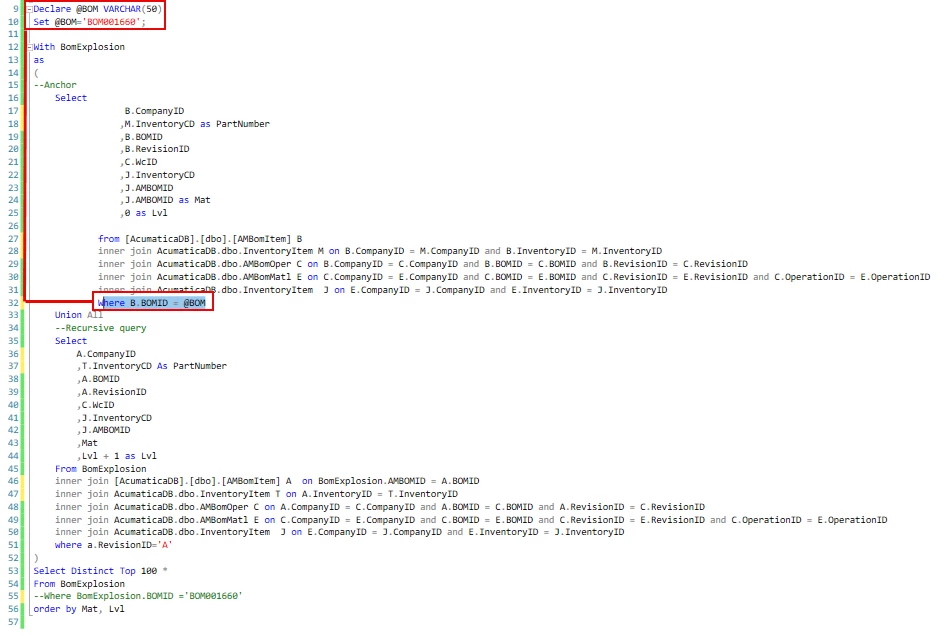
I am trying to make another version of the Multi Level Bom as a SQL View. The multi level bom doesnt have all the information that we need on it and I cant join tables on it. So I am creating a Sql view with a recursive statement to explode the boms. It needs to have a parameter in the anchor for it to work correctly and to keep it from bogging down the system with trying to do it for everything. How would I go about loading it into acumatica with a “Blank” for this field so that it could be filled out using the parameter from a report or a GI parameter? Screen shot below of my sql statement with the area im talking about highlighted. Doing it this way, would give me the ability to have any or all information from the tables in the joined in the below query. The information is currently limited to make it easier for testing.