Answer

how to get qty on hand for every month.

  • September 8, 2025
  • 8 replies
  • 86 views

Forum|alt.badge.img

Hi,

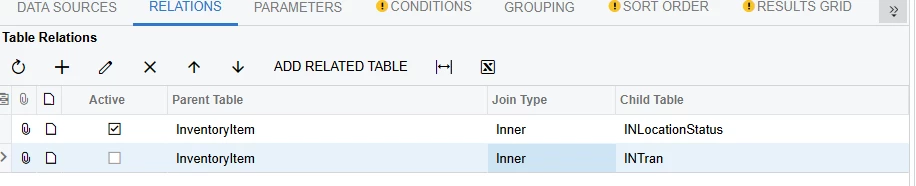
So, I have been trying to build this GI for Qty on Hand for every MTH. The issues is that the INLocationStatus that I have Qty on Hand table has no date in it. So, I can’t get my every MTH Qty I need. 

And any time I join it with INTran in the Data Sources, the Qty multiples it.

Is there any way I can go around this? 


Best answer by nmizzell9000

This thread seems to be similar to your use case and uses excel only.

excel - Power Query - Creating a History table from a Part Change Register - Stack Overflow

8 replies

hkabiri
Acumatica Moderator
Forum|alt.badge.img+8
  • Acumatica Support Team
  • September 8, 2025

@SandyA Depending on your Warehouse structure, the INLocationStatus has values for locations within each site and when you do inner join with InventoryID that would result into inaccurate values. (SiteID is another key for this table which needs to be specify) therefore if you need the values per Warehouse you need to make the join with INSitStatus. Regarding the InventoryItem - INTRran relation given the INTran is at detail level for Inventory Transactions there are one to many relation and obviously you will have multiple lines for same item and again depends on if you have multiple location, Lot/Serial Number it can have multiple lines for same item.


nmizzell9000
Varsity I
Forum|alt.badge.img
  • Varsity I
  • September 8, 2025

@SandyA It seems like you may be attempting to derive historical inventory information from a current inventory snapshot table. Perhaps another table that has a periodical listing of all inventories with associated quantities at that time would better suit your use case. Typically, inventory log tables with inventory transaction details can be used to reconstruct historical inventory listings by day, month, etc.


Forum|alt.badge.img
  • Author
  • Freshman II
  • September 8, 2025

@nmizzell9000 Yes, that is what I’m try to build.


nmizzell9000
Varsity I
Forum|alt.badge.img
  • Varsity I
  • September 8, 2025

@SandyA In that case, you may want to use the INTran table to re-create a monthly snapshot of inventory balances by X (product, category, location, combination of product and location). The easiest way to do this would be to expose a GI of the INTran table over your desired period to OData. Then load this into powerBI or excel and perform your calculations in power query. You would start with an inventory balance at time 0, then use power query to calculate changes by day for additions and removals by the category X decided above. At this point, you have a daily balance of inventories by your categories. Then all that needs to be done to make this a monthly snapshot is to discard all daily snapshots except for those made on the last day of the month. Once you are happy with the results of the query you can embed the dashboard in acumatica.

There may be an easier way to do this, but this is the simplest way I can think of.

Here is a similar thread explaining the power query portion in greater depth: Solved: Turn Inventory transaction/movement table into inv... - Microsoft Fabric Community


Forum|alt.badge.img
  • Author
  • Freshman II
  • September 8, 2025

@nmizzell9000 The sad truth is that my company is not using PowerBi. I will have to find any way around this issue. This solution will have been the best.


nmizzell9000
Varsity I
Forum|alt.badge.img
  • Varsity I
  • September 8, 2025

Excel has the same power query functionality as power BI. You can perform all the steps mentioned in excel.


nmizzell9000
Varsity I
Forum|alt.badge.img
  • Varsity I
  • Answer
  • September 8, 2025

This thread seems to be similar to your use case and uses excel only.

excel - Power Query - Creating a History table from a Part Change Register - Stack Overflow


bwhite49
Captain II
Forum|alt.badge.img+10
  • Captain II
  • September 8, 2025

I like the excel solution using INTran, but I just want to add that there are few historical inventory tables available in Acumatica as well. There is inventory history by period as well as by day. I also like the inventory turnover table.

Attached is a GI showing the qty on hand by period. It might be helpful.