Solved

How to get Cell Borders into Excel Sheets in Report Designer

  • December 11, 2025
  • 4 replies
  • 40 views

Forum|alt.badge.img

I’m trying to create a report that produces a excel sheet with cell borders. However, I can’t figure out how to get the borders to display in Excel. Is there a way to format the excel cells in Report Designer?

Best answer by BenjaminCrisman

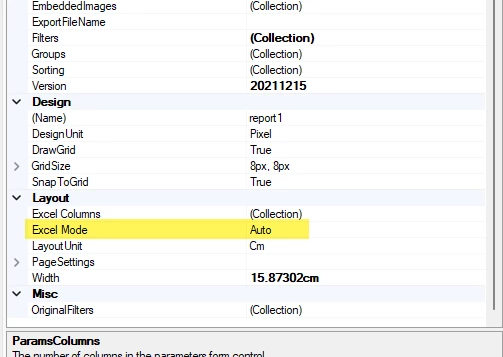
@kkraus I noticed you have set the Excel mode to Auto, have you tried switching this to Manual?

Once you switch to Manual you can turn on the excel grid on the report and it makes it a bit easier to work with for Excel purposes.

4 replies

Manikanta Dhulipudi
Captain II
Forum|alt.badge.img+16

@kkraus can you show me a screenshot of it?


Forum|alt.badge.img
  • Author
  • Freshman II
  • December 12, 2025

I’ve attached both the report and the excel sheet it generates. Probably easier that way. Need to add borders to some of the cells, but can’t seem to get them to appear.


Chris Hackett
Community Manager
Forum|alt.badge.img
  • Acumatica Community Manager
  • January 9, 2026

Hi ​@kkraus were you able to find a solution? Thank you!


BenjaminCrisman
Acumatica Employee
Forum|alt.badge.img+4
  • Acumatica Support Team
  • Answer
  • January 12, 2026

@kkraus I noticed you have set the Excel mode to Auto, have you tried switching this to Manual?

Once you switch to Manual you can turn on the excel grid on the report and it makes it a bit easier to work with for Excel purposes.