Solved

How to eliminate the negatives as a result of date difference calculation between [INTran.ReleasedDateTime] and Today()

  • February 5, 2026
  • 17 replies
  • 141 views

Forum|alt.badge.img

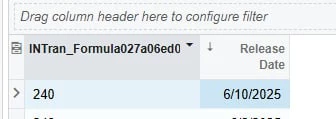
Hi everyone, I am working on a GI and I need it to display the number of days between the Last trans date of an item and current date (Today()), =DateDiff('d', Today(), [INTran.ReleasedDateTime]) gives me the right difference but in negatives as shown in the first screenshot and I need them show as positives.
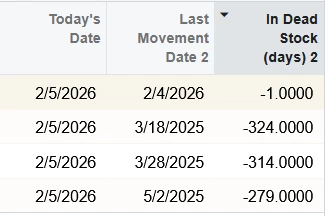
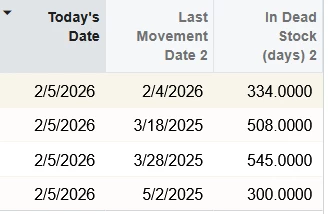
The following formulas are the other attempts I tried but they all gave me totally wrong values as shown in the second screenshot; =Abs(DateDiff('d', Today(), [INTran.ReleasedDateTime])), =DateDiff('d', Today(), [INTran.ReleasedDateTime]) * -1, =CDec(DateDiff('d',[INTran.ReleasedDateTime] ,Today())), =CDec(DateDiff('d', Today(),[INTran.ReleasedDateTime])), =CInt(DateDiff('d', Today(), [INTran.ReleasedDateTime])).
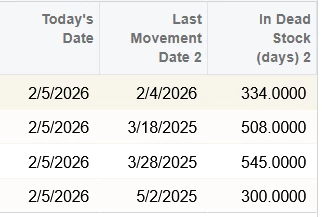
Anyone with a solution for this or a workaround, I could appreciate.

Thank you!

Best answer by ricoybanez

@lorach

Try this condition, I made the same G.I. years back, it shows no negative days. 

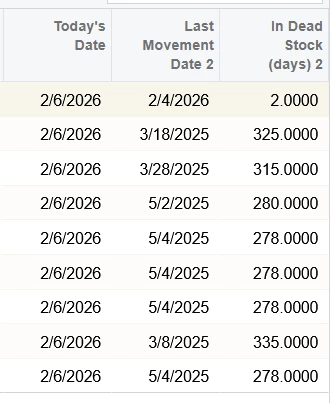
=Abs(DateDiff('d', Now(), MAX([INTran.ReleasedDateTime])))


17 replies

abhimanyuprajapati52
Jr Varsity I
Forum|alt.badge.img

Hi ​@lorach,
 

You may want to reverse the DateDiff parameters. Try using:
=DateDiff('d', [INTran.ReleasedDateTime], Today())

If you need to ensure positive values regardless of date order, you can wrap it with Abs().


  • Freshman II
  • February 5, 2026

Hi ​@lorach  Could you please try this 

DateDiff('d', [INTran.ReleasedDateTime], Today())


Forum|alt.badge.img
  • Author
  • Jr Varsity III
  • February 5, 2026

Hi ​@abhimanyuprajapati52 and ​@Meri36 , I forgot to include that in, but I had tried it and it was still giving me the wrong values 


  • Freshman II
  • February 5, 2026

@lorach Have you tried this option?

=DateDiff( 'd', Date([INTran.ReleasedDateTime]), Date(Today()))


Forum|alt.badge.img
  • Author
  • Jr Varsity III
  • February 5, 2026

@Meri36 I did but unfortunately the formula operator ‘Date’ is unsupported


abhimanyuprajapati52
Jr Varsity I
Forum|alt.badge.img

@lorach
you can try
=Abs(DateDiff('d', [INTran.ReleasedDateTime], Now()))


  • Freshman II
  • February 5, 2026

@lorach  I have tried with this formula 
DateDiff('d', [INTran.ReleasedDateTime], Today())

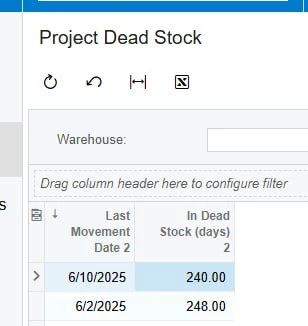
and today is 02/05/2026 on my system,
difference is 240 days 

could you please show the result when you run this formula


Forum|alt.badge.img
  • Author
  • Jr Varsity III
  • February 5, 2026

Hi ​@abhimanyuprajapati52 and ​@Meri36 , I have both options and I get the same result, it’s interesting that ​@Meri36 is getting the right values 🤔


  • Freshman II
  • February 5, 2026

@lorach could you please share the GI xml file?
I would like to try the same on my system


abhimanyuprajapati52
Jr Varsity I
Forum|alt.badge.img

@lorach 
 

Since the difference between 2/4/2026 and 2/5/2026 should be 1 day, the values 334 or 508 suggest the formula may be referencing a different INTran record than the one displayed.

Could you verify:
• Whether there are multiple joins causing row duplication
• That the ReleasedDateTime used in the formula matches the field displayed in the grid
• Or try adding ReleasedDateTime directly as a column in GI to confirm the exact value being evaluated

It seems more like a data context issue rather than a DateDiff calculation issue.


Forum|alt.badge.img
  • Author
  • Jr Varsity III
  • February 5, 2026

@Meri36 ,I have attached the xml, just a heads up, in case you are wondering why so many table it’s because it’s a custom project allocated inventory GI which is listing the results correctly, I just needed to get the date difference btn the two dates I have mentioned earlier in order to determine some project specific deadstock.


Forum|alt.badge.img
  • Author
  • Jr Varsity III
  • February 5, 2026

I have also attached the original project allocated inventory report that I worked on before adding the new tables in order to get the [INTran.ReleasedDateTime] and something I forget to mentioned in the first report I shared, I  tried using [INTran.TranDate] as you will see in the result grid, but it got the same results.


  • Freshman II
  • February 5, 2026

@lorach 


No problem at all for to many tables, 
but as I see the problem is related to the Grouping/joins you have in GI, not the formula, the formula itself is correct


Forum|alt.badge.img
  • Author
  • Jr Varsity III
  • February 5, 2026

@Meri36 Ok, I guess I will have a thorough double checking of the Groupings and joins


abhimanyuprajapati52
Jr Varsity I
Forum|alt.badge.img

@lorach ,

I imported your GI XML into a clean instance and tested it without modifications. The DateDiff formula is returning correct results (e.g., 2/5/2026 to 6/28/2026 = 143 days). This suggests the issue may not be with DateDiff itself but possibly with which INTran record is being evaluated due to joins or grouping. You may want to temporarily expose DocType, RefNbr, and ReleasedDateTime in the grid to verify the exact INTran record used in the calculation.


ricoybanez
Jr Varsity III
Forum|alt.badge.img+5
  • Jr Varsity III
  • Answer
  • February 6, 2026

@lorach

Try this condition, I made the same G.I. years back, it shows no negative days. 

=Abs(DateDiff('d', Now(), MAX([INTran.ReleasedDateTime])))


Forum|alt.badge.img
  • Author
  • Jr Varsity III
  • February 6, 2026

​​​Hi ​@ricoybanez , Thank you so much, your formula actually fixed it 🤗👍