

Answer

How to do Contains or Starts with in a GI Expression

  • May 5, 2025
  • 3 replies
  • 98 views

Forum|alt.badge.img+1

Is there any way to do a contains or starts with in an expression?


Google gave me some suggestions like using ‘LIKE’ or StartsWith([Field], ‘value’) but acumatica says its not supported.


I am trying to do a parameter for IIF the location ID contains or starts with a Q, then Remove the Q, and if not, leave it as is. 


Like this:

=IIf( ([INLotSerialStatus.LocationID] LIKE 'Q'), ([INLotSerialStatus.LocationID] - 'Q'), [INLotSerialStatus.LocationID] )


Or this:

=IIf( (StartsWith([INLotSerialStatus.LocationID], 'Q')), ([INLotSerialStatus.LocationID] - 'Q'), [INLotSerialStatus.LocationID] )


However, I cannot seem to find a way to do a contains expression.


Is this possible?
Best answer by kmuczynski54

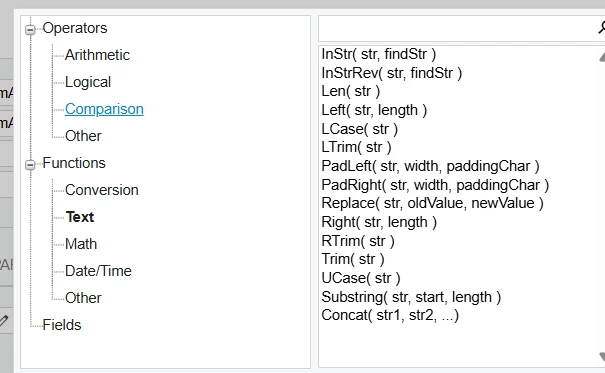
If you click on the pencil to the right of the GI Data Field, you can open the formula editor.


It looks like maybe the Text / LEFT function may work for you?


3 replies

Forum|alt.badge.img
  • Jr Varsity III
  • Answer
  • May 5, 2025

If you click on the pencil to the right of the GI Data Field, you can open the formula editor.


It looks like maybe the Text / LEFT function may work for you?


Forum|alt.badge.img+1
  • Author
  • Semi-Pro II
  • May 5, 2025

@kmuczynski54 You are a Genius, thank you, 


I also used the Substring function to remove the Q and leave the rest of the Location, in case anyone else runs across this.


=IIf( Left([INLotSerialStatus.LocationID], 1) = 'Q', Substring([INLotSerialStatus.LocationID], 2), [INLotSerialStatus.LocationID] )


Forum|alt.badge.img
  • Jr Varsity III
  • May 5, 2025

So glad it worked!