Answer

How to Display Only the First Record of Each Group in Acumatica Report Designer

  • May 17, 2024
  • 12 replies
  • 745 views

Forum|alt.badge.img

Hello everyone,

I'm working on a report in Acumatica Report Designer and have encountered a challenge. My report includes multiple records grouped by a specific field, and I need to display only the first record of each group.

I’ve been exploring the options in Acumatica Report Designer, but I haven’t been able to figure out how to accomplish this. Could someone guide me through the steps or provide a solution to achieve this?

Any detailed instructions, tips, or code snippets would be greatly appreciated!


Thank you!
Best answer by lauraj46

Hi @RKarunarathne51 ,

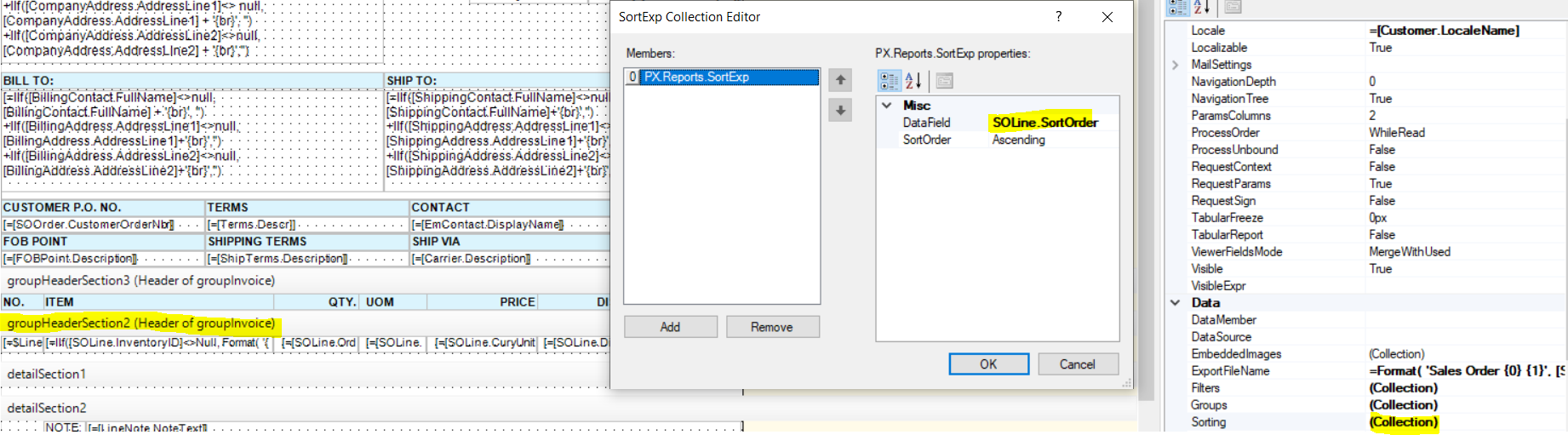
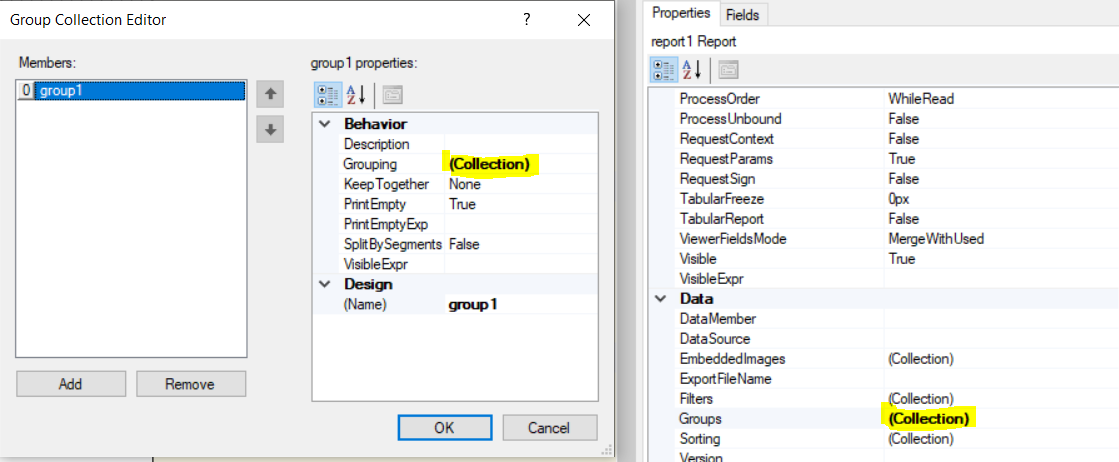
Define the group using the group collection editor.  Use the sorting collection editor to define the sort within the group. 

Add the fields to the group section header of the report.  The result will be from the first record of each group.

Hope this helps!

Laura

12 replies

lauraj46
Captain II
Forum|alt.badge.img+8
  • Captain II
  • Answer
  • May 17, 2024

Hi @RKarunarathne51 ,

Define the group using the group collection editor.  Use the sorting collection editor to define the sort within the group. 

Add the fields to the group section header of the report.  The result will be from the first record of each group.

Hope this helps!

Laura


ejmillar
Varsity II
Forum|alt.badge.img+1
  • Varsity II
  • May 17, 2024

How would you identify the first record?

If there is a line number for each record then you could create a table self join.

For example:

List table twice as a datasource:

I’m using SOLine as an example:

SOLine as alias SOLine

SOLine as alias SOLine2

Then create the self table join

SOLine.LineNbr = Min(SOLine.LineNbr)


lauraj46
Captain II
Forum|alt.badge.img+8
  • Captain II
  • May 17, 2024

The self join the @ejmillar explains works well in a GI.  In the report designer, you should be able to simply sort on the order number and line number fields, then print the first line details in the group header.

Laura 


Forum|alt.badge.img

Hi @lauraj46 @ejmillar,
I need to display only the first record of each group in the report. Is there any method to do that?
Thank you 


ejmillar
Varsity II
Forum|alt.badge.img+1
  • Varsity II
  • May 20, 2024

Hi @RKarunarathne51,

Both the techniques described above will display the first record of each group. 

Are you having difficulty implementing them?

Regards,

Ewan.


Forum|alt.badge.img

Hi @ejmillar ,

Yes. Could you please explain it step by step?
Thanks in advance


ejmillar
Varsity II
Forum|alt.badge.img+1
  • Varsity II
  • May 20, 2024

Is it an existing Acumatica report? 

What are you grouping on?


Forum|alt.badge.img

Hi @ejmillar ,

The Min (x,y) function returns the smaller of two values. How can we use it to get the minimum value from an array, as you mentioned above in SOLine.LineNbr = Min (SOLine.LineNbr)? Or is there any other Min function for that?
Thank you


ejmillar
Varsity II
Forum|alt.badge.img+1
  • Varsity II
  • May 20, 2024

Hello,

I tried the Min function within a report and it wasn’t working the way that I expected.

Apologies for that.


Here is another technique:


  1. Add a Variable for Row Number:

    • In the Group Collection Editor, select the group you want to modify.
    • In the Properties pane for the selected group, add a variable to keep track of row numbers. Click on Behavior > Variables, then add a new variable, e.g., RowNumber
  2. Set the Variable:

    • In the detail section of your group, set the variable to increment by 1 for each record. You can use the Expression Editor to set this up. For example, set RowNumber to RowNumber + 1.
  3. Filter to Show Only the First Record:

    • In the Properties pane, go to the Visibility property of the detail section and click the button to open the Expression Editor.
    • Add a condition to show the detail section only when RowNumber equals 1. For example, =IIF(RowNumber = 1, true, false).


lauraj46
Captain II
Forum|alt.badge.img+8
  • Captain II
  • May 20, 2024

Hi @RKarunarathne51 ,

If you simply move your fields into the group header then you will be able to print the details for one record per group.  You will need to define the Group in the Groups collection and the sort order in the Sorting collection.  Hope this helps!


Forum|alt.badge.img

Hi @lauraj46 ,
Thank you for your guidance. Moving the fields into the group header and defining the Group in the Groups collection, as well as setting the sort order in the Sorting collection, worked perfectly. I appreciate your help


Forum|alt.badge.img

Hi @ejmillar ,

I greatly appreciate your detailed instructions. Your guidance was invaluable. Thank you!