Answer

How to delete unposted transactions so I can close financial period

  • January 23, 2023
  • 5 replies
  • 729 views

Hi There, 


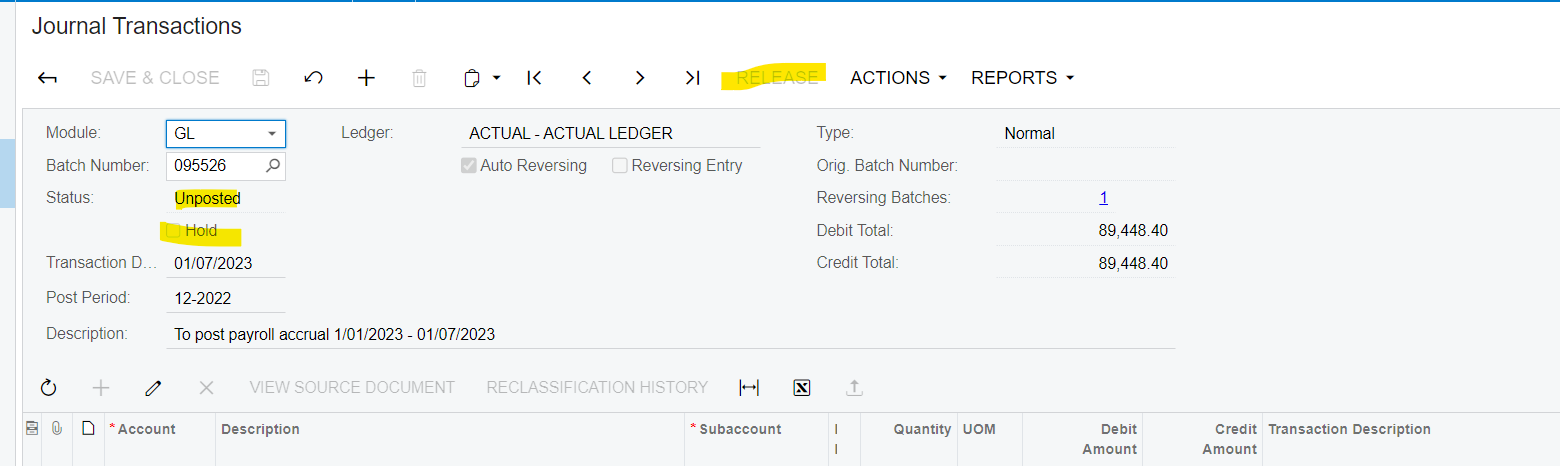
Can anyone help me figure out to remove an unposted GL transaction? I originally made a gl transaction for Dec 2022 that was auto-reversing in Jan 2023, before I had ‘Opened’ the Jan 2023 period. I released it and realized my mistake and the entry became ‘unposted’. I opened Jan 2023 period and made a new GL entry in it’s place. When I tried to close the December 2022 period, I got a message that I still had unposted transactions. I’m not sure how to get rid of it? I don’t want to reverse it because the reversal of the reversing entry will now ‘Post’ that Jan is open and it won’t have the initial entry to clear it out.


Can anyone help me?


Thanks!

Vanessa

Best answer by Laura03

Hello, To Post a transaction. go to Financial → Processes → Post Transactions screen.  Select this batch with the checkbox to the left side, and click Process.

5 replies

Kandy Beatty
Captain II
Forum|alt.badge.img+17
  • Captain II
  • January 24, 2023

HI @vanessa54 

What is the current status of the transaction? Can you share a screen shot of it? Thanks.


Laura03
Captain II
Forum|alt.badge.img+19
  • Captain II
  • January 24, 2023

Hello @vanessa54 ,

If you’re not able to delete the Unposted transaction in GL Journal Transactions screen, the next step is to Post the batch in GL Post Transactions process screen. Then you may reverse the recently posted reversal batch, or reverse your manual GL entry that was made in its place. I recommend reversing the manual batch, leaving the two related batches; they are correctly connected to each other.


  • Author
  • Freshman I
  • January 24, 2023

Hi @laurabarber08 @kandybeatty49 

Thanks for the replies! I thought about posting/reversing the unposted transaction but I don’t know how to ‘Post’ it, though. I’ve already released the transaction and the Release button is now grayed out. The only option I have when I click on Actions is to Reclassify or Reverse the transaction. I could Reverse the transaction and I’m assuming that would successfully post now that January is open, but I’m afraid my original unposted transaction would still remain unposted, so the reversing transaction wouldn’t have an original txns to clear it out.


Laura03
Captain II
Forum|alt.badge.img+19
  • Captain II
  • Answer
  • January 24, 2023

Hello, To Post a transaction. go to Financial → Processes → Post Transactions screen.  Select this batch with the checkbox to the left side, and click Process.


  • Author
  • Freshman I
  • January 24, 2023

@laurabarber08 Amazing!!! Thank you so so so so much for help. Was able to post and reverse the transactions. Really appreciate your help!