

Answer

How to change light theme to dark theme in Report designer 2024R2?

  • May 27, 2025
  • 2 replies
  • 95 views

Forum|alt.badge.img+6

        We are long-time users of Acumatica. Users have gotten used to the Dark theme style of print forms in the past. After we upgraded to 24R2, one of the print forms started throwing an error, and I don’t know how to fix it. The only way to make printing work normally was to delete the customized version and enable the default version—but this uses the Light theme style, and our clients still prefer the previous Dark theme style.


   Is there a way to switch themes quickly? Or do we have to manually modify the styles one by one?
Best answer by ray20

To whom may be insterested in:


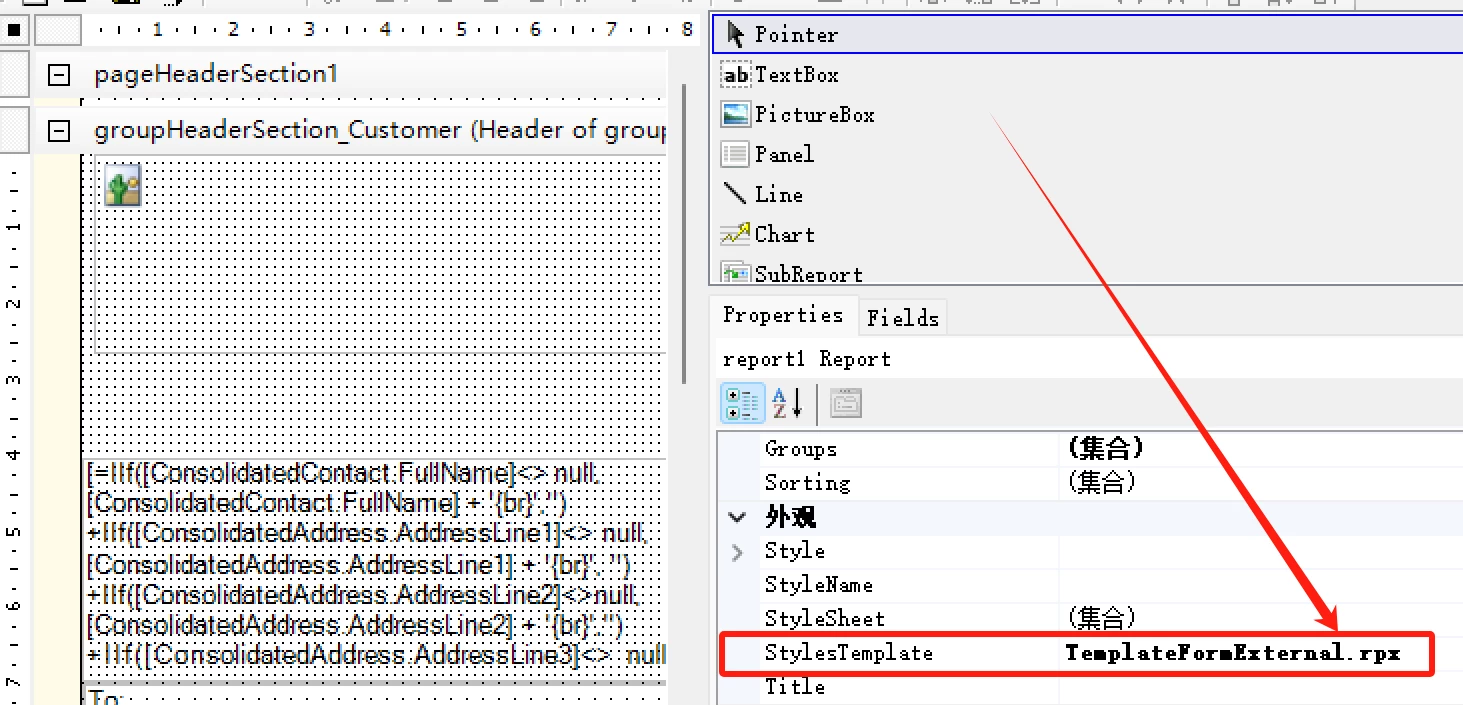
To quickly switch the style, just change in the stylesTemplate, like change TemplateFormExternal.rpx to TemplateForm.rpx.  note, you must have the predefined style template on server or local.

2 replies

Forum|alt.badge.img+6
  • Author
  • Captain II
  • Answer
  • May 28, 2025

To whom may be insterested in:


To quickly switch the style, just change in the stylesTemplate, like change TemplateFormExternal.rpx to TemplateForm.rpx.  note, you must have the predefined style template on server or local.


Chris Hackett
Community Manager
Forum|alt.badge.img
  • Acumatica Community Manager
  • May 28, 2025

Thank you for sharing your solution with the community ​@ray20!
