

Answer

How to add Qty in Sales Profitability by Item Class and Item(Detailed)

  • July 21, 2024
  • 5 replies
  • 178 views

Forum|alt.badge.img

Hi everyone i need one help very important.


There is one report which is called as" Sales profitability by Item class and Item(Detailed).


In this report customer told me to add one column as Qty.


I have added but it not working as a date time period


For ex:- From -13/06/2023

             To - 1/07/2024


             Qty - 604,69.00

             Net Sales - 674,69.00
             It Should be Same as Net Sales


I have tried by adding INItemSiteHistDay using table and added the relation "InventoryID - InventoryID"


Plz help me how can i fix this and show proper data in the Qty field.
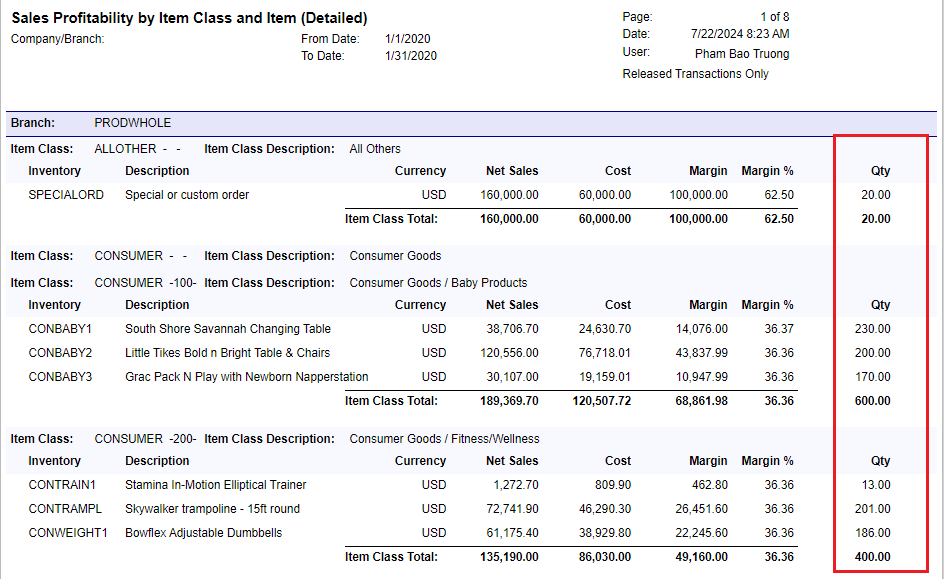
Best answer by nhatnghetinh

Hi @nasirh85 

You add column “sum([ARTran.Qty])”


Best Regards,

NNT

5 replies

nhatnghetinh
Captain II
Forum|alt.badge.img+11
  • Captain II
  • Answer
  • July 22, 2024

Hi @nasirh85 

You add column “sum([ARTran.Qty])”


Best Regards,

NNT


DipakNilkanth
Pro III
Forum|alt.badge.img+13

Hi @nasirh85 ,

As per your example I am not sure , Is the Quantity and NetSales will be same As NetSales is the Amount field.
In the Sales profitability by Item class and Item(Detailed)  report, It is taking all calculated fields from ARTran table, So as per @nhatnghetinh suggested, You can use  “sum([ARTran.Qty])” to pull quantities to display on the report.

Hope, it helps!


Forum|alt.badge.img
  • Jr Varsity II
  • May 5, 2025

Hi @nasirh85 

You add column “sum([ARTran.Qty])”

My two cents.  I do not trust this modification to the Sales Profitability reports.  I did the same thing some months ago.  Based on a casual observation, it looked great.  However, we occasionally saw some very strange QTY numbers while the other numbers remained correct.  In depth research showed that the report would randomly generate gibberish QTYs.  Example, over the course of a week (of a few hundred invoices), this report chose one invoice to report 5 times the QTY for every line item on the invoice!  All the other columns were correct as calculated with the correct quantities.  Same week - another invoice, all the line items the QTY was multiplied by 3 times.  Again, all the other columns were correct as calculated with the correct quantities.

One invoice had over a dozen line items and the other only four.  I removed the custom QTY column and am still looking for a solution.


  • May 28, 2025

Check the payments on the faulty invoice. I had a similar experience that duplicated the QTY for each time a separate payment was applied. Something to do with the ARTran table.

I hope this helps.


Forum|alt.badge.img
  • Jr Varsity II
  • May 29, 2025

Check the payments on the faulty invoice. I had a similar experience that duplicated the QTY for each time a separate payment was applied. Something to do with the ARTran table.

I hope this helps.

Thank you for the insight on what might be causing the issue.  Since multiple payments will be applied to invoices, this report modification cannot be used.

Anyone with a solution to adding QTY to this report?


