Answer

How do I format SOOrder.CuryLineTotal to read like 1,000.00?

  • December 30, 2022
  • 9 replies
  • 483 views

ALEXSLUSSER15
Freshman II
Forum|alt.badge.img

I want to format SOOrder.CuryLineTotal to read like 1,000.00 across the entire document. This is due to a formatting issue when having the report do math to the SOOrder.CuryLineTotal value. After the math, it comes out with no comma and more than two decimal places despite the ‘format’ column having of the text box having the right information. Any solutions?

Best answer by ALEXSLUSSER15

wrap each of those IIFs in a into a CStr() or CDec() like so...

=CStr(IIF([SoOrder.TermsID]=’5050’,[SoOrder.CuryLineTotal + 0.50, ‘’)) + CStr(IIF(…..)) + CStr(IIF(…..))

Then format =[SoOrder.LineTotal]

I believe that will work...Let us know!

@brendan91 To get it working, I put CDec in front and put ='#,##0.00' in the formatting.

9 replies

brendan91
Semi-Pro III
Forum|alt.badge.img+1
  • Semi-Pro III
  • December 30, 2022

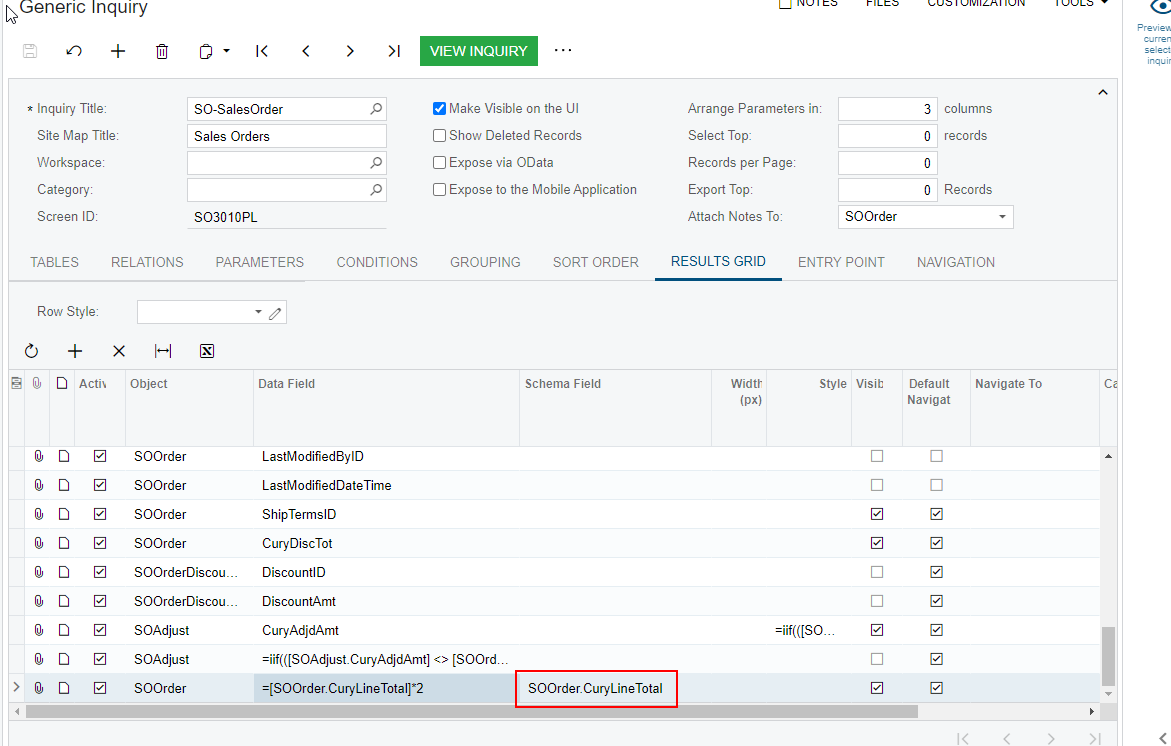
All calculated fields do that. Add in CuryLineTotal as a schema field like below and this will resolve your issue.


ALEXSLUSSER15
Freshman II
Forum|alt.badge.img
  • Author
  • Freshman II
  • December 30, 2022

All calculated fields do that. Add in that CuryLineTotal as a schema field like below and this will resolve your issue.


@brendan91 Sorry- how do I do this in a report?


brendan91
Semi-Pro III
Forum|alt.badge.img+1
  • Semi-Pro III
  • December 30, 2022

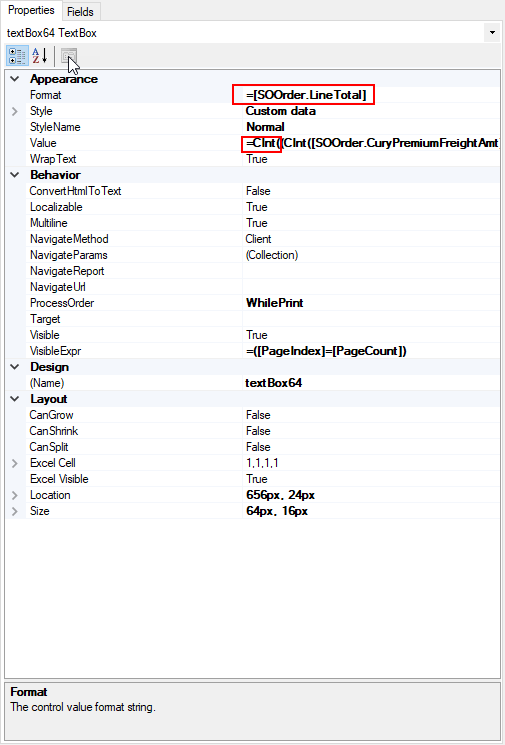
Report designer can be trickier. After an equation, you may need to convert the answer using CInt([table.field]) or CDec([table.field]) and then use the field you want your calculated field to look like in the format line.

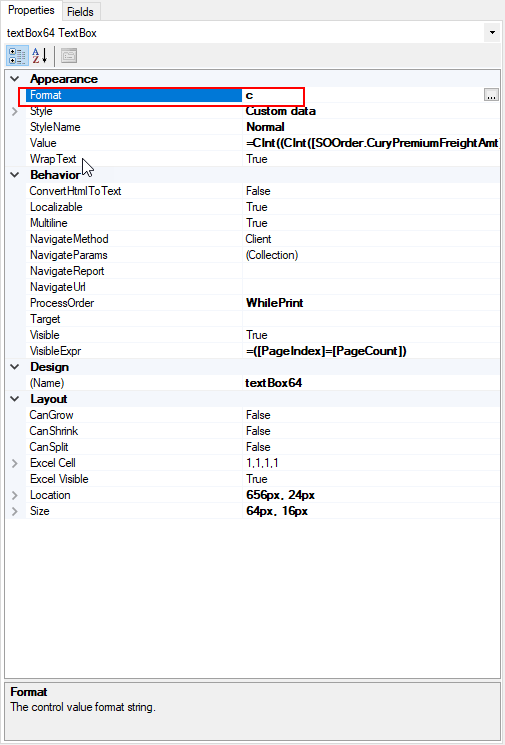
If you want a dollar sign, use c instead


DConcannon
Varsity II
Forum|alt.badge.img+2
  • Varsity II
  • December 31, 2022

@ALEXSLUSSER15 

I use #,##0.00 in the format property like so:


ALEXSLUSSER15
Freshman II
Forum|alt.badge.img
  • Author
  • Freshman II
  • January 3, 2023

Report designer can be trickier. After an equation, you may need to convert the answer using CInt([table.field]) or CDec([table.field]) and then use the field you want your calculated field to look like in the format line.

If you want a dollar sign, use c instead


@brendan91 I tried this but it didn’t work. I think it’s because the value of the text box is an if/then statement. Any ideas on how to format the outcome of this? It’s just an if/then to determine what math should be done.


brendan91
Semi-Pro III
Forum|alt.badge.img+1
  • Semi-Pro III
  • January 3, 2023

wrap each of those IIFs in a into a CStr() or CDec() like so...

=CStr(IIF([SoOrder.TermsID]=’5050’,[SoOrder.CuryLineTotal + 0.50, ‘’)) + CStr(IIF(…..)) + CStr(IIF(…..))

Then format =[SoOrder.LineTotal]

I believe that will work...Let us know!


ALEXSLUSSER15
Freshman II
Forum|alt.badge.img
  • Author
  • Freshman II
  • Answer
  • January 3, 2023

wrap each of those IIFs in a into a CStr() or CDec() like so...

=CStr(IIF([SoOrder.TermsID]=’5050’,[SoOrder.CuryLineTotal + 0.50, ‘’)) + CStr(IIF(…..)) + CStr(IIF(…..))

Then format =[SoOrder.LineTotal]

I believe that will work...Let us know!

@brendan91 To get it working, I put CDec in front and put ='#,##0.00' in the formatting.


DConcannon
Varsity II
Forum|alt.badge.img+2
  • Varsity II
  • January 4, 2023

@ALEXSLUSSER15

Just so the solution is clear for the future, you do not need the CDEC in front as the result was already a decimal. The only thing needed is #,##0.00 in the formatting property.


Glad you got it working!


brendan91
Semi-Pro III
Forum|alt.badge.img+1
  • Semi-Pro III
  • January 4, 2023

@DConcannon  I believe I’ve trained myself into a bad habit (or an unnecessary habit at best). I had a formula once that I “got working” by converting it to a number and I’ve been converting my formula’s ever since - “to be safe.” Turns out, this was likely unnecessary. 

I just confirmed for myself that Alex’s formula worked without the number conversion. As well as a lot of my own formulas 😏.Thanks