Answer

how can I join 2 DATA SOURCES and it will pull from only one

  • February 12, 2025
  • 8 replies
  • 85 views

Forum|alt.badge.img

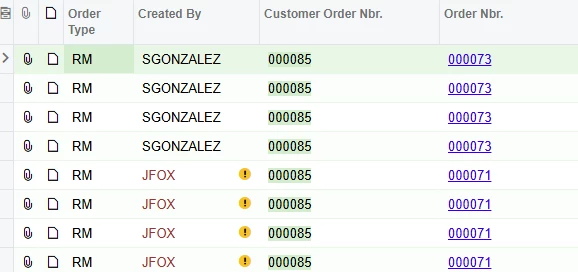
its duplicating the ordernbr

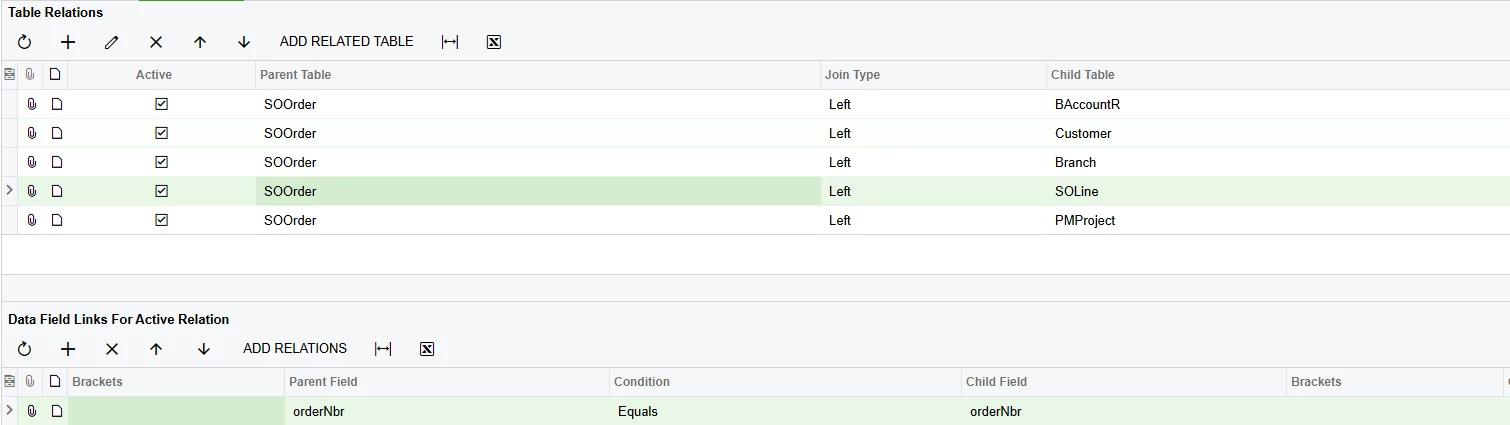
so how can i join the SOOrder and SOline, 

and make it pull from both side 

Best answer by BenjaminCrisman
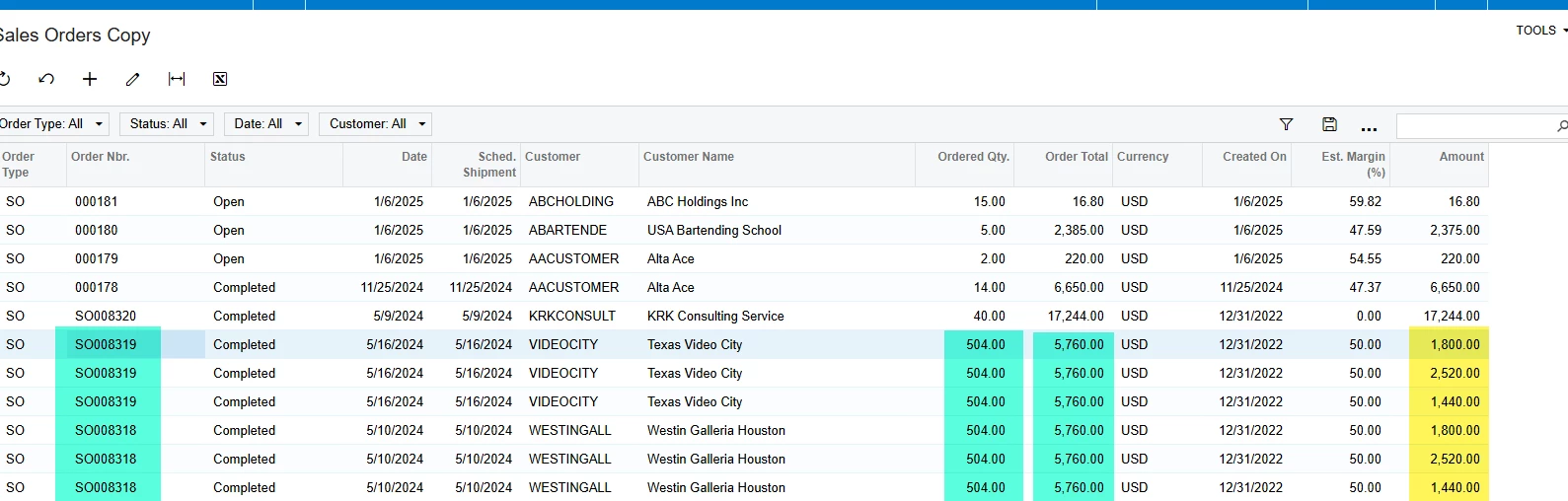
@SandyA In this example I’ve joined the SOLine table in and linked to SOOrder and we can see there are 6 lines consisting of 2 actual orders:

Each line displays the Ordered Qty and the Order Total, on the far right we have the SOLine.CuryLineAmt.

Now when I add the grouping:

We can see that the Order Total is getting multiplied by the number of lines, so 3x5760 = 17280, but the SOLine amount is showing as the correct amount of 5760 since it is summing the amount off the lines as expected.

The same thing is happening to the Quantity and so if that column is needed you should instead use SOLine.OrderQty:

 

8 replies

Forum|alt.badge.img
  • Author
  • Freshman II
  • February 12, 2025


BenjaminCrisman
Acumatica Employee
Forum|alt.badge.img+4
  • Acumatica Support Team
  • February 12, 2025

@SandyA What you’re seeing is a join type which is considered a ‘one:many’ (one to many) type relationship. There can be multiple lines on an SO, so by joining SOOrder to SOLine you’re getting a result for each line on the order. This may not be a problem and all you need to do is add a grouping on the SOOrder.OrderNbr and then it will lump all into one line.

This can cause a problem though if you are also displaying the order total and it’s appearing on each line because if you group it will SUM the values and then the order total will look overstated, so instead you’d need to display the line amounts and then once they are summed it will have a normal amount.

I also can’t tell in your relation if you’re adding OrderType to the data links for the join on SOOrder to SOLine. It’s important to make sure all key linking fields are used if possible and for SOOrder you’ll always need to have OrderType and OrderNbr in the links.

Hope this helps!


Forum|alt.badge.img
  • Author
  • Freshman II
  • February 12, 2025

can you give an example of how i will write the Group, for the SOOrder.OrderNbr


BenjaminCrisman
Acumatica Employee
Forum|alt.badge.img+4
  • Acumatica Support Team
  • February 12, 2025

@SandyA Just add SOOrder.OrderNbr to the grouping tab in the GI setup screen:


Forum|alt.badge.img
  • Author
  • Freshman II
  • February 12, 2025

thanks a lot, you the best. i got it working now


Forum|alt.badge.img
  • Author
  • Freshman II
  • February 12, 2025

I have come to this issue that you mention. How to I fix it. Can you give a example.

“This can cause a problem though if you are also displaying the order total and it’s appearing on each line because if you group it will SUM the values and then the order total will look overstated, so instead you’d need to display the line amounts and then once they are summed it will have a normal amount.”


BenjaminCrisman
Acumatica Employee
Forum|alt.badge.img+4
  • Acumatica Support Team
  • Answer
  • February 12, 2025

@SandyA In this example I’ve joined the SOLine table in and linked to SOOrder and we can see there are 6 lines consisting of 2 actual orders:

Each line displays the Ordered Qty and the Order Total, on the far right we have the SOLine.CuryLineAmt.

Now when I add the grouping:

We can see that the Order Total is getting multiplied by the number of lines, so 3x5760 = 17280, but the SOLine amount is showing as the correct amount of 5760 since it is summing the amount off the lines as expected.

The same thing is happening to the Quantity and so if that column is needed you should instead use SOLine.OrderQty:


Forum|alt.badge.img
  • Author
  • Freshman II
  • February 12, 2025

thanks