I want to filter a report based on the CreatedDateTime and adjust for UTC. I have the filter working properly in the body of the report but how can I use it in the filter of the report overall?
as another option, how can I filter so [EPActivityApprove.CreatedDateTime] = Today(UTC)
Best answer by noorula77
Hi @bduprey19, try with below approaches:
For the filter, you can use: [EPActivityApprove.CreatedDateTime] >= DateAdd('h',6,Today()) AND [EPActivityApprove.CreatedDateTime] < DateAdd('h',6,DateAdd('d',1,Today()))
Alternatively, you could create a calculated field in your report's schema: =DateAdd('h',-6,[EPActivityApprove.CreatedDateTime])
For filtering based on UTC directly, you can use: [EPActivityApprove.CreatedDateTime] >= Today() AND [EPActivityApprove.CreatedDateTime] < DateAdd('d',1,Today())
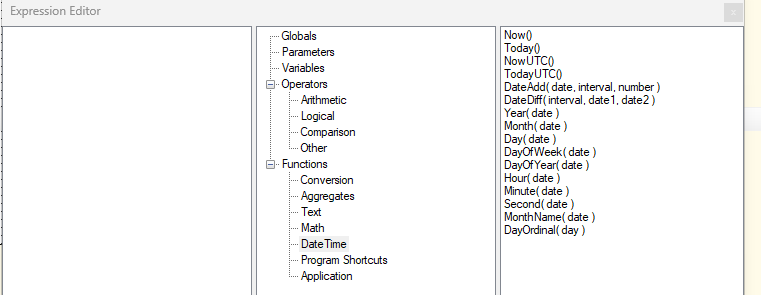
There are 2 options - NowUTC() and TodayUTC() - available on reports that should use UTC time. I’ve never used them, so I can’t verify they work, but they should be available to select for both fields on the report and the report filters.
For the filter, you can use: [EPActivityApprove.CreatedDateTime] >= DateAdd('h',6,Today()) AND [EPActivityApprove.CreatedDateTime] < DateAdd('h',6,DateAdd('d',1,Today()))
Alternatively, you could create a calculated field in your report's schema: =DateAdd('h',-6,[EPActivityApprove.CreatedDateTime])
For filtering based on UTC directly, you can use: [EPActivityApprove.CreatedDateTime] >= Today() AND [EPActivityApprove.CreatedDateTime] < DateAdd('d',1,Today())
I'm guessing you're asking based on experiencing a need; however, I was fairly certain that Acumatica adjusts the returned CreatedDateTime based on the user's time zone. It's not stored that way, but I think it should be returned that way if the user's time zone / server time zone is correct.
@darylbowman I’m not sure if using an API changes how the CreateDateTime stamp works, but the example is when I sync my time via an API @ 11/26/2024 5:30a central time, the CreateDateTime stamp is 11/25/2024 11:30p (6 hours earlier).