


Answer

Help: GI Cell formating PO vs Avg Cost

  • February 16, 2024
  • 3 replies
  • 58 views

joshmcgrew
Jr Varsity III
Forum|alt.badge.img

Hello, 

Brand new to Acumatica, I am creating a GI for PO vs Avg cost comparison and would like for the field that contains the PO cost to highlight red if its greater than the AVG cost field. I have the entire GI built but am having some trouble getting the format of the formula for this to happen. I was hoping maybe some one here could help me with this ?
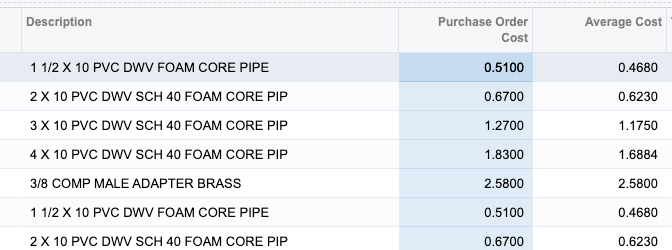
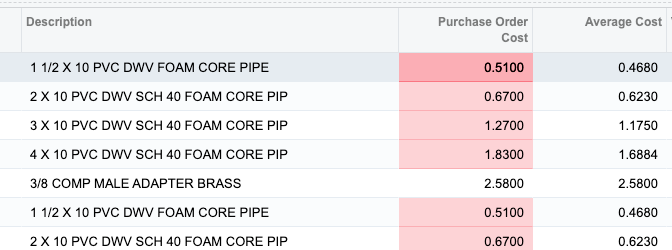
 

Best answer by joshmcgrew

@lauraj46 Thank you that helped get me on the right path for sure and I appreciate it. It was still giving me a bit of a problem but we were able to get it to work with the following formula that I thought I would share incase others ran into this:


=Iif([POLINE.UnitCost] > [INITEMCOST.AvgCost],'red20','default')


3 replies

lauraj46
Captain II
Forum|alt.badge.img+8
  • Captain II
  • February 16, 2024

Hi @joshmcgrew ,

To highlight on cell you would use a formula like this in the Style column of the result field that should be highlighted.  Or to highlight the entire row, you would enter the formula in the Row Style field on the Results Grid tab.

=IIf( IIf( [POLine.UnitCost] < [INItemCost.AvgCost.., 'red40', 'default')


​​​​​Hope this helps!

Laura 


joshmcgrew
Jr Varsity III
Forum|alt.badge.img
  • Author
  • Jr Varsity III
  • Answer
  • February 16, 2024

@lauraj46 Thank you that helped get me on the right path for sure and I appreciate it. It was still giving me a bit of a problem but we were able to get it to work with the following formula that I thought I would share incase others ran into this:


=Iif([POLINE.UnitCost] > [INITEMCOST.AvgCost],'red20','default')


Chris Hackett
Community Manager
Forum|alt.badge.img
  • Acumatica Community Manager
  • February 16, 2024

Thank you for sharing your solution with the community @joshmcgrew!


