

Answer

Grouping salesperson and netsales

  • January 25, 2023
  • 3 replies
  • 80 views

Forum|alt.badge.img+1

Hi All,

Does anybody knows what I can put in the value to group the ‘salesperson’ and display total of its netsales above my report?
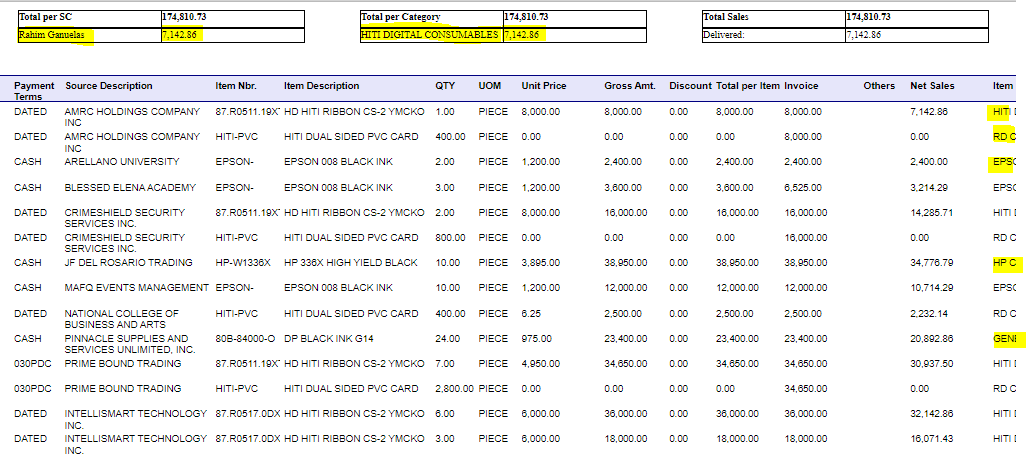
Please help, thanks!

Best answer by lauraj46

Hi @paula012 ,

On the report properties, use the Groups collection to add a grouping by salesperson.  Then in the header for that group the formula would be something like this: 

=sum([SOOrder.OrderTotal])


3 replies

lauraj46
Captain II
Forum|alt.badge.img+8
  • Captain II
  • Answer
  • January 25, 2023

Hi @paula012 ,

On the report properties, use the Groups collection to add a grouping by salesperson.  Then in the header for that group the formula would be something like this: 

=sum([SOOrder.OrderTotal])


Forum|alt.badge.img+1
  • Author
  • Semi-Pro II
  • January 26, 2023

Hi @paula012 ,

On the report properties, use the Groups collection to add a grouping by salesperson.  Then in the header for that group the formula would be something like this: 

=sum([SOOrder.OrderTotal])


Hi, thanks for the answer. Somehow I realized, this would group all my details in the report by Salesperson right? But I want to group only what’s in the report header. Is that possible? If not, and subreport is the only key, can you kindly see my concern here about making that, I updated this with trying subreport, perhaps do you know ? How to display salespersons and their total netsales aside from using subreport? | Community (acumatica.com)


Thank you!


lauraj46
Captain II
Forum|alt.badge.img+8
  • Captain II
  • January 26, 2023

Hi @paula012 ,

If you need to subtotal based on something other than the groupings in your report then you could use variables to accumulate totals as you process each detail row.  Please explain a bit more what you are trying to accomplish.

