

Question

Grouping - Keep Non-Null Values

  • January 27, 2026
  • 7 replies
  • 43 views

Forum|alt.badge.img

I have a GI and displays the below information
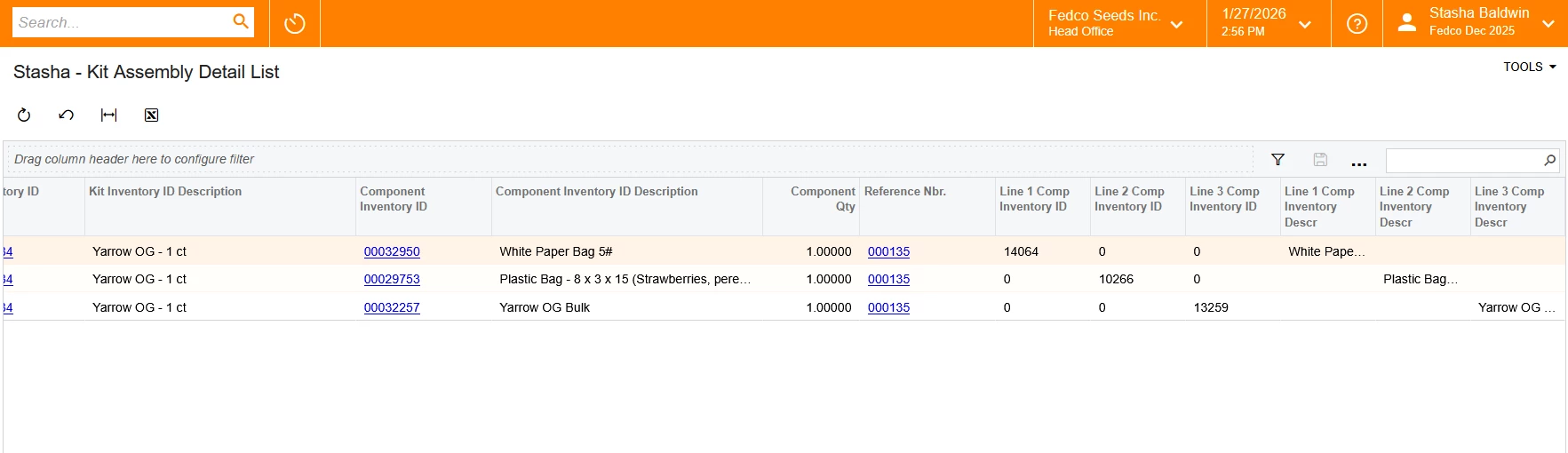
 

When I group by reference ID I would like the non-null values to show in the last 3 columns (Line 1 Comp Inventory Description, Line 2 Comp Inventory Description, Line 3 Comp Description) to show in their appropriate columns once the group has occurred. Is there a way to do that? 

7 replies

BenjaminCrisman
Acumatica Employee
Forum|alt.badge.img+4
  • Acumatica Support Team
  • January 27, 2026

@SBaldwin You would need to use conditional expressions to get them to display. Like iif(linenbr=1, Line 1 Comp Inventory Description, ‘’) and do this for each column.

I don’t know what the tables you’re using are, so I can’t give you specifics but if you showed what the fields were in the GI setup then it would be easy to formulate


Samvel Petrosov
Jr Varsity II
Forum|alt.badge.img+9

Which version of Acumatica are you running this on? For the IDs you probably can use SUM as the aggregation with the idea that other lines will have 0 in that position. For the text portion it probably will be MAX, but something to test.


Forum|alt.badge.img
  • Author
  • Varsity I
  • January 27, 2026

@SBaldwin You would need to use conditional expressions to get them to display. Like iif(linenbr=1, Line 1 Comp Inventory Description, ‘’) and do this for each column.

I don’t know what the tables you’re using are, so I can’t give you specifics but if you showed what the fields were in the GI setup then it would be easy to formulate

That is actually how I got those columns to populate to begin with but I’m struggling to get them to appear once I make the grouping active. It looks like it’ll default to line 3 so the last column will be populated but the first two will not.

XML Attached


Forum|alt.badge.img
  • Author
  • Varsity I
  • January 27, 2026

Which version of Acumatica are you running this on? For the IDs you probably can use SUM as the aggregation with the idea that other lines will have 0 in that position. For the text portion it probably will be MAX, but something to test.

25R1, MAX still left those columns blank, and when I tried to do MIN or SUM I got an aggregate error


BenjaminCrisman
Acumatica Employee
Forum|alt.badge.img+4
  • Acumatica Support Team
  • January 27, 2026

@SBaldwin I’m sure there is a way to do this in a GI, but I’m not seeing one of the functions which can do this. I think this type of request would be much better suited for a report where more functions like Prev() and Next() are available as well as assigning variables.


Forum|alt.badge.img+2
  • Captain II
  • January 27, 2026

I don’t know how critical it is that you have the report displayed as a GI with grouping, but looking at the data you already have, I bet you could get most of the details and format you’re after if you use a pivot table


Put the kit info in your rows (without totals), put the kit line number in your columns and then add  the component inventory ID and aggregate with Max? 


If you just need a quick excel export that might be a faster way to pull what you’re looking for


WillH
Semi-Pro I
Forum|alt.badge.img+4
  • Semi-Pro I
  • January 29, 2026

I tend to use MAX() for these kinds of situations, but depending on exactly what your data is and how the joins work in your DACs the behavior can get strange based on exactly how data is handled.
Are you setting those lines as NULL when they’re not line 1 (for example) or are you setting them as empty strings?

Are you able to share a GI Definition/customize one of the core GI to model your situation and share that here so people can look at the underlying logic you’re running?



