Answer

Grid Result column as codition data field

  • October 16, 2025
  • 14 replies
  • 113 views

Forum|alt.badge.img

Does anyone know of a way to bring a “filter” into conditions?

I’m trying to filter “First Invoice Date” and i’m using SOInvoice.DocDate to do so. however, this catches all invoices. 

I can filter, but that only happens after my information has been pulled and it does not achieve what i am trying to do.
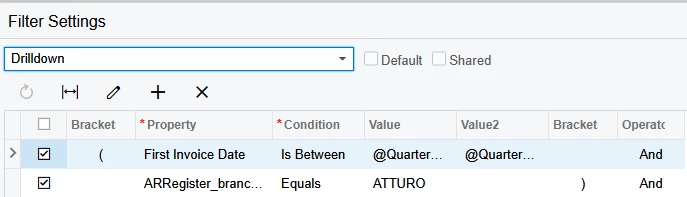
^this is the “Drilldown” filter that gets applied when going from the Sales Manager Dashboard. It shows the exact info I need, but i cannot set this up as a business event; it drops the filter. 

 

This is how I have attempted to create the filter; but it still shows me old customers because their invoice date is still included in this filter.

I get my information perfectly but I cannot, ‘filter’, for a better word, my First Invoice Date down without bringing in other customers who have also had invoices created within the last month, or using a separate filter after the GI has been ran. I post here as a last report and my google abilities have ran dry now that AI has taken over their algos. I can find posts that are close, but involve more equations and i don’t think my issue is that complicated, but i can’t get it after nearly two weeks of research.

Best answer by darylbowman

Please try the attached version.

I added a note to the GI to briefly explain the mechanics of it.

14 replies

darylbowman
Captain II
Forum|alt.badge.img+15

I’m not sure I’m entirely understanding the problem, but I am curious what you’re hoping to achieve with this filter:

I believe it’s currently doing nothing at all, since your ‘filter’ is effectively including everything.


Forum|alt.badge.img
  • Author
  • Freshman II
  • October 20, 2025

I’m not sure I’m entirely understanding the problem, but I am curious what you’re hoping to achieve with this filter:

I believe it’s currently doing nothing at all, since your ‘filter’ is effectively including everything.

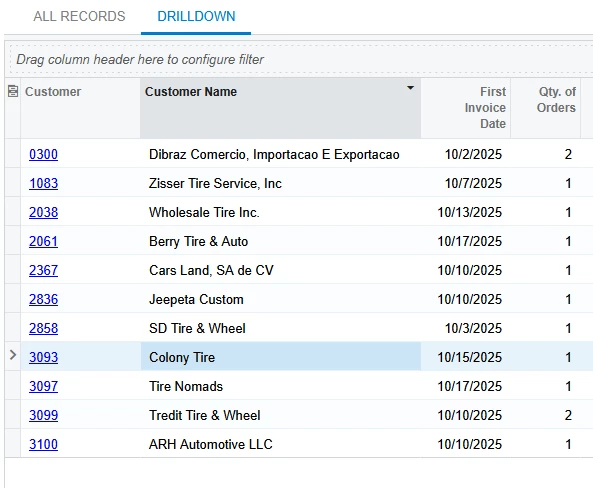
The sales manager dashboard has a “new orders” widget. This takes all invoices; aggregates them to the MIN of First Invoice Date and displays them. (so far it’s 9 records; 2 NEW customers with FIRST invoices, and 7 OLD customers with FIRST invoices)

What i was trying to achieve there (which half works) is to show me First Invoices created for customers that were created within the last month, or customers created before the last month.

However, my issue; is since the dashboard “filters” the results after they’re aggregated, i cannot email this including the filter.

I then decided to hand create it, however, with what you screenshot ; I can only show “New customers who’s first invoices were created within the last 31 days” or “ALL invoices created within the last 31 days aggregated down to the first date within this range”. You are correct in your assumption, the less than equation does not work, however, the greater than does exactly what i need, but only half the data i needed. 

I’m struggling to get “Established customers who’s creation date was older than 31 days and first ever invoice was within the last 30 days AND customers who’s creation date is older than 31 days and first ever invoice was within the last 30 days”

I probably made this more confusing...


darylbowman
Captain II
Forum|alt.badge.img+15

“Established customers who’s creation date was older than 31 days and first ever invoice was within the last 30 days

 AND customers who’s creation date is older than 31 days and first ever invoice was within the last 30 days

I've re-read this like 12 times and I can't see a difference here.


Forum|alt.badge.img
  • Author
  • Freshman II
  • October 21, 2025

“Established customers who’s creation date was older than 31 days and first ever invoice was within the last 30 days

 AND customers who’s creation date is older than 31 days and first ever invoice was within the last 30 days

I've re-read this like 12 times and I can't see a difference here.

It’s because i wrote it wrong and did not proof read.

I’m struggling to get “Established customers who’s creation date was older than 31 days and first ever invoice was within the last 31 days AND customers who’s creation date is within the last 31 days and first ever invoice was within the last 31 days”

Old customer/first invoices & new customers/first invoices


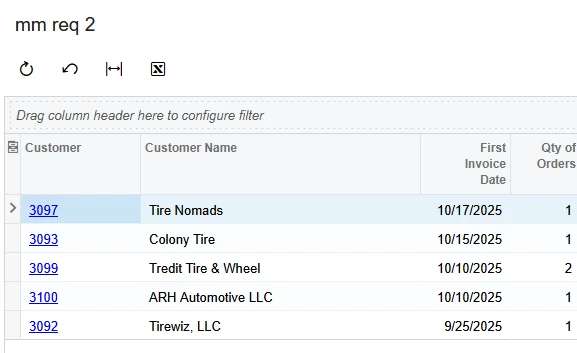
I can get new customers/first invoice perfectly. That’s what i want. However, when i try to add in established customers, since we have some that ordered a lot over the last month the filter shows their first invoice as the first of the month but i know it’s not. But there are a few established customers who’s first invoice was within the last month. 


Does it make sense now? if not i’ll just close this as answered and move on. sorry for wasting your time. 


Edit with screen shots

“Drilldown” filter from New customers Dashboard widget


This is the one I built only showing “new customers / first invoice within the month”


The dashboard filters AFTER the date is pulled, then aggregated. So it will show exactly what i want. however I can’t email this because the filter drops off.
 

I go to recreate it, and I cannot add “established customers / first invoice” because the data pulls from all invoices and I can’t filter it down from there using parameters or conditions. 


darylbowman
Captain II
Forum|alt.badge.img+15

Old customer/first invoices & new customers/first invoices

Are you trying to differentiate between old customers and new customers? Because unless you are, you’re just looking for customers whose first invoice is within the last 31 days.

I think I do understand your problem, but I think I can help. Can you share the GI?


Forum|alt.badge.img
  • Author
  • Freshman II
  • October 21, 2025

Old customer/first invoices & new customers/first invoices

Are you trying to differentiate between old customers and new customers? Because unless you are, you’re just looking for customers whose first invoice is within the last 31 days.

I think I do understand your problem, but I think I can help. Can you share the GI?

Not differentiate; combine.

But ONLY if their FIRST EVER INVOICE  was WITHIN the the last 31 days.

My issue is getting our larger customers who order daily out of the pool. The Special filter after the data has been aggregated works great; but i need it non filtered so i can turn it into a pdf file via business event.


See attached for the jumble mess of XML file i have. 


darylbowman
Captain II
Forum|alt.badge.img+15
  • Answer
  • October 21, 2025

Please try the attached version.

I added a note to the GI to briefly explain the mechanics of it.


Forum|alt.badge.img
  • Author
  • Freshman II
  • October 21, 2025

Please try the attached version.

I added a note to the GI to briefly explain the mechanics of it.

Unfortunately we haven't updated to the newest version of acumatica. I think we transition near the end of the month. But looking at the code in my browser i think i should be able to parse out what you did. I see the note you put in there. I did have that link as a reference when i was attempting this but i dont remember why i couldn’t get it to work. 


I”ll keep busting on it and correlate that to what you posted when we upgrade. 


darylbowman
Captain II
Forum|alt.badge.img+15

Ah, my bad. I forgot the XML was upgraded in 25 R1.


Forum|alt.badge.img
  • Author
  • Freshman II
  • October 21, 2025

Ah, my bad. I forgot the XML was upgraded in 25 R1.

I was able to upload this into our sandbox and see what you did and was able to recreate it in my version of acumatica.

However, now the data being pulled is completely different than what i was filtering down to. To be honest, I’m not even sure what it’s pulling. 

I’m going to use this as an example and see if i can build it after lunch.


I understand what it’s getting at..Using a LEFT JOIN to read between it’s own records until it cannot anymore. This seems to be what I was missing. i wonder if I combine my mess with this solution….hmm...


darylbowman
Captain II
Forum|alt.badge.img+15

In my instance, it seemed to return believable data. I didn’t fact check it the most thoroughly.


Chris Hackett
Community Manager
Forum|alt.badge.img
  • Acumatica Community Manager
  • November 6, 2025

Hi ​@kdolgner were you able to find a solution? Thank you!


lauraj46
Captain II
Forum|alt.badge.img+8
  • Captain II
  • November 10, 2025

Hi ​@kdolgner ,

I hope you got your GI to work based on the help from ​@darylbowman

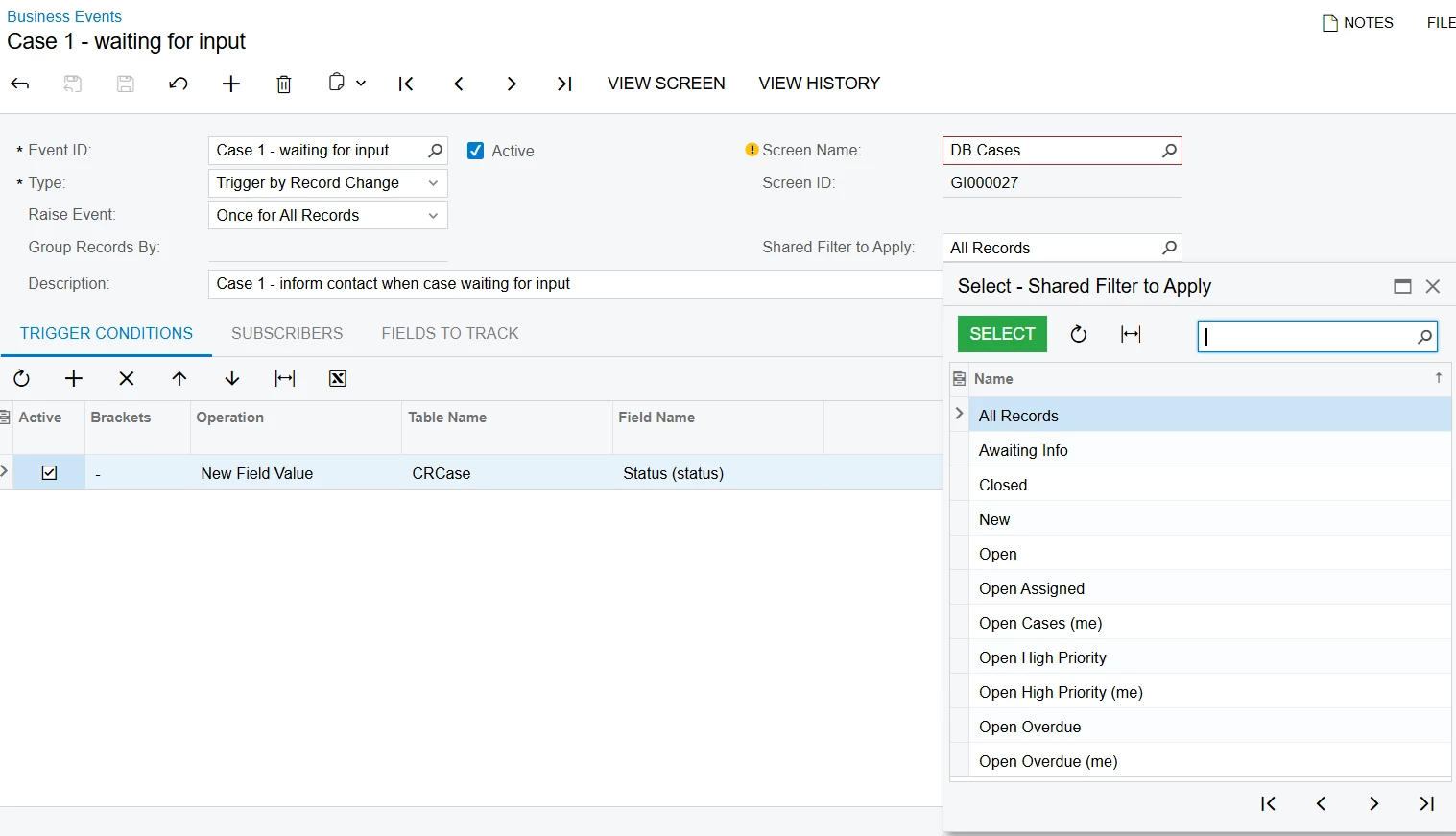
Just wanted to add that if you save the GI date fitler as a shared filter, you should be able to select it on the Business Event.  Have you tried that approach?

Hope this helps!

Laura


Forum|alt.badge.img
  • Author
  • Freshman II
  • November 13, 2025

Hi ​@kdolgner ,

I hope you got your GI to work based on the help from ​@darylbowman

Just wanted to add that if you save the GI date fitler as a shared filter, you should be able to select it on the Business Event.  Have you tried that approach?

Hope this helps!

Laura

it did not fully resolve my issue.


However with a bunch of testing i did get this to work and filter down correctly. it’s not 100% exact, but 99% is good enough for what we needed. Solution marked