Answer

Get empty attribute values in a Generic Inquiry

  • July 18, 2024
  • 9 replies
  • 259 views

Forum|alt.badge.img

I’m trying to create a generic inquiry which should display the attribute values of a specific attribute. I left joined the Customers table to the CSAnswers table and added a condition to limit attributes to the specific attribute I’m interested in.

However, I’m only getting customers that have a value for that attribute. How can I get a list of all customers including ones that don’t have any value for that attribute?

Best answer by darylbowman

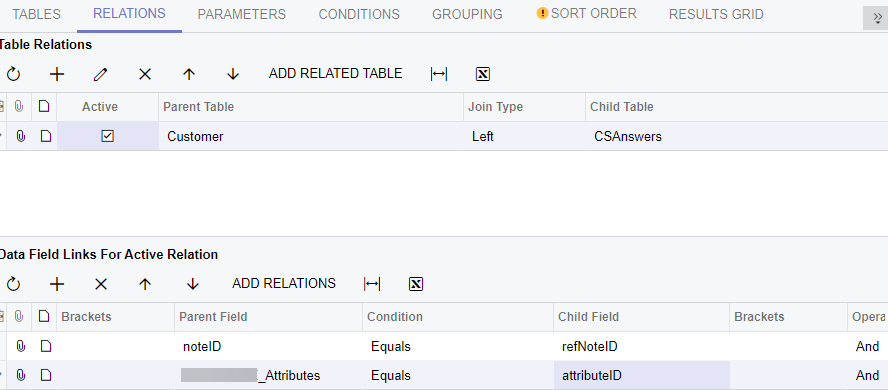
It would look like

="ATTRIB" Equals attributeID

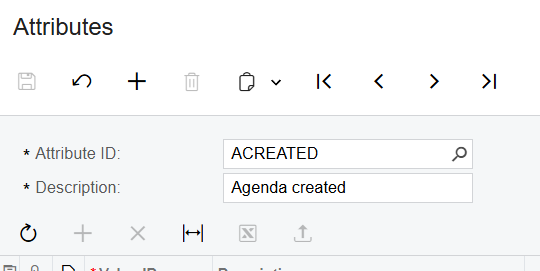
where “ATTRIB” is the value on the Attributes screen


9 replies

darylbowman
Captain II
Forum|alt.badge.img+15

You’d need to LeftJoin the CSAnswers table to the Customer table. You have it reversed.


lauraj46
Captain II
Forum|alt.badge.img+8
  • Captain II
  • July 18, 2024

Hi @aaronsilber ,

Instead of specifying the value of the attribute on the Conditions tab, you can specify it as another line on the relationship between Customer and CSAnswers.  If you add the criteria there then the left join should return the record even if the attribute isn’t found.

Hope this helps!

Laura


darylbowman
Captain II
Forum|alt.badge.img+15

@aaronsilber Were you able to get this working?


Forum|alt.badge.img
  • Author
  • Freshman I
  • July 19, 2024

You’d need to LeftJoin the CSAnswers table to the Customer table. You have it reversed.

When I add in the conditions tab “CSAnswers.AttributeID Equals <myattribute>” I only get a list of customers that have a value for that attribute.

I would like to get a list of all customers, whether they have a value for this attribute or not.


Forum|alt.badge.img
  • Author
  • Freshman I
  • July 19, 2024

Hi @aaronsilber ,

Instead of specifying the value of the attribute on the Conditions tab, you can specify it as another line on the relationship between Customer and CSAnswers.  If you add the criteria there then the left join should return the record even if the attribute isn’t found.

Hope this helps!

Laura

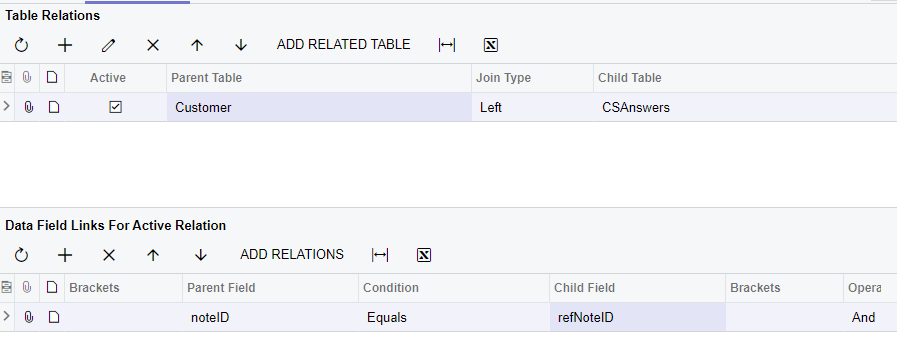
Is this what the Relations tab should look like?

When I do this it seems like I do get all of the customers, but I don’t get any attribute values in the GI. I have added the Value data field from the CSAnswers object in the Results Grid tab.


darylbowman
Captain II
Forum|alt.badge.img+15

It would look like

="ATTRIB" Equals attributeID

where “ATTRIB” is the value on the Attributes screen


Forum|alt.badge.img
  • Author
  • Freshman I
  • December 12, 2024

@darylbowman

="ATTRIB" Equals attributeID 

I couldn’t get it to work for me until I changed it to single quotes ='ATTRIB'


darylbowman
Captain II
Forum|alt.badge.img+15
  • December 12, 2024

You’re right. My mistake 🙂


Forum|alt.badge.img
  • Author
  • Freshman I
  • December 12, 2024

Thanks for your help!