Answer

Generic Inquiry - total of amount by employee for selected subaccounts

  • November 14, 2024
  • 4 replies
  • 106 views

Hi,

I have an existing Generic Inquiry which provides a breakdown of employee costs by subaccount.  Please see the attached screenshot. 

The Inquiry currently displays a column with the amount by subaccount and the total for each employee.  I would like the total for each employee to exclude where a subaccount is equal to 1. I still want to retain the rows where the subaccount is to 1 so I don’t think I can use Parameters and Conditions to achieve this.

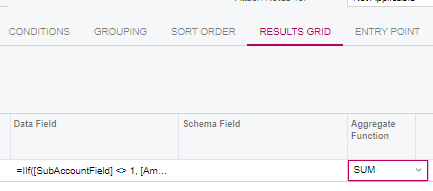
I have been trying to use IIF and SUM in formula in the Results Grid but without success. 

Any assistance appreciated !

Best answer by jwright

Better yet, ​@bfryett it should be possible to accomplish all of this within a pivot table, if that is acceptable.

4 replies

DipakNilkanth
Pro III
Forum|alt.badge.img+13

Hi @bfryett,

Have you tried something like this?


  1. =SUM(IIf([SubAccountField] <> 1, [AmountField, 0))

  1. In Grouping tab add the Employee ID field to group the records by Employee.

    Hope, it helps!

jwright
Jr Varsity III
Forum|alt.badge.img+1
  • Jr Varsity III
  • November 15, 2024

Hi @bfryett,

Have you tried something like this?


  1. =SUM(IIf([SubAccountField] <> 1, [AmountField, 0))

  1. In Grouping tab add the Employee ID field to group the records by Employee.

    Hope, it helps!

If you are using the grouping tab, it would probably help for clarity of your GI to try using ​Dipak’s formula simplified to =IIf([SubAccountField] <> 1, [AmountField, 0)) and put the “Sum” in the aggregate function column within the formulas row in the results tab.


jwright
Jr Varsity III
Forum|alt.badge.img+1
  • Jr Varsity III
  • Answer
  • November 15, 2024

Better yet, ​@bfryett it should be possible to accomplish all of this within a pivot table, if that is acceptable.


  • Author
  • Freshman I
  • November 17, 2024

Thank you both.  This was an existing Generic Inquiry put together with some custom tables quite a while ago.  On closer examination the table structure was making it difficult to include all the required information in the one Generic Inquiry - Amount was pulling from one table and Total Amount from another.  Although a bit counterintuitive the simpler solution was to set up two GIs to pull the required information by employee and then use the Grouping correctly.  The information was then summarised using the pivot table function.  So, I did pick on part of your suggestions once the table structure was sorted.