

Solved

Generic Inquiry to Color Code rows appointments that are over 30 days and over 60 days

  • December 11, 2025
  • 2 replies
  • 23 views

Forum|alt.badge.img

I created GI that pulls all appointments that are past today’s date but have the status of not started. Now I am trying to set the appointments that are over 60 days to one color and the ones over 30 days to another color. 

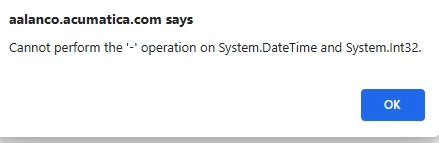
I am having issues with the date in the formula to set the row colors.  In the conditions it lets me use the @today-30 or -60 function but it doesn’t like the @ today in the results grid to setup the color.  I tried the today() function but then it gives me a syntax error.


=IIf([FSAppointment.ScheduledDateTimeBegin]<((today())-60),'red', (IIf([FSAppointment.ScheduledDateTimeBegin]<((today())-30),'orange', 'default')))


Any ideas on how I can accomplish this? I know the issue is integer versus date but I am not sure how to fix this.

Best answer by nickcerri32

@eucciferri35 instead of today()-60 (or whatever number), try using DateAdd( Today(), 'd', -60). 


IIf([FSAppointment.ScheduledDateTimeBegin]<(DateAdd( Today(), 'd', -60)),'red', (IIf([FSAppointment.ScheduledDateTimeBegin]<(DateAdd( Today(), 'd', -30)),'orange', 'default')))

2 replies

nickcerri32
Jr Varsity III
Forum|alt.badge.img+2
  • Jr Varsity III
  • Answer
  • December 11, 2025

@eucciferri35 instead of today()-60 (or whatever number), try using DateAdd( Today(), 'd', -60). 


IIf([FSAppointment.ScheduledDateTimeBegin]<(DateAdd( Today(), 'd', -60)),'red', (IIf([FSAppointment.ScheduledDateTimeBegin]<(DateAdd( Today(), 'd', -30)),'orange', 'default')))


Forum|alt.badge.img
  • Author
  • Varsity I
  • December 11, 2025

Thank you!  That worked perfectly.
