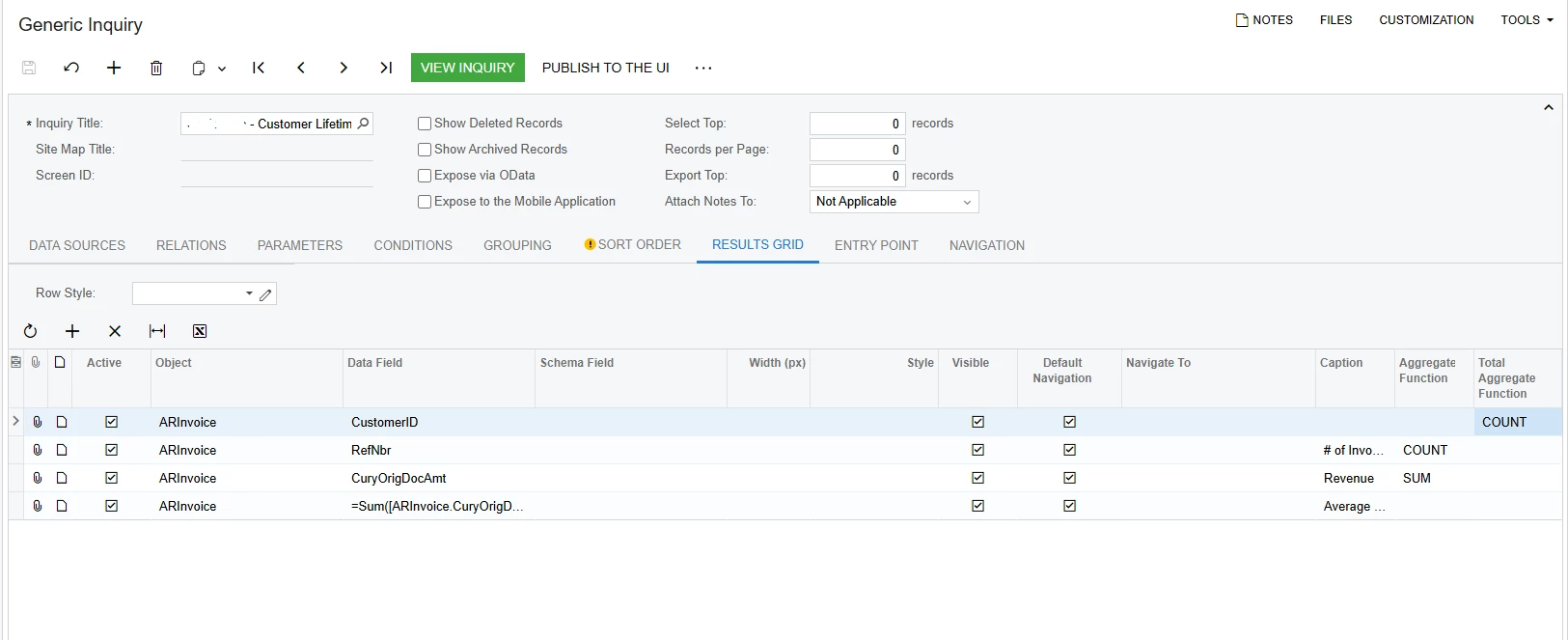
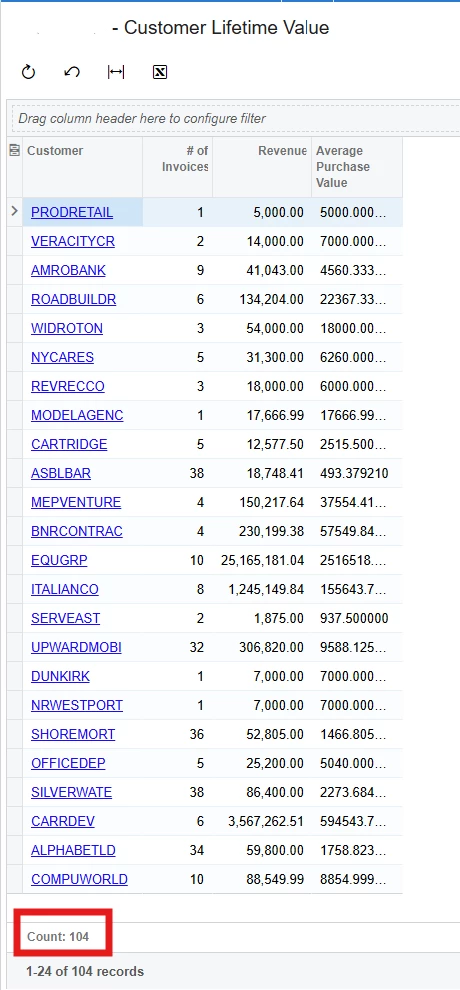
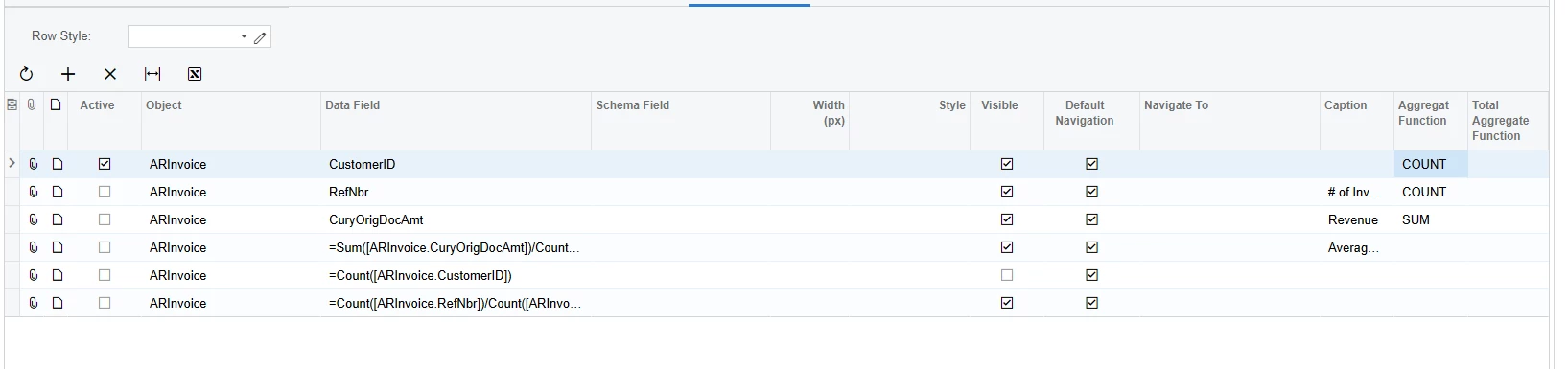
I am creating a GI and want to use the Total Aggregate value for the Customer ID in a calculation for a new column to calculate Number of orders/number of customers, grouped by Customer ID. I have run into this issue is other GIs as well, where I want to produce the COUNT of all Customer IDs and cannot. Here are my current results grid and view of the inquiry.
Thank you!
Best answer by npetrosov31
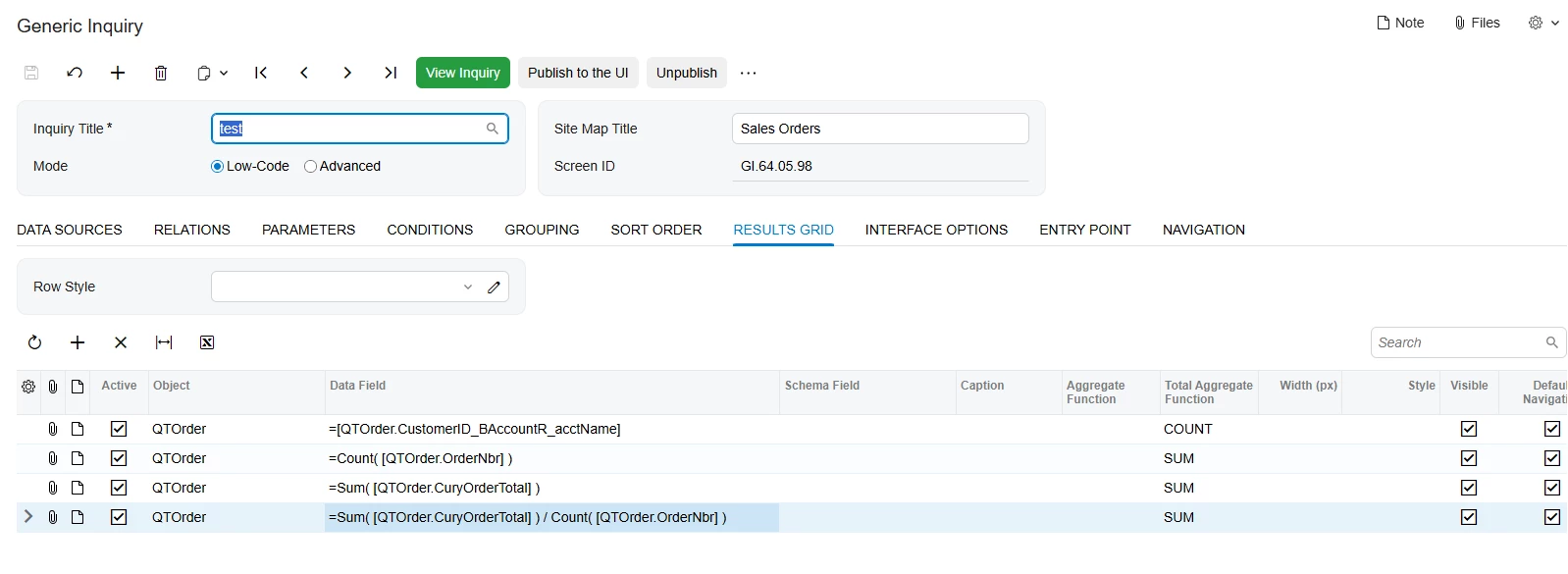
I don’t know how much this will satisfy you but I got only this, I don’t think more is possible without code changes:
This is an example on SOOrder table:
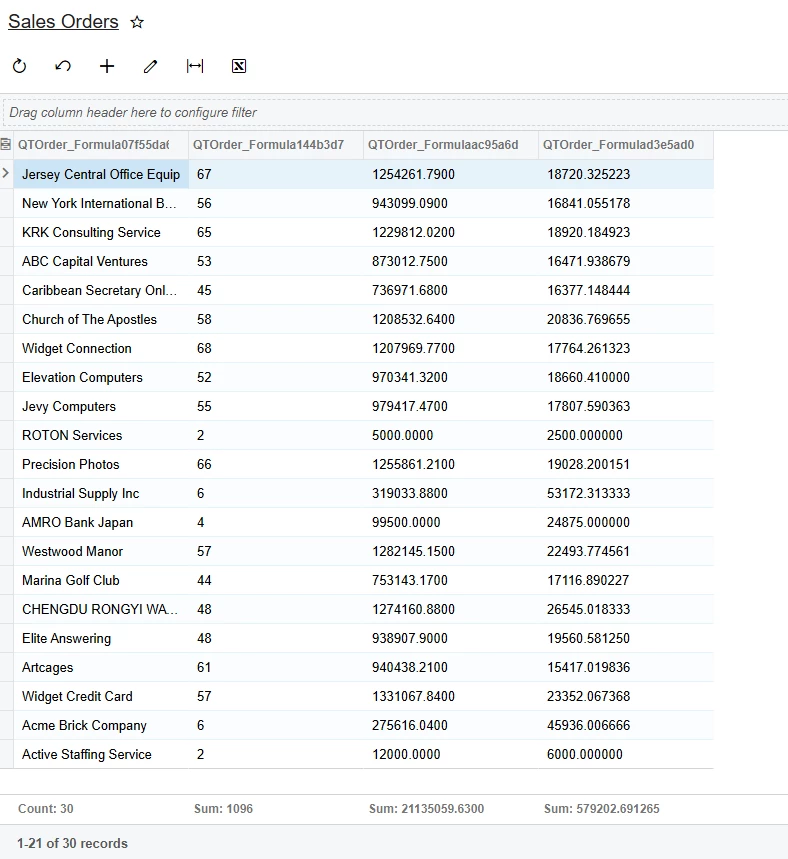
First column is the customer name who we grouped by. Count at the end just shows the count of the grouped lines(104 in your case).
Second column actually shows how many orders every customer has. At the bottom we show the Sum of it.
Third column shows the total amount for the grouped orders for each customer. It will show the sum of grouped orders at bottom.
Fourth column shows the total/orderqty for each customer. Note that this one divides amount on order count at the customer group level and then does summarizing.
Here is the result I got:
I think this may not be the result that you expect at the end, but more I look on this more I see that some code changes will be required to go over this.
@aminerd Are you trying to count the total Nbr of order or nbr of order for specific customer.
The # of Invoices represents how many invoices exist for that specific customer. I am looking to add another calculation column to divide the # of Invoices by the Total number of customers. I was attempting to use COUNT for the number of customers, but the best I could get was the total aggregate COUNT for the Customer ID
You got the correct number of all the Customer ID-s there. You have 104 grouped records by customer ID, that means there are 104 records for distinct customers. if you want to get the full count of all the orders in the current gi you need to do something like this:
Please give more details if there are still some questions on this.
You got the correct number of all the Customer ID-s there. You have 104 grouped records by customer ID, that means there are 104 records for distinct customers. if you want to get the full count of all the orders in the current gi you need to do something like this:
Please give more details if there are still some questions on this.
Yes, this GI is currently grouped by Customer ID, but I want to use that value in a calculation as well to divide the number of orders by customer. I created a Count for the Customer IDs and marked as not visible and used that same function in the desired calculation I am trying to achieve.
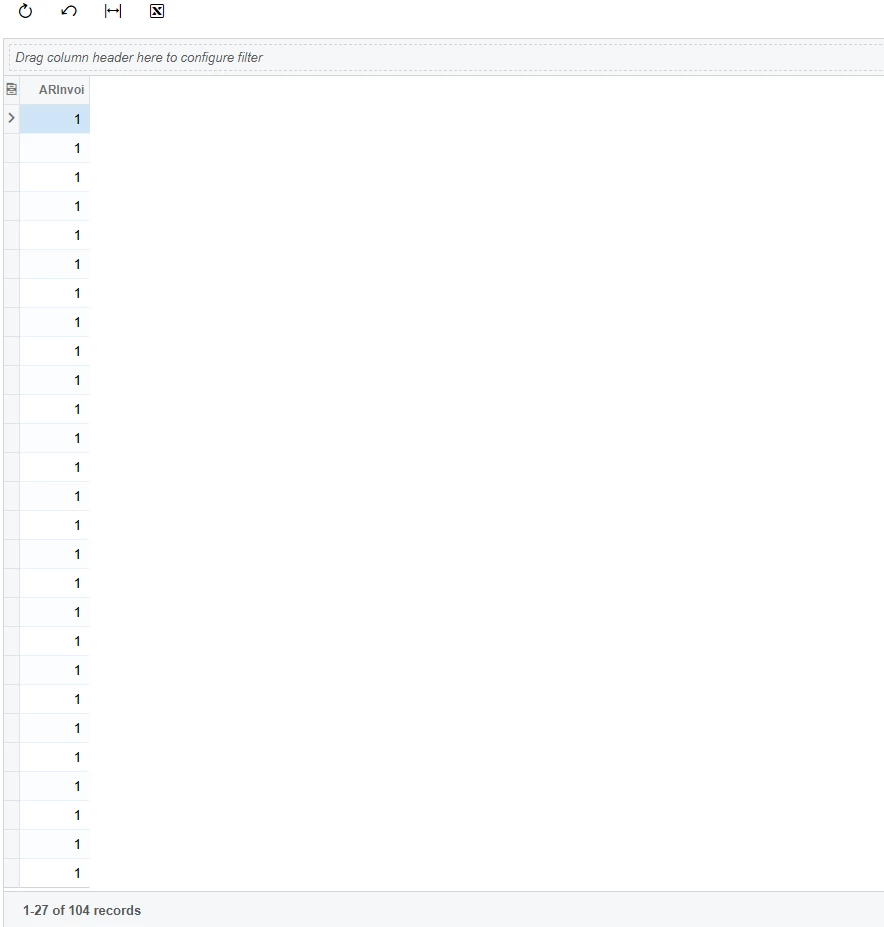
If I remove all other objects, this Count also does not work to produce just one number, the 104 and I get the following results:
Results:
I have experienced this before when trying to Count the Customer IDs and rather than producing 1 number, the results are similar to the above screenshot.
Is there any way to use Count or another function to produce the same result as the total aggregate function for the Customer ID and use in a calculation?
I still do not understand clearly the expected result. Do you need the quantity of the grouped orders in one customer? Counting customers will always return you the same number as there are just that count of them. Could you please try to describe the expected final result, what should the numbers be in this particular case?
I still do not understand clearly the expected result. Do you need the quantity of the grouped orders in one customer? Counting customers will always return you the same number as there are just that count of them. Could you please try to describe the expected final result, what should the numbers be in this particular case?
I have 2 questions really. A general one that can apply to any GI, not just this one. Is it possible to use Count or Sum as an aggregate for the Customer ID, rather than using the Total aggregate Count?
For this inquiry in particular I have them grouped by Customer ID because that was the only way I could produce that count (104) using the total aggregate. Ideally, I would have one row return in this GI with columns for the count of customer ID, the total number of Invoices for all customers, the total Revenue for all Invoices, the average purchase value (Revenue/Invoices), the purchase frequency (invoices/customers).
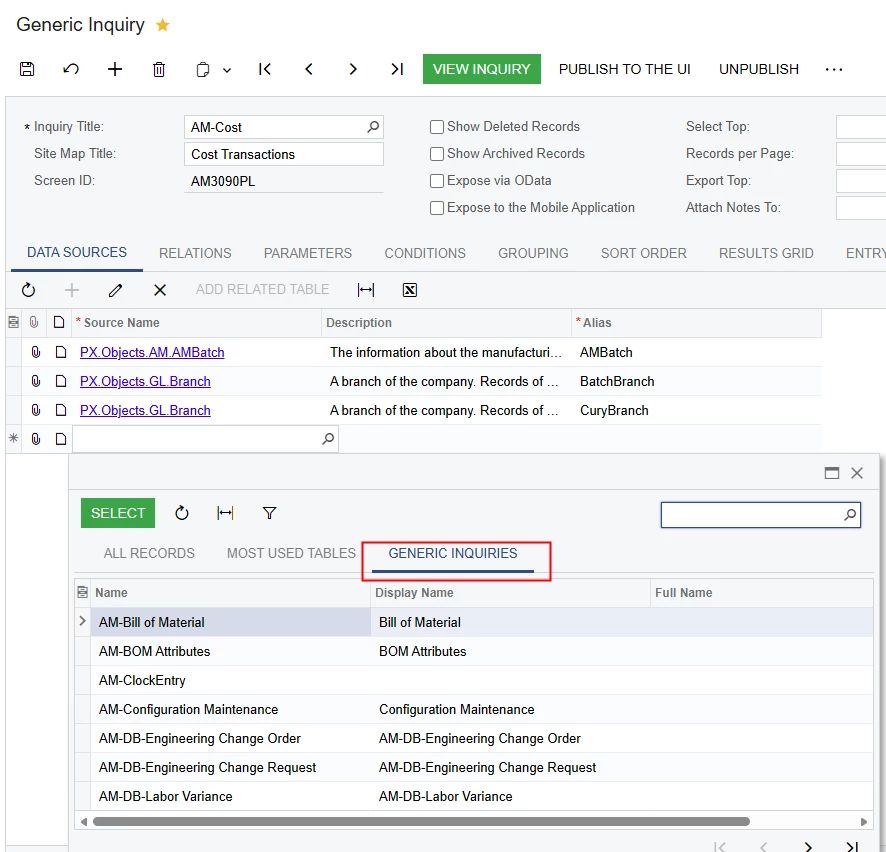
You could use your current GI as a data source in a new GI. Then you’d be able to use the calculated column from the original GI as data for a calculated column in a new GI. You could also create a GI with different grouping that just gives you the customer count for all orders. In the Data Sources tab:
I don’t know how much this will satisfy you but I got only this, I don’t think more is possible without code changes:
This is an example on SOOrder table:
First column is the customer name who we grouped by. Count at the end just shows the count of the grouped lines(104 in your case).
Second column actually shows how many orders every customer has. At the bottom we show the Sum of it.
Third column shows the total amount for the grouped orders for each customer. It will show the sum of grouped orders at bottom.
Fourth column shows the total/orderqty for each customer. Note that this one divides amount on order count at the customer group level and then does summarizing.
Here is the result I got:
I think this may not be the result that you expect at the end, but more I look on this more I see that some code changes will be required to go over this.
I don’t know how much this will satisfy you but I got only this, I don’t think more is possible without code changes:
This is an example on SOOrder table:
First column is the customer name who we grouped by. Count at the end just shows the count of the grouped lines(104 in your case).
Second column actually shows how many orders every customer has. At the bottom we show the Sum of it.
Third column shows the total amount for the grouped orders for each customer. It will show the sum of grouped orders at bottom.
Fourth column shows the total/orderqty for each customer. Note that this one divides amount on order count at the customer group level and then does summarizing.
Here is the result I got:
I think this may not be the result that you expect at the end, but more I look on this more I see that some code changes will be required to go over this.
Thank you!
This is not the expected end result and agree code changes may be needed. Thanks for your effort on this!