Answer

Generic Inquiry Error - Arithmetic Overflow Converting Expression to Data type Int

  • November 13, 2023
  • 6 replies
  • 340 views

Forum|alt.badge.img

Hello, 

On a Sales order screen, we recently experienced this error message: 
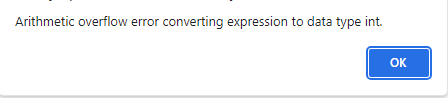


The trace log doesn’t seem to show which column is causing the error. I’ve looked into the fields of the generic inquiry and not sure what to do next. This GI was working fine last week. 

Any help is much appreciated!


I’ve attached the XML of the generic inquiry here, as well. 

Best answer by Naveen Boga

@bclark  Have you attempted to uncheck fields from the Results Grid one by one and verified the results? If not, please proceed with this step as it will assist us in identifying the root cause of the issue.

6 replies

Naveen Boga
Captain II
Forum|alt.badge.img+19
  • Captain II
  • November 13, 2023

Hi @bclark  I have imported this GI in my local instance and I don’t see any issues with it. I’m assuming that this issue is related to data but not with the GI.

Have you checked this GI in any other instance?


Forum|alt.badge.img
  • Author
  • Varsity I
  • November 13, 2023

@Naveen Boga 

I just checked in my test instance and it worked as expected. So thank you for helping make the determination that it is not anything wrong with the GI. 

Do you have any advice on how to find where the issue in the data is then? 


Naveen Boga
Captain II
Forum|alt.badge.img+19
  • Captain II
  • Answer
  • November 13, 2023

@bclark  Have you attempted to uncheck fields from the Results Grid one by one and verified the results? If not, please proceed with this step as it will assist us in identifying the root cause of the issue.


Forum|alt.badge.img
  • Author
  • Varsity I
  • November 13, 2023

@Naveen Boga 
I went through the fields one by one and finally discovered that it was the Customer.PrimaryContactID that was causing the issue. 

One specific customer made an order yesterday. I still need to figure out what’s wrong with that field, but I excluded that order number from the GI for now and it works again, so thank you!


Naveen Boga
Captain II
Forum|alt.badge.img+19
  • Captain II
  • November 13, 2023

@bclark Glad that you figured out the issue and sharing the update!


  • Freshman I
  • December 9, 2025

@bclark Were you ever able to identify what the root cause of this was?

I just recently ran into this exact same error with a GI that I built a few months ago. The GI is fairly complex and utilizes multiple other GIs as data sources and some really long formulas to calculate different sales figures for the current day, month, and year compared to the budget for the sales account.

The first time this error occured was on the first of this month, and I found an issue with one of my data source GIs being used to pull the budget amount for the current year and month. My filter conditions were configured improperly causing there to be 2 rows of data if viewed on the first day of the month. Once I fixed that issue with the data source GI, the main GI worked again without producing this error. I assumed that was it, but today I’m getting the error again.

I copied the GI into the validation tenant of the same instance, and it runs fine in that tenant. So as was the case with your situation, it doesn’t seem to be an issue with the design of the GI itself.

I tried deactivating each field on the GI one by one to isolate the error to one particular field/formula in the results grid, but I continue to get this error every time which seems to suggest that the issue is with the data in a key field within the primary parent table (SOOrder).


What was the nature of the issue you found with the Customer.PrimaryContactID field on your GI?

Any ideas or suggestions to help me track down what’s causing this on my GI?
