Answer

Generating a Unique Random Number Each Time a Report is Run?

  • July 2, 2025
  • 2 replies
  • 55 views

Forum|alt.badge.img

Hi All,

I would like to ask if there is a formula or method in the report designer that allows a random number to be generated each time a report is run. For example, when generating a customer statement, I would like the report to display a unique number each time it is executed.

Is this possible, could you please guide me on how to implement it?

Thank you in advance for your support.

Best answer by praveenpo

Hi ​@hthuy24 ,

If you want to add a unique number to a report each time it’s generated, there are some practical workarounds:

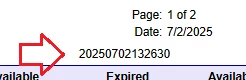
For example, you can create a calculated field that combines parts of the current date/time to create a pseudo-unique number.
In Report Designer, add a calculated field like:

=Format('{0:yyyyMMddHHmmss}', Now())

In some newer versions of Acumatica, the expression language might support:

=NewGuid()

2 replies

praveenpo
Semi-Pro III
Forum|alt.badge.img+3
  • Semi-Pro III
  • Answer
  • July 2, 2025

Hi ​@hthuy24 ,

If you want to add a unique number to a report each time it’s generated, there are some practical workarounds:

For example, you can create a calculated field that combines parts of the current date/time to create a pseudo-unique number.
In Report Designer, add a calculated field like:

=Format('{0:yyyyMMddHHmmss}', Now())

In some newer versions of Acumatica, the expression language might support:

=NewGuid()


nhatnghetinh
Captain II
Forum|alt.badge.img+11
  • Captain II
  • July 2, 2025

Hi ​@hthuy24 

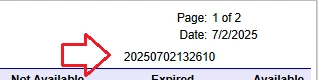
In Acumatica Report Designer. Try using the Now() or Today() function to create a series of numbers Year/Month/Day/Hour/Minute/Second that will not be duplicated when opening the report.
For example: =Year(Now()) * 10000000000 + Month(Now()) * 100000000 + Day(Now()) * 1000000 + Hour(Now()) * 10000 + Minute(Now()) * 100 + Second(Now())

Result


Best Regards,

NNT