Answer

Filter Internal Hyperlink

  • April 23, 2025
  • 8 replies
  • 74 views

We have modified the Project WIP Detail Report to 1. be less information and 2. to have the Period Costs linked to the Project Transaction Details page that when clicked on, will bring up the transactions associated with the Cost Code. However, it does not filter them the same period as the report and instead, just provides us with all the transactions within that cost code. 

Is there a way to add a filter within Report Designer to make it so this hyperlink shows only the transactions that are being referenced in the report for the period selected?

Thanks! 

Best answer by MDEVERILL

@Chris Hackett yes- but not the way I intended. I instead wrote a whole new report code instead of editing the current WIP code and then saved it in place of the original WIP code. 

8 replies

BenjaminCrisman
Acumatica Employee
Forum|alt.badge.img+4
  • Acumatica Support Team
  • April 23, 2025

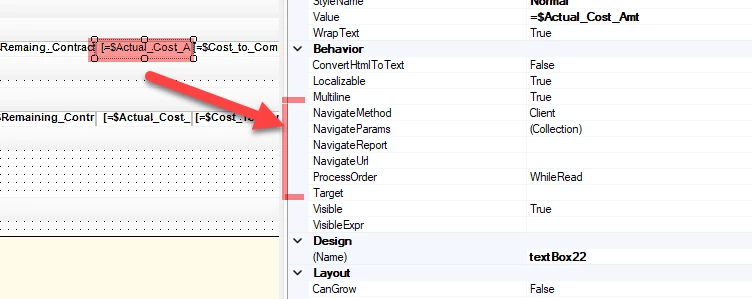
@MDEVERILL I believe for this you would need to adjust the navigation parameters for the specific field:

You can specify parameters and the url is formatted just like you would see on the URL bar, so if you navigate to the URL you wanted to land on you can copy that into the NavigateURL field (minus the domain parts) then you can specify in the Target field which type of pop up will appear (solo pop up, new tab kind of pop).

So if I wanted to land on AR Invoices screen my URL field would look like:

‘~Main?ScreenId=AR301000&DocType=’+[ARInvoice.DocType]+’&RefNbr=’+[ARInvoice.RefNbr]


  • Author
  • Freshman II
  • April 23, 2025

I have the URL and some parameters entered which works great, but I am not able to figure out how to enter the filter for the dates. My Navigate URL shows: 

=’main?ScreenID=PM401000=’+[PMReportProject.ContactCD]+’&CostCode=’+[PMCostCodeCD] 

which allows the hyperlink to filter it to the project and cost code. But, I tried to add +’&Date=’+the parameters. I also tried +’&Fin.Period’+ the parameters. But neither filters at all. 


BenjaminCrisman
Acumatica Employee
Forum|alt.badge.img+4
  • Acumatica Support Team
  • April 23, 2025

@MDEVERILL This is because these parameters don’t exist on the screen to enter, the date and period are columns in the details section, can’t be affected by the URL. You would need to make a customization to add these to the top portion of the screen in order for that to work.


  • Author
  • Freshman II
  • April 23, 2025

That makes sense. How do I add them to the top of the screen?


BenjaminCrisman
Acumatica Employee
Forum|alt.badge.img+4
  • Acumatica Support Team
  • April 23, 2025

That would require a customization, I’m not great at customizations so I’m not sure how difficult it would be (probably very easy for someone who knows).

Someone like ​@darylbowman could probably advise on how difficult it would be


darylbowman
Captain II
Forum|alt.badge.img+15

I can't actually dig into the code right now (or very soon). Alternatively, a GI?


Chris Hackett
Community Manager
Forum|alt.badge.img
  • Acumatica Community Manager
  • July 2, 2025

Hi ​@MDEVERILL were you able to find a solution? Thank you!


  • Author
  • Freshman II
  • Answer
  • July 2, 2025

@Chris Hackett yes- but not the way I intended. I instead wrote a whole new report code instead of editing the current WIP code and then saved it in place of the original WIP code.