Question

Export to Excel Missing Data

  • April 6, 2026
  • 2 replies
  • 25 views

mkabacinski
Freshman I

Hi,

We have a report that shows all of our labor transactions by order.  On that report, one of the first things it displays is the work order number.  The report could contain hundreds or thousands of work orders.  

When viewing the report in Acumatica, all of the data is present, but when exporting to excel not all of the work order numbers will display.  We may be missing 1-5% of the work order numbers in excel..  Does anyone have any ideas why this may be?  I have messed around the with excel options in the report designer and have not been able to come up with anything.


Thanks
2 replies

nhatnghetinh
Captain II
Forum|alt.badge.img+13

Hi ​@mkabacinski 

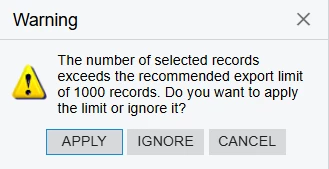
Is your report a Generic Inquiry? If it's a Generic Inquiry, when you export it to Excel, if the data exceeds 1,000 rows, a message like the one below will appear. If you click "APPLY," data will be missing.


Best Regards,

NNT


Laura03
Captain II
Forum|alt.badge.img+20
  • Captain II
  • April 7, 2026

Hello ​@mkabacinski ,

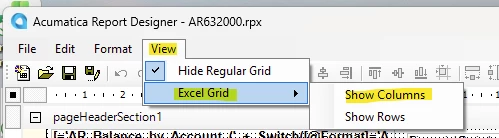
In addition to NNT’s recommendation, if your Report is an Acumatica Report Designer report, please expose Excel Column and Row Numbers in your report by clicking View, Excel Grid, Show Columns:

Expose Excel cell Columns

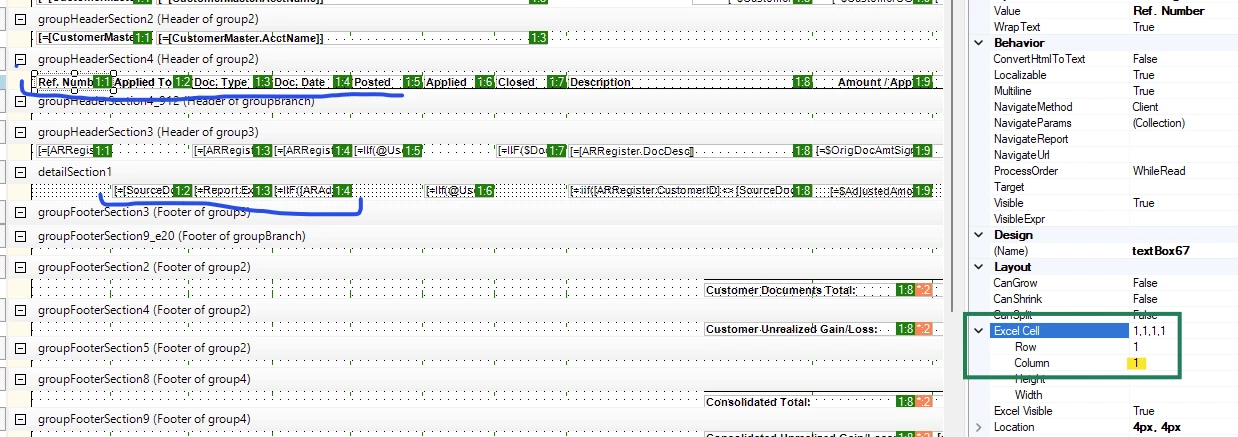
Now, you will see green Excel Column numbers on all fields. If any two columns of data on the same row have the same Excel cell number, the second will over-write the first when exported to Excel (report will look normal on screen).

The solution is to click on each field and adjust Excel Row Column Number where highlighted yellow in the next screenshot. A good row will be numbered like:

1:1     1:2     1:3     1:4     1:5   etc.

Look for duplicate Excel Column numbers in one row.

Is there anything different about the rows that are missing, when compared to the rows that print?  Anything the missing rows have in common that makes them different from the printing rows could lead you in the right direction.  I hope this post helps you.

Laura