

Question

Email Template Creation but will not pull in Sales order fields when SENDing

  • January 30, 2026
  • 2 replies
  • 15 views

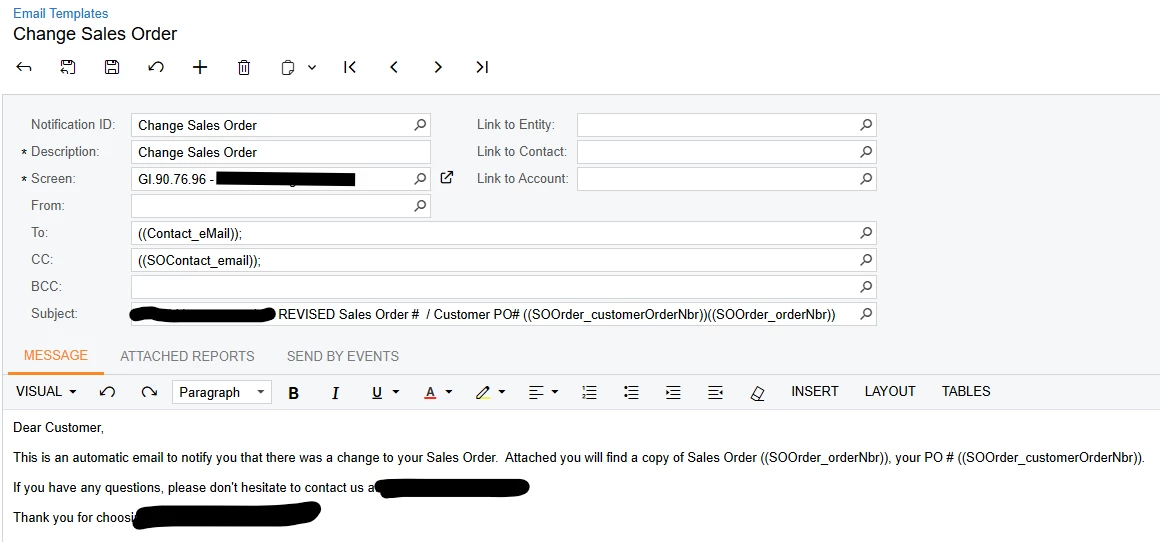
Hello - I have created a new Email Template for when there are any changes to an order that the employee just choose TEMPLATE in the SEND box and it has different wording.  The template works except for the fact that none of the fields I’ve coded into the Email are pulling?  Am i missing some link…


2 replies

BenjaminCrisman
Acumatica Employee
Forum|alt.badge.img+4
  • Acumatica Support Team
  • January 30, 2026

@koboldinst Pretty sure that email template is going to need to be triggered by an automation, like a business event.

I would recommend to setup an event to trigger based off a change from the GI and then it should populate the email with no issues


WillH
Semi-Pro I
Forum|alt.badge.img+4
  • Semi-Pro I
  • February 1, 2026

What screen are the employees generating the email from Or are these coming from Notificatiions?
 

I’m fairly sure ​@BenjaminCrisman’s answer is the best method, since it reduces manual work, but in my experience context fields depend on the originating screen. 


In theory, if they’re opening the Activity screen from inside of the Sales Orders form and then choosing Add Email it should have access to the template fields for that screen.

On the other hand, your screenshot shows your form is defined as GI907696, which means it will probably only auto-populate if used from within the GI screen in question.




