Answer

Edit Access via Report Designer after 2020 r2 upgrade

  • October 1, 2020
  • 3 replies
  • 516 views

wfilipiak67
Captain II
Forum|alt.badge.img+3

After an upgrade to 2020 R2, I cannot access the edit button (Pencil) on reports & forms. The Report Designer role is assigned to the user. The user is Admin with Administrator Role & Customizer Role. 

Is there something else to select?

This is happening at 2 different instances. Since this was working on them both prior to the upgrade, I don’t think it is a security issue. 

If the report/form was previously midified, I can edit the version. but not the base version.

Best answer by vkumar

Hi Bill 

This has been fixed on our latest build released today, i.e., build 20.201.0051.

Here is the release notes link.

https://acumatica-builds.s3.amazonaws.com/builds/20.2/ReleaseNotes/Release_Notes_for_Acumatica_20_201_0051.pdf


Regards,

3 replies

wfilipiak67
Captain II
Forum|alt.badge.img+3
  • Author
  • Captain II
  • October 1, 2020

I heard from Acumatica. This is a known issue.

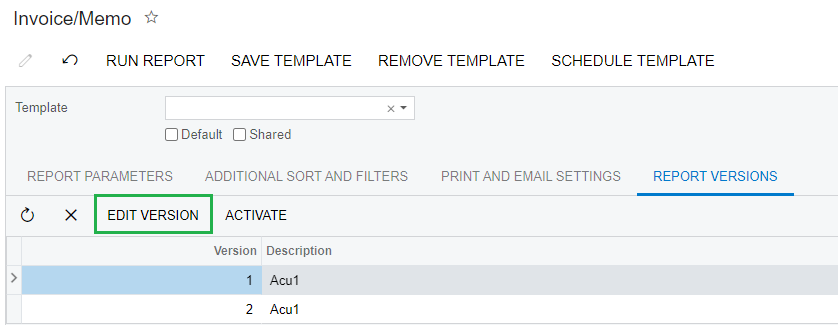
From Acumatica: I see they are working on it currently, but don't see which version it's set to fix in and until then you'll need to use the Edit Version button on the Report Versions tab, or open the report manually via Report Designer.


BenjaminCrisman
Acumatica Employee
Forum|alt.badge.img+4
  • Acumatica Support Team
  • October 1, 2020

Hi Bill! Seems this is part of a known issue with the initial release of 2020R2 unfortunately.

You can still edit the reports by clicking Edit Version on the Report Versions tab:

Or you can open Report Designer and load the report manually from the report list, at least for the moment.


Forum|alt.badge.img+12
  • Acumatica Support Team
  • Answer
  • October 6, 2020

Hi Bill 

This has been fixed on our latest build released today, i.e., build 20.201.0051.

Here is the release notes link.

https://acumatica-builds.s3.amazonaws.com/builds/20.2/ReleaseNotes/Release_Notes_for_Acumatica_20_201_0051.pdf


Regards,