Answer

Duplicate Lines on GI using ARTran & ARInvoice

  • May 7, 2025
  • 4 replies
  • 122 views

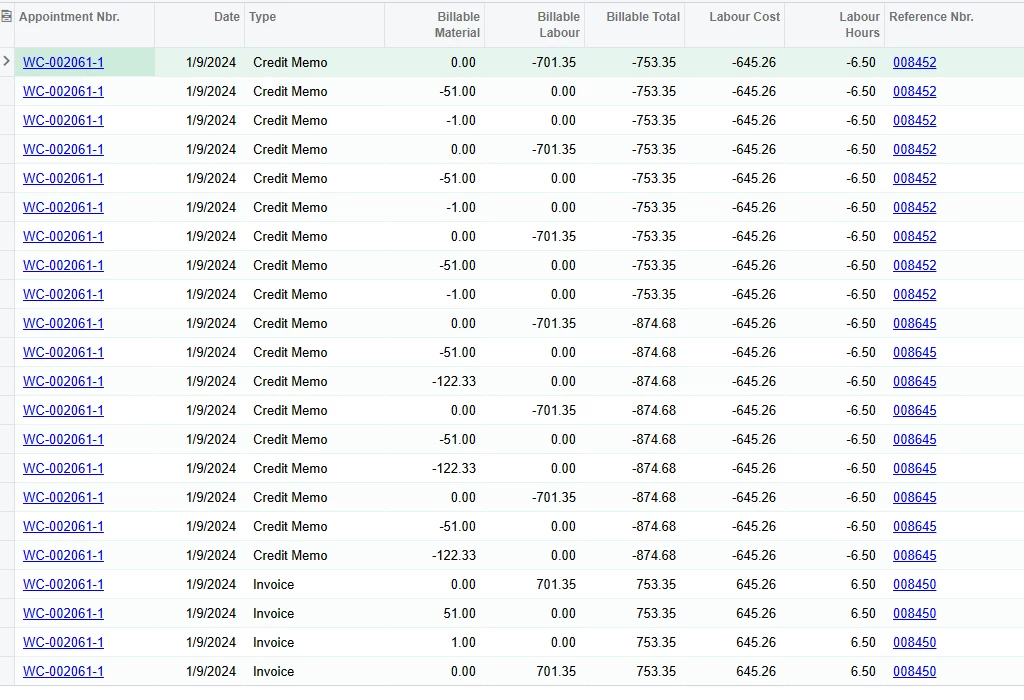
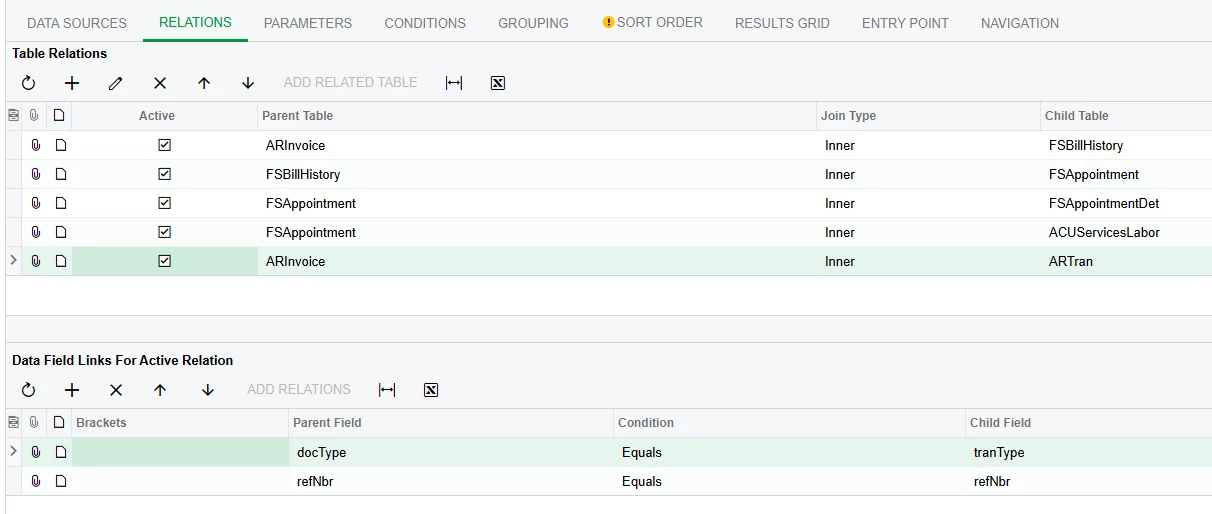
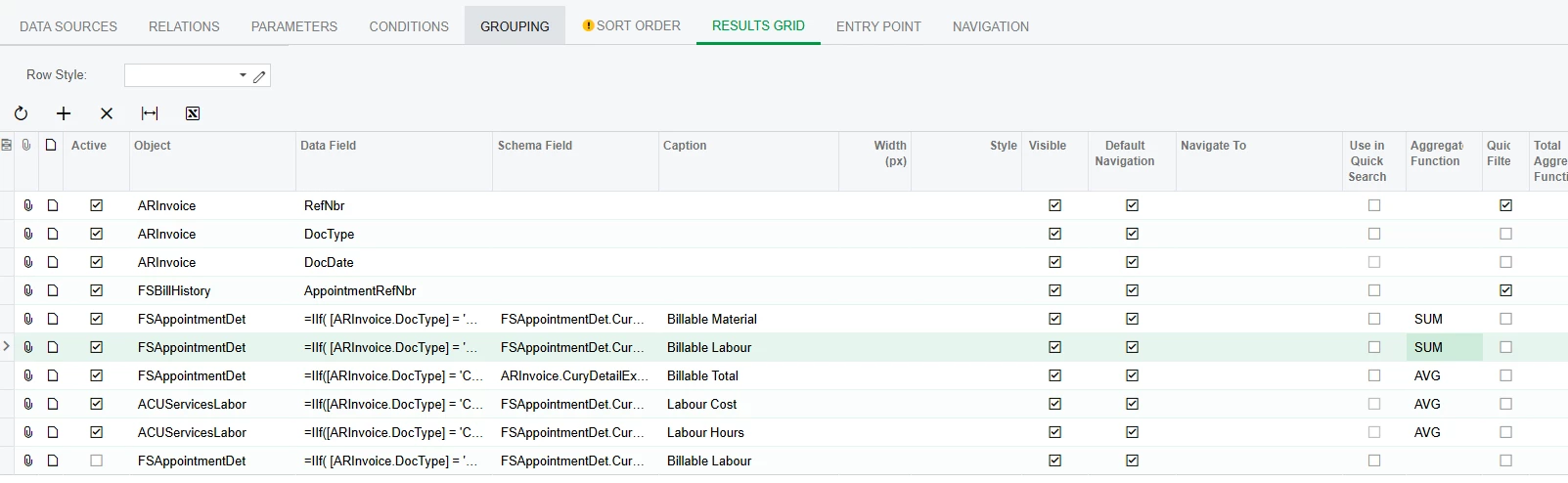
I’m using a join between ARInvoice & ARTran as well pulling data from FSAppointment. I need ARTran for credit memos detail lines because it wont always match the appointment detail lines. When activated ARInovice-ARTran join causes a duplicate of how ever many artran lines there are. Any workarounds? I cant group by ARTran ref number for some reason as it removes my billable Labour totals. For context RefNBR 008452 in the last picture should just be the first 3 lines but its doing 3x the return because there is 3 lines of ARTrans in the document.
 

Best answer by hgilbert

Have you tried working with the Report Designer tool yet? This is something that you could get past by utilizing sub reports within report designer, rather than just using the GI screen.

4 replies

Forum|alt.badge.img

Someone might come up with a better way, but I would end up doing this report directly in SQL where you can do a subselect.

SELECT * /*add report columns here*/

FROM ARInvoice

LEFT JOIN (SELECT DISTINCT DocType, RefNbr from ARTran ) AS subAR

      ON subAR.DocType = ARInvoice.TranType, 

    AND subAR.RefNbr = ARInvoice.RefNbr
/*other joins here*/

This will give you one entry for all your ARInvoice records.  Just be careful adding other columns from ARTran that may cause a Many to Many match.


  • Author
  • Freshman I
  • May 8, 2025

Someone might come up with a better way, but I would end up doing this report directly in SQL where you can do a subselect.

SELECT * /*add report columns here*/

FROM ARInvoice

LEFT JOIN (SELECT DISTINCT DocType, RefNbr from ARTran ) AS subAR

      ON subAR.DocType = ARInvoice.TranType, 

    AND subAR.RefNbr = ARInvoice.RefNbr
/*other joins here*/

This will give you one entry for all your ARInvoice records.  Just be careful adding other columns from ARTran that may cause a Many to Many match.

I need info from more than just ARInvoice & ARTran as well though. It’s an amalgamation of a few places to try and find margin on appointments, but also need to know if there was credits to those appts, & the value of those credits. I haven’t spent any time learning the SQL report system yet though so I’m not fully aware of its capabilities. 


Forum|alt.badge.img+1
  • Varsity I
  • Answer
  • May 8, 2025

Have you tried working with the Report Designer tool yet? This is something that you could get past by utilizing sub reports within report designer, rather than just using the GI screen.


Forum|alt.badge.img

Someone might come up with a better way, but I would end up doing this report directly in SQL where you can do a subselect.

SELECT * /*add report columns here*/

FROM ARInvoice

LEFT JOIN (SELECT DISTINCT DocType, RefNbr from ARTran ) AS subAR

      ON subAR.DocType = ARInvoice.TranType, 

    AND subAR.RefNbr = ARInvoice.RefNbr
/*other joins here*/

This will give you one entry for all your ARInvoice records.  Just be careful adding other columns from ARTran that may cause a Many to Many match.

I need info from more than just ARInvoice & ARTran as well though. It’s an amalgamation of a few places to try and find margin on appointments, but also need to know if there was credits to those appts, & the value of those credits. I haven’t spent any time learning the SQL report system yet though so I’m not fully aware of its capabilities. 


The Generic Inquiry is building all that SQL logic for you.  The /* Other Joins Here */ is where you put the rest of your tables and constraints.  

You may want to double check your groupings.


I ran your issue through ChatGPT’s Acumatica ERP - Knowledge Assistant and it said the following:


Solution: To Get 1 Row Per Invoice

You have two paths:

Option A: Remove ARTran

If you don’t actually need line-level details, remove the ARTran table.

Option B: Aggregate ARTran

If you want something like total quantity or total amount per invoice:

  1. Add a join to ARTran as before.

  2. Group by ARInvoice.DocType and ARInvoice.RefNbr.

  3. Use aggregate fields on ARTran, like:

    • SUM(ARTran.Qty)

    • SUM(ARTran.TranAmt)

This will collapse the 9 rows back into 3.


Observations from the Screenshot:

  • The same appointment number and Reference Nbr appear multiple times.

  • Credit Memo amounts are repeated.

  • It appears there are multiple ARTran lines and possibly multiple joins to related tables (e.g., service orders, appointment, billing details).

🎯 Root Cause:

You’ve likely joined:

  • ARInvoice to ARTran (which is fine: 1-to-many),

  • But also joined to other tables (e.g., FSAppointment, FSSrvOrd, or PMTran)—and each of those has their own multiple lines per invoice.

This creates a many-to-many explosion unless one side is grouped or filtered.

✅ Fix Options:

Option 1: Aggregate ARTran

If you only want one result per Reference Nbr (Invoice):

  1. Only include ARInvoice, and aggregate or remove ARTran fields.

  2. Alternatively, create a separate GI for ARTran detail and link from the main invoice GI.

Option 2: Distinct Join Strategy

If you need ARTran, be strict about what you join:

  • Only join ARTran on:

    • ARInvoice.DocType = ARTran.TranType

    • ARInvoice.RefNbr = ARTran.RefNbr

  • Avoid joining to other 1-to-many tables unless grouped (e.g., PMTran, FSSODet, FSAppointmentDet, etc.).


    ✅Tip for GI Setup:

  • In Generic Inquiry:

    • Go to the Relations tab.

    • Join ARInvoiceARTran

    • Use just the required fields in ARTran

    • Use the Grouping tab to group by RefNbr and DocType

    • Use aggregates (SUM, MAX, etc.) on ARTran fields to avoid duplication