Answer

Display Day of Week in GI

  • October 6, 2023
  • 5 replies
  • 282 views

Forum|alt.badge.img

I would like to display the Day of the week in a GI,  Either display, Sunday, Monday, Tuesday, etc… 

or display, 1, 2, 3,   Where 1 is equal the first day of the week etc…


So for Document Date,  I would like to see 


Document Date   Document Day

10/6/2023          Monday



Best answer by Vignesh Ponnusamy

Hi @sspencer,

In the data column of the field you can use switch condition along with DayOfWeek,

=Switch(  
DayOfWeek( [SOOrder.OrderDate] )= 1, 'Sun',
DayOfWeek( [SOOrder.OrderDate] )= 2, 'Mon',
DayOfWeek( [SOOrder.OrderDate] )= 3, 'Tue',
DayOfWeek( [SOOrder.OrderDate] )= 4, 'Wed',
DayOfWeek( [SOOrder.OrderDate] )= 5, 'Thu',
DayOfWeek( [SOOrder.OrderDate] )= 6, 'Fri',
DayOfWeek( [SOOrder.OrderDate] )= 7,'Sat')

Good Luck.!

5 replies

Vignesh Ponnusamy
Acumatica Moderator
Forum|alt.badge.img+5

Hi @sspencer,

In the data column of the field you can use switch condition along with DayOfWeek,

=Switch(  
DayOfWeek( [SOOrder.OrderDate] )= 1, 'Sun',
DayOfWeek( [SOOrder.OrderDate] )= 2, 'Mon',
DayOfWeek( [SOOrder.OrderDate] )= 3, 'Tue',
DayOfWeek( [SOOrder.OrderDate] )= 4, 'Wed',
DayOfWeek( [SOOrder.OrderDate] )= 5, 'Thu',
DayOfWeek( [SOOrder.OrderDate] )= 6, 'Fri',
DayOfWeek( [SOOrder.OrderDate] )= 7,'Sat')

Good Luck.!


Forum|alt.badge.img+1
  • Semi-Pro II
  • March 11, 2025

Thank you ​@Vignesh Ponnusamy , 


This was a huge help for me!!!


Forum|alt.badge.img+1
  • Semi-Pro II
  • March 27, 2025

Hi @sspencer,

In the data column of the field you can use switch condition along with DayOfWeek,

=Switch(  
DayOfWeek( [SOOrder.OrderDate] )= 1, 'Sun',
DayOfWeek( [SOOrder.OrderDate] )= 2, 'Mon',
DayOfWeek( [SOOrder.OrderDate] )= 3, 'Tue',
DayOfWeek( [SOOrder.OrderDate] )= 4, 'Wed',
DayOfWeek( [SOOrder.OrderDate] )= 5, 'Thu',
DayOfWeek( [SOOrder.OrderDate] )= 6, 'Fri',
DayOfWeek( [SOOrder.OrderDate] )= 7,'Sat')

Good Luck.!

Hey ​@Vignesh Ponnusamy, My Day of the week seems to be off, and I believe it maybe to be due to Time Zone difference because it seems to be 7 hours off since I am on Mountain time.


Do you have any ideas of how to adjust to time zone? 


Would it be as simple to just add a -7 somewhere? Or would that not work in this instance because we are dealing with date instead of hours?


Forum|alt.badge.img+1
  • Semi-Pro II
  • April 7, 2025

Hi @sspencer,

In the data column of the field you can use switch condition along with DayOfWeek,

=Switch(  
DayOfWeek( [SOOrder.OrderDate] )= 1, 'Sun',
DayOfWeek( [SOOrder.OrderDate] )= 2, 'Mon',
DayOfWeek( [SOOrder.OrderDate] )= 3, 'Tue',
DayOfWeek( [SOOrder.OrderDate] )= 4, 'Wed',
DayOfWeek( [SOOrder.OrderDate] )= 5, 'Thu',
DayOfWeek( [SOOrder.OrderDate] )= 6, 'Fri',
DayOfWeek( [SOOrder.OrderDate] )= 7,'Sat')

Good Luck.!

Hey ​@Vignesh Ponnusamy, My Day of the week seems to be off, and I believe it maybe to be due to Time Zone difference because it seems to be 7 hours off since I am on Mountain time.


Do you have any ideas of how to adjust to time zone? 


Would it be as simple to just add a -7 somewhere? Or would that not work in this instance because we are dealing with date instead of hours?

Update:

 in order to adjust for time zones, you must add 

(DateAdd([DATAFIELD], ‘h’, -6)  The -6 being the time zone you are in, so it would need to be changed on each day of the week.


This is what mine looks like:

=Switch( DayOfWeek(DateAdd([AMBatch.CreatedDateTime],’h’,-6))= 1, 'Sun', DayOfWeek(DateAdd([AMBatch.CreatedDateTime],’h’,-6))= 2, 'Mon',DayOfWeek(DateAdd([AMBatch.CreatedDateTime],’h’,-6))= 3, 'Tue',DayOfWeek(DateAdd([AMBatch.CreatedDateTime],’h’,-6))= 4, 'Wed',DayOfWeek(DateAdd([AMBatch.CreatedDateTime],’h’,-6))= 5, 'Thu',DayOfWeek(DateAdd([AMBatch.CreatedDateTime],’h’,-6))= 6, 'Fri',DayOfWeek(DateAdd([AMBatch.CreatedDateTime],’h’,-6))= 7,'Sat')


plambert
Semi-Pro I
Forum|alt.badge.img+2
  • Semi-Pro I
  • April 8, 2025

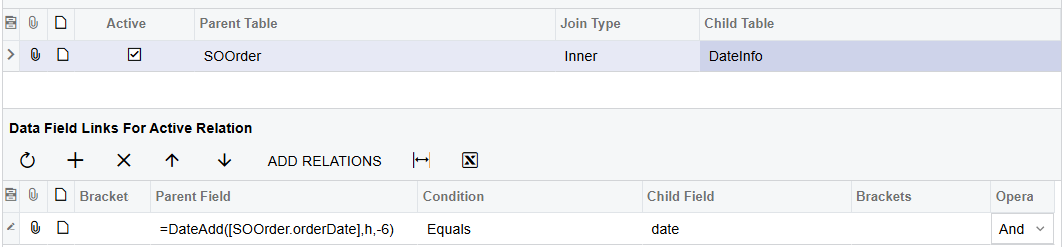
I would also like to add that there is a DAC for such information: PX.SM.DateInfo
It contains basic information about dates from Jan 1st 1970 to June 6th 2079, including the Day of Week (Name).
As to the time zone adjustment, that can be done in the join conditions with the same formula: