
Answer

Decimal/Number formatting in a GI to excel

  • April 5, 2021
  • 2 replies
  • 1863 views

wfilipiak67
Captain II
Forum|alt.badge.img+3

HI, I am trying to do 2 things in a Generic Inquiry for sold Kitted items - getting the quantity of the components.

I am trying to have a calculation of sold components be exportable to excel as a numberic field from a GI. The formula is: =([ARTran.Qty] * [INKitSpecStkDet.DfltCompQty])

It comes through as a text field, left justified. 
We would like the result to be a numberic field, Right justified.

We would also like to have this display with only 2 decimals
 

Best answer by Neil Cantral

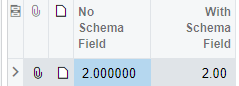
Define a schema field value to copy the formatting of another field. Just be sure to enter a caption value to name the field. 

Since we use USD and two decimals, CuryUnitPrice is typically my go-to.


2 replies

Neil Cantral
Jr Varsity I
Forum|alt.badge.img+3
  • Jr Varsity I
  • Answer
  • April 5, 2021

Define a schema field value to copy the formatting of another field. Just be sure to enter a caption value to name the field. 

Since we use USD and two decimals, CuryUnitPrice is typically my go-to.


wfilipiak67
Captain II
Forum|alt.badge.img+3
  • Author
  • Captain II
  • April 5, 2021

Thank you! That worked. It set the decimals to 4 but I am guessing that is from the companies Price/Cost Decimal settings