




I’m currently working on a report which involves summarizing Sales and Shipments info in various time periods and I keep getting tripped up by inconsistencies with how the DateTime functions work with respect to default date values from Acumatica. I wanted to open this up to see if anyone else sees these as errors or has experienced something similar.
Month (@MonthEnd) <> Month(Today())
I have two parameters which define the Year To Date period ending at the last full month, a start date which I default to @YearStart and an end date of @MonthEnd -1. The issue which made my periods misalign is that, for example on May 22nd, Month(Today()) = 5 and Month (@MonthEnd) = 6. It displays properly as 5/31/2025 in the parameter at the top of the GI and when formatted. I expected that MonthEnd would be in the relative month, just as MonthStart is. Could this be a timezone issue that the Month function is slightly adjusting the date parameter instead of extracting the month as given?
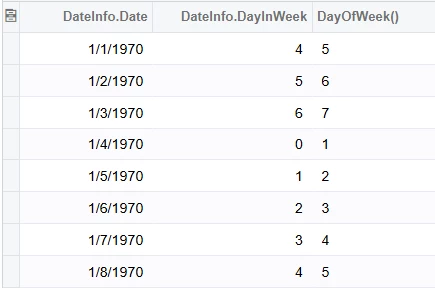
DayOfWeek() <> DateInfo.DayInWeek
I’m totaling the number of weekdays in a month as part of this report. When testing performance, oddly, I found that DayOfWeek() returns 1-7 for Sunday-Saturday, while the DateInfo DAC calculates them as 0-6.
I’m curious if anyone else has any date nuances they’ve discovered.