Answer

Customer - Screen to show all Activty

  • October 24, 2025
  • 2 replies
  • 41 views

We are unable to find a screen in Acumatica like we use in our current system. The screen is a tab in the customer record and shows all activity such Quotes, Sales Orders, Invoice, Credits, Payments etc. See screenshot.

Thanks

Best answer by jhouser

Hi ​@StuartAllen I think you could create a GI for this

2 replies

jhouser
Captain II
Forum|alt.badge.img+6
  • Captain II
  • Answer
  • October 25, 2025

Hi ​@StuartAllen I think you could create a GI for this


alexx
Jr Varsity II
Forum|alt.badge.img
  • Jr Varsity II
  • November 13, 2025

We have a screen for that but I’m not sure if it’s a GI or not..

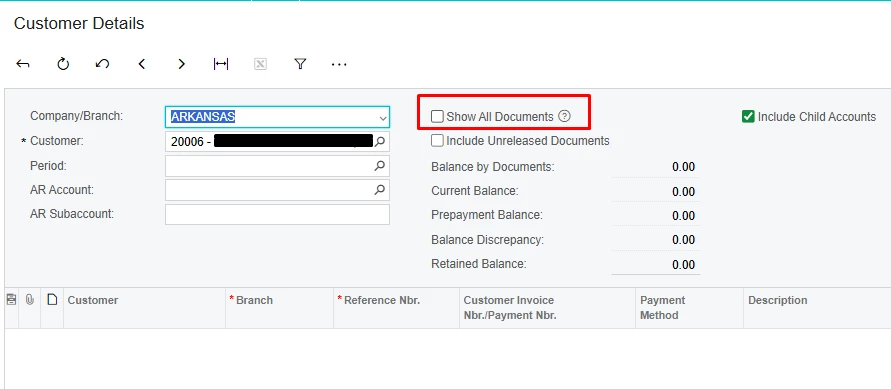
It’s called “Customer Details”

I have it where it’ll automatically show up top but you may have to click on the three dots to see the tab option.

Once you click on it, it’ll bring you to the screen in the second screenshot. It automatically will only show anything that’s open. To show everything, you’ll need to check the box to “Show All Documents.”

  • Note: If you have multiple branches in your company and multiple locations deals with this customer, to see everything within the whole company, you’ll need to change the “Company/Branch” to the company level.

Hope this helps.