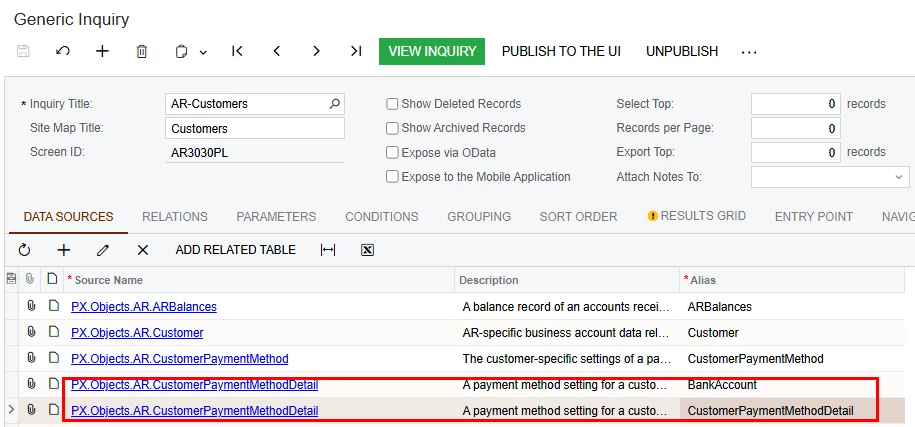
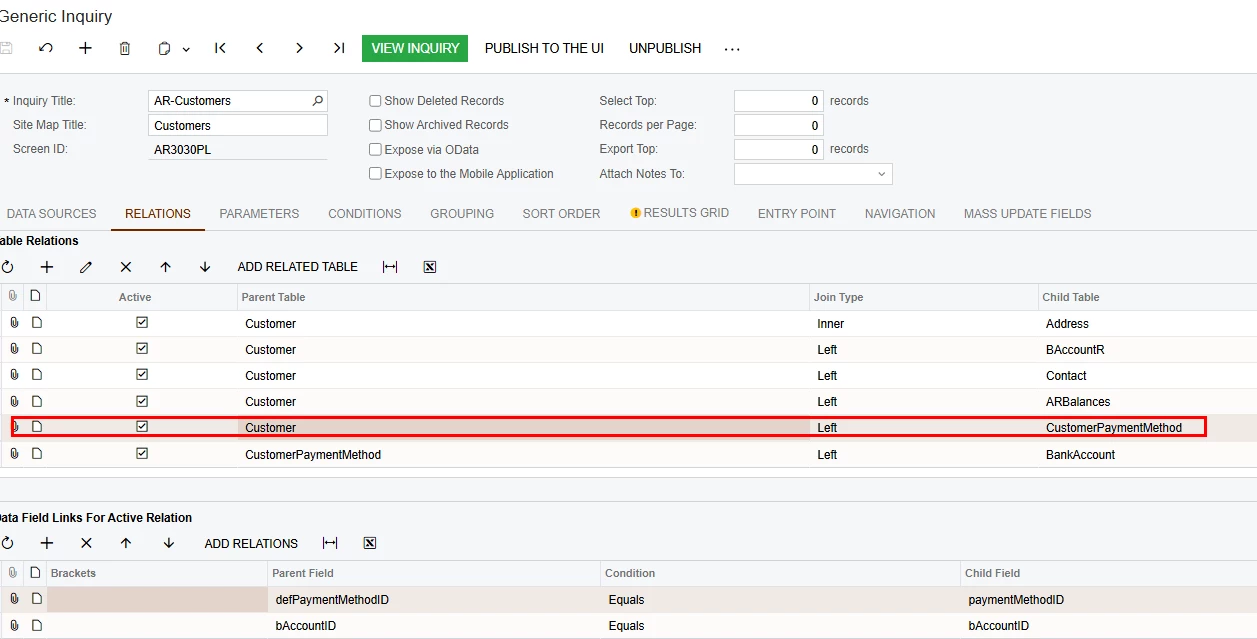
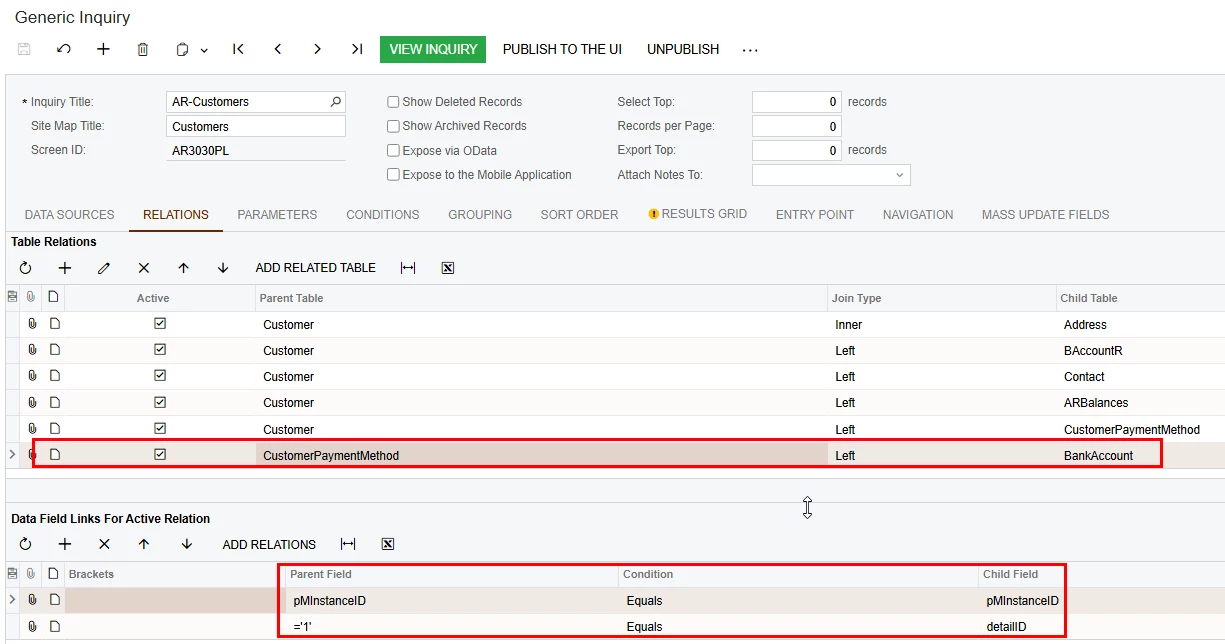
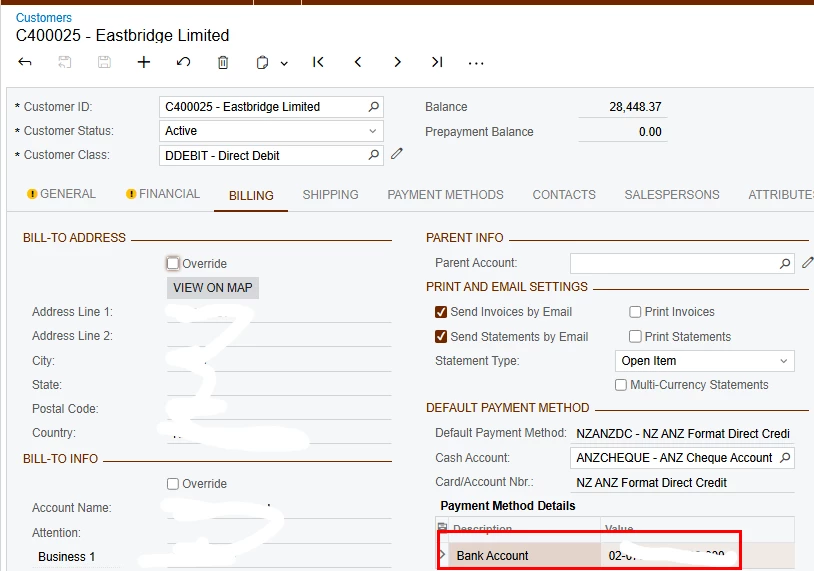
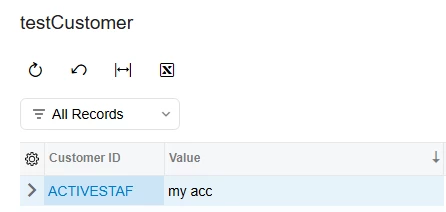
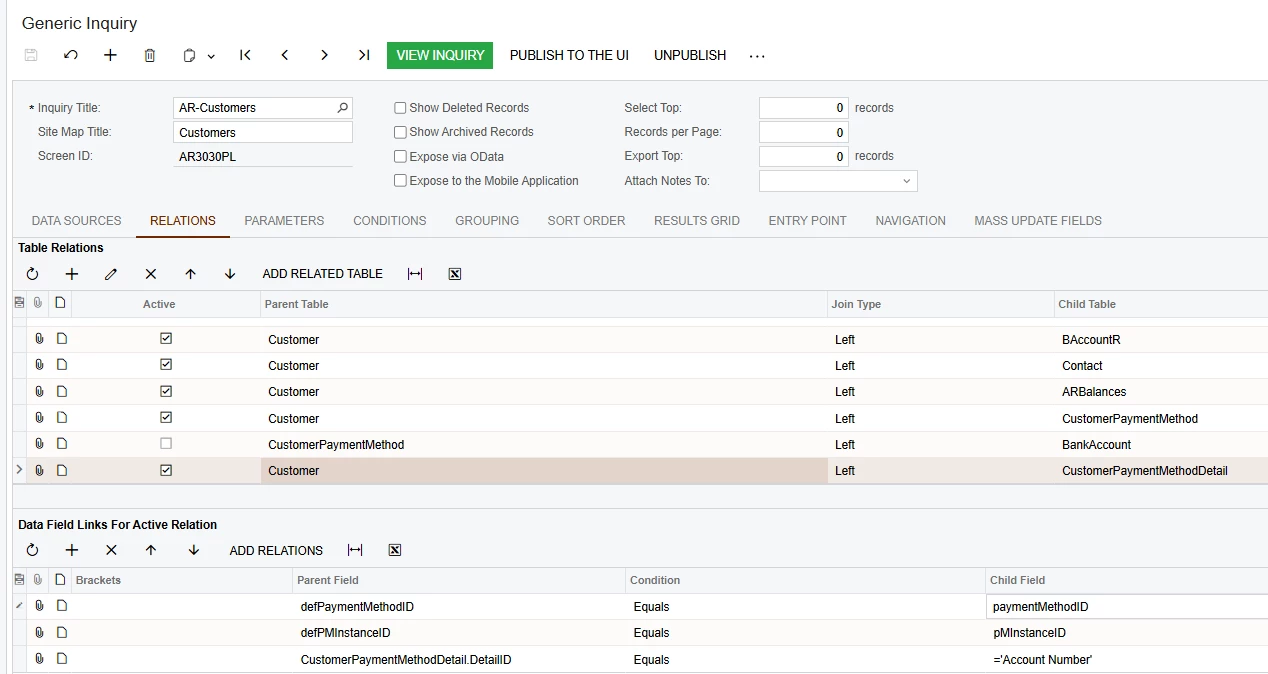
I’ve added the relevant tables and joins in the Customer master GI to display the customer’s bank account number. However, instead of the actual values, the GI is showing 0000000000.
Refer to below screenshot.
I’ve attached the GI file for reference.
Has anyone come across this issue before, or know how to correctly display the customer bank account number?
Best answer by aleksandrsechin
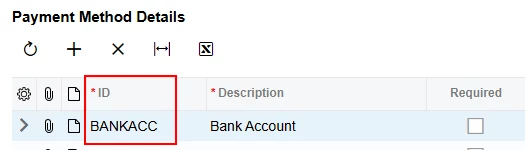
1. You can find the correct value for the CustomerPaymentMethodDetail.DetailID field used in the join on the Payment Methods screen:
Payment Methods screen
It seems that in the first screenshot you posted above, that is the correct value.
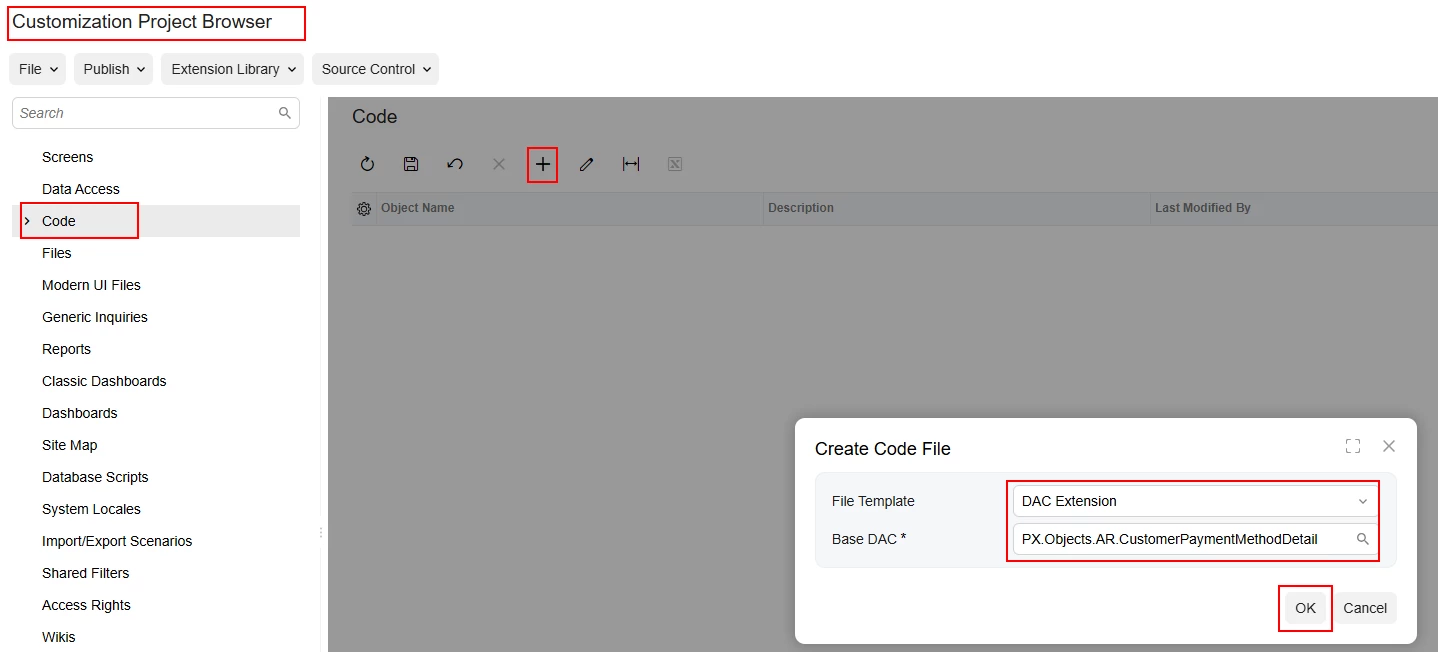
2. The results covered by asterisks mean that the field is encrypted. I haven’t found a simple solution — only to create a DAC extension and override the Value field along with all of its attributes. This works, but you have to be aware that this code will decrypt the values of the CustomerPaymentMethodDetail.Value field everywhere it is used in the system. The following code is a DAC extension with an exact copy-paste of the base code, only adding the IsViewDecrypted = true property to the PXRSACryptStringWithMask attribute:
using PX.Data;
using PX.Objects.CA;
using System;

namespace PX.Objects.AR
{
	public class CustomerPaymentMethodDetailExt : PXCacheExtension<PX.Objects.AR.CustomerPaymentMethodDetail>
	{
		#region Value
		public abstract class value : PX.Data.BQL.BqlString.Field<value> { }
		protected String _Value;
		/// <summary>
		/// The value for the customer payment method setting,
		/// such as the actual credit card number, the expiration date.
		/// This value in this field can be subject to dynamic value
		/// validation depending on the regular expression defined
		/// in the corresponding <see cref="PaymentMethodDetail"/>.
		/// </summary>
		//[PXDBStringWithMask(255, typeof(Search<PaymentMethodDetail.entryMask, Where<PaymentMethodDetail.paymentMethodID, Equal<Current<CustomerPaymentMethodDetail.paymentMethodID>>,
		//                              And<PaymentMethodDetail.detailID, Equal<Current<CustomerPaymentMethodDetail.detailID>>>>>), IsUnicode = true)]
		[DynamicValueValidation(typeof(Search<PaymentMethodDetail.validRegexp, Where<PaymentMethodDetail.paymentMethodID, Equal<Current<CustomerPaymentMethodDetail.paymentMethodID>>,
										And<PaymentMethodDetail.useFor, Equal<PaymentMethodDetailUsage.useForARCards>,
									  And<PaymentMethodDetail.detailID, Equal<Current<CustomerPaymentMethodDetail.detailID>>>>>>))]
		[PXDefault(PersistingCheck = PXPersistingCheck.Nothing)]
		[PXRSACryptStringWithMaskAttribute(1028, typeof(Search<PaymentMethodDetail.entryMask, Where<PaymentMethodDetail.paymentMethodID, Equal<Current<CustomerPaymentMethodDetail.paymentMethodID>>,
									  And<PaymentMethodDetail.useFor, Equal<PaymentMethodDetailUsage.useForARCards>,
									  And<PaymentMethodDetail.detailID, Equal<Current<CustomerPaymentMethodDetail.detailID>>>>>>), IsUnicode = true, IsViewDecrypted = true)]
		//[PXRSACryptStringAttribute(1028)]
		[PXUIField(DisplayName = "Value")]
		[PXPersonalDataFieldAttribute.Value]
		public virtual String Value
		{
			get
			{
				return this._Value;
			}
			set
			{
				this._Value = value;
			}
		}
		#endregion
	}
}
Add DAC extension
GI
This solution is based on 25R2. If you are using a different version, it may require some adjustments — let me know if so. Hope it helps.
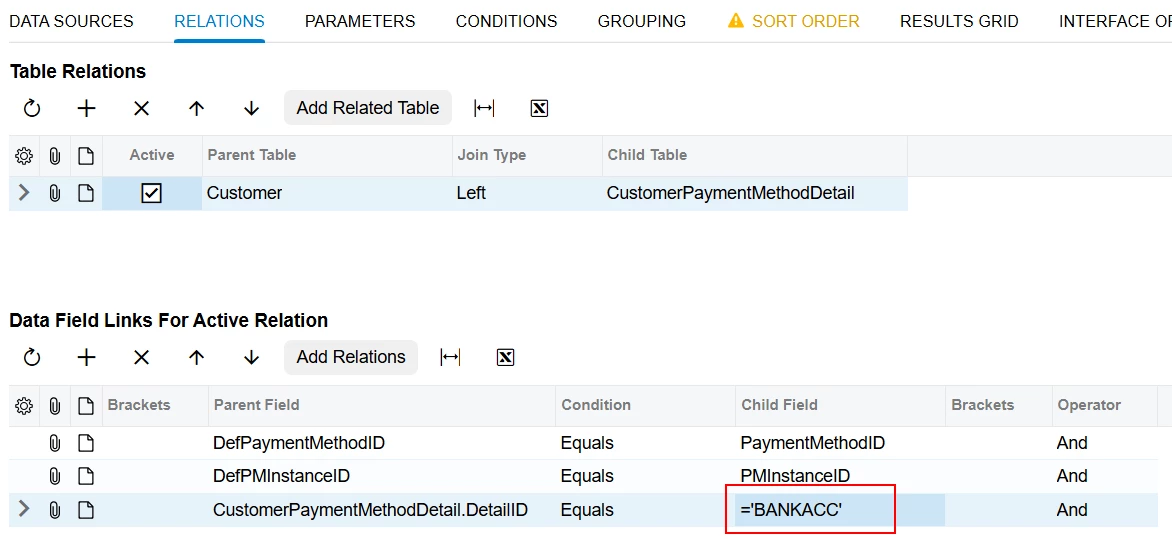
Hi @pankaj65 I’m a bit confused about why you joined the CustomerPaymentMethodDetail table twice in your GI. To join the Customer table with CustomerPaymentMethodDetail, all you need is:
where BANKACC you need to replace with your CustomerPaymentMethodDetail.DetailID value.
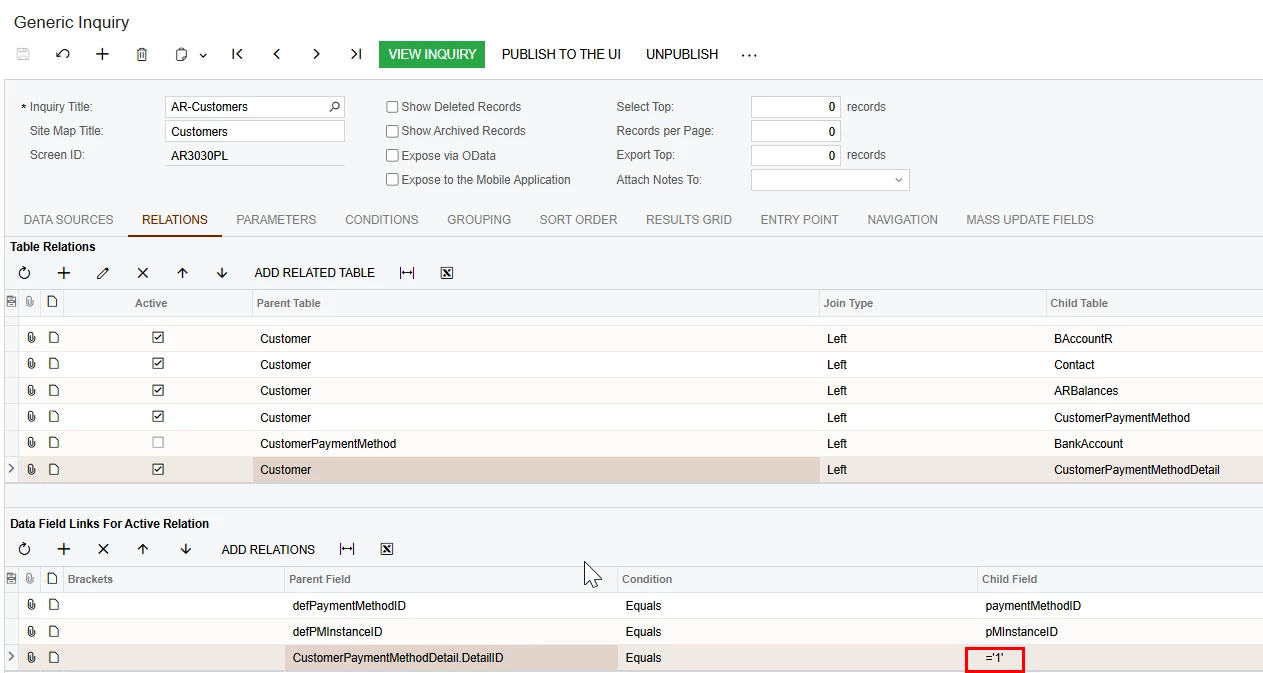
Thanks, i’ve changed the join as you have mentioned in your post, however bank account number is still not printing correctly. refer to below screenshot.
Additionally I've tried detail id to set as ‘1’, but still bank account number is not displaying correctly.
1. You can find the correct value for the CustomerPaymentMethodDetail.DetailID field used in the join on the Payment Methods screen:
Payment Methods screen
It seems that in the first screenshot you posted above, that is the correct value.
2. The results covered by asterisks mean that the field is encrypted. I haven’t found a simple solution — only to create a DAC extension and override the Value field along with all of its attributes. This works, but you have to be aware that this code will decrypt the values of the CustomerPaymentMethodDetail.Value field everywhere it is used in the system. The following code is a DAC extension with an exact copy-paste of the base code, only adding the IsViewDecrypted = true property to the PXRSACryptStringWithMask attribute:
using PX.Data;
using PX.Objects.CA;
using System;

namespace PX.Objects.AR
{
	public class CustomerPaymentMethodDetailExt : PXCacheExtension<PX.Objects.AR.CustomerPaymentMethodDetail>
	{
		#region Value
		public abstract class value : PX.Data.BQL.BqlString.Field<value> { }
		protected String _Value;
		/// <summary>
		/// The value for the customer payment method setting,
		/// such as the actual credit card number, the expiration date.
		/// This value in this field can be subject to dynamic value
		/// validation depending on the regular expression defined
		/// in the corresponding <see cref="PaymentMethodDetail"/>.
		/// </summary>
		//[PXDBStringWithMask(255, typeof(Search<PaymentMethodDetail.entryMask, Where<PaymentMethodDetail.paymentMethodID, Equal<Current<CustomerPaymentMethodDetail.paymentMethodID>>,
		//                              And<PaymentMethodDetail.detailID, Equal<Current<CustomerPaymentMethodDetail.detailID>>>>>), IsUnicode = true)]
		[DynamicValueValidation(typeof(Search<PaymentMethodDetail.validRegexp, Where<PaymentMethodDetail.paymentMethodID, Equal<Current<CustomerPaymentMethodDetail.paymentMethodID>>,
										And<PaymentMethodDetail.useFor, Equal<PaymentMethodDetailUsage.useForARCards>,
									  And<PaymentMethodDetail.detailID, Equal<Current<CustomerPaymentMethodDetail.detailID>>>>>>))]
		[PXDefault(PersistingCheck = PXPersistingCheck.Nothing)]
		[PXRSACryptStringWithMaskAttribute(1028, typeof(Search<PaymentMethodDetail.entryMask, Where<PaymentMethodDetail.paymentMethodID, Equal<Current<CustomerPaymentMethodDetail.paymentMethodID>>,
									  And<PaymentMethodDetail.useFor, Equal<PaymentMethodDetailUsage.useForARCards>,
									  And<PaymentMethodDetail.detailID, Equal<Current<CustomerPaymentMethodDetail.detailID>>>>>>), IsUnicode = true, IsViewDecrypted = true)]
		//[PXRSACryptStringAttribute(1028)]
		[PXUIField(DisplayName = "Value")]
		[PXPersonalDataFieldAttribute.Value]
		public virtual String Value
		{
			get
			{
				return this._Value;
			}
			set
			{
				this._Value = value;
			}
		}
		#endregion
	}
}
Add DAC extension
GI
This solution is based on 25R2. If you are using a different version, it may require some adjustments — let me know if so. Hope it helps.