

Answer

Custom Report not showing up

  • May 29, 2025
  • 3 replies
  • 158 views

Forum|alt.badge.img

I amended an existing GL and am trying to set it up in Acu. I saved to server with a new report name (GL633002), added it into the site map. Updated the site map URL.

Here’s my problem - It won’t show up on Acu’s menu and when I try to nav to the report Screen ID, it boots me to the home page.

I can save a different version within the existing GL report and it populates/runs properly. But I can’t get a new report to generate on our menu/within our software. Anyone know how to fix this? 

I watched the S150 Report Designer 2025 R1 training on Acu & Johann had the same issue but he skipped over the fix. 
Best answer by DipakNilkanth

Hi ​@Sydneysturtevant,

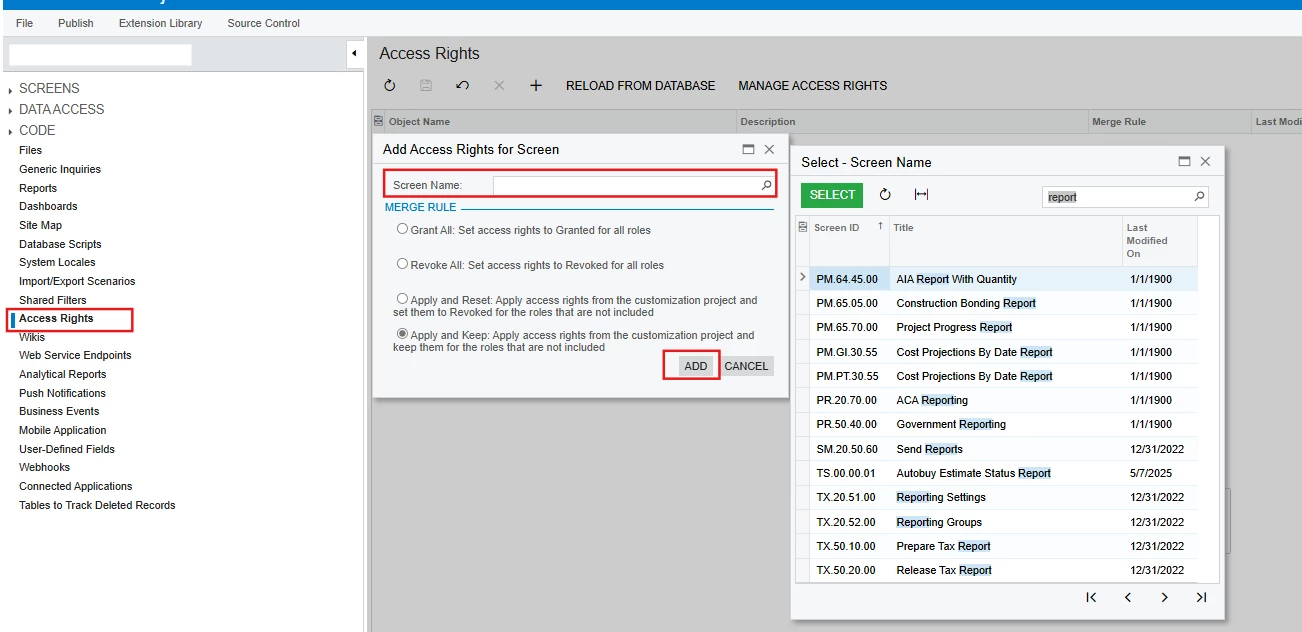
In the addition of ​@lauraj46 comment, You can add Access Rights from the Customization Editor itself.
When you publish the same customization project to another instance, it will carry those access rights with it — so you won’t need to set them again manually on the new instance.

This is especially important starting from Acumatica 2024 R1, where some security updates were introduced. Now, whenever you add a new screen, GI, or report, you must explicitly grant access to those new entities. Only then will they be visible in the Acumatica UI.

Hope, it helps!

3 replies

Forum|alt.badge.img

Acumatica Cloud ERP 2024 R1
Build 24.112.0026 +


lauraj46
Captain II
Forum|alt.badge.img+8
  • Captain II
  • May 30, 2025

Hi ​@Sydneysturtevant ,

You need to assign rights to the new screen.  By default, no roles have rights assigned including Administrator.

You can adding these rights on the Access Rights by Screen screen.  If you've designated a workspace for the report on the site map, then you will find the new screen under that workspace node.  If no workspace is assigned then it will be located under Hidden. 

Hope this helps!

Laura 


DipakNilkanth
Pro III
Forum|alt.badge.img+13

Hi ​@Sydneysturtevant,

In the addition of ​@lauraj46 comment, You can add Access Rights from the Customization Editor itself.
When you publish the same customization project to another instance, it will carry those access rights with it — so you won’t need to set them again manually on the new instance.

This is especially important starting from Acumatica 2024 R1, where some security updates were introduced. Now, whenever you add a new screen, GI, or report, you must explicitly grant access to those new entities. Only then will they be visible in the Acumatica UI.

Hope, it helps!


