Answer

Combining fields on different DAC in the same GI column

  • March 17, 2025
  • 7 replies
  • 119 views

Forum|alt.badge.img

Hi! We have a customized table that holds historical sales order data. The goal is to create a GI that displays the historical SO data and current live SO data, where the doc id will show in the same column. Is this something possible to create? 

I’ve tried joining the DAC with business account ID field, but because the document number on the historical table is ‘DocID,’ and on the SOOrder it’s ‘orderNbr.’ the two fields show up in two different columns instead in the same column.

Any suggestions/ideas on if this can be done? Thanks!

Best answer by plambert

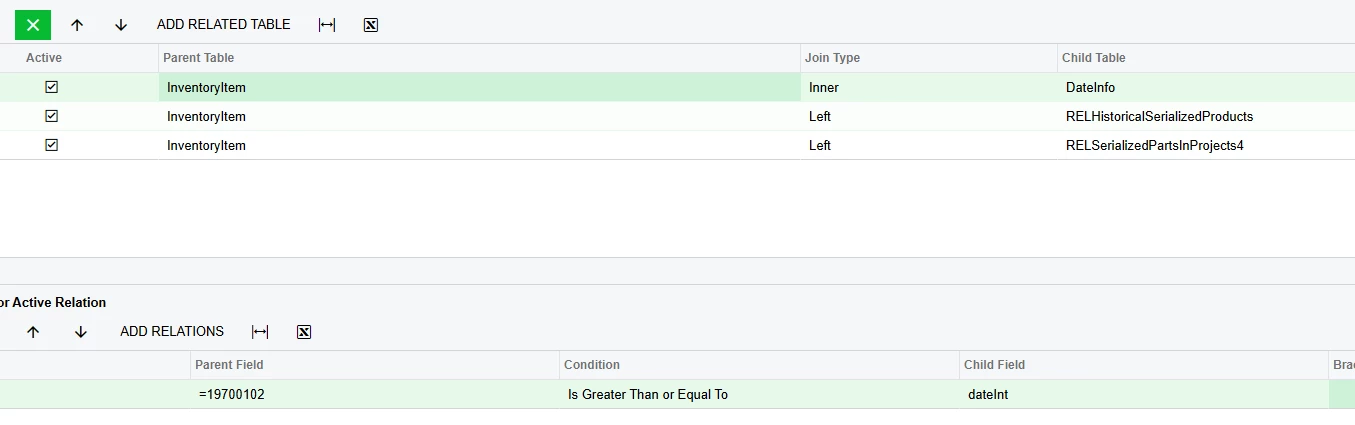
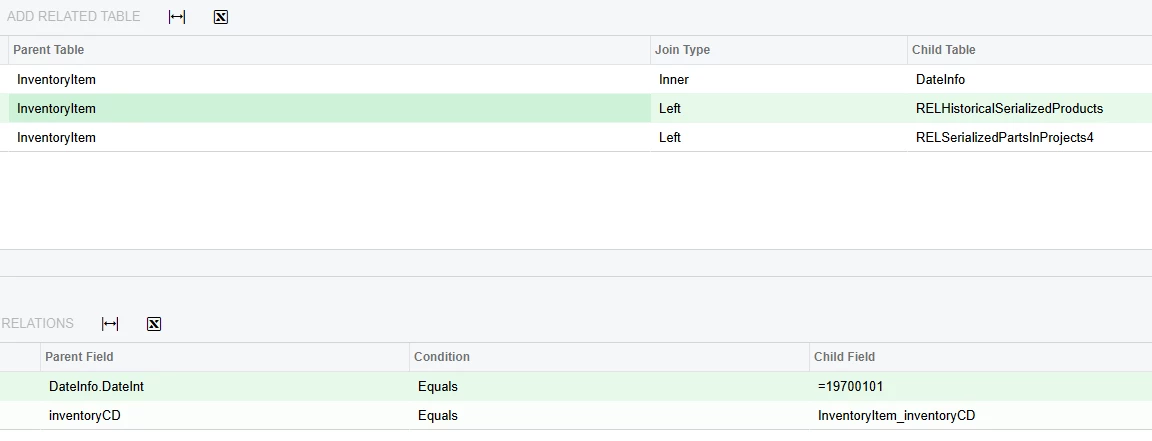
I have been brainstorming this situation as well. There is a technique to use two sets of data, which I have outlined in much greater detail in this related post.

Using two GIs as data source | Community

First, you will need a way to join these records in to your query. I’m going to assume that you have that relationship of HistoricalBAccountNumber <> BAccountID.

Then, left join in the Current SO Data table into one (I like to call them) slot, and left join the Historical SO Data into a second. Don’t group by anything, though, you want to preserve the separation of those lists.

Finally, in your results column, use ISNULL([CurrentSOData.Field],[HistoricalSOData.Field]) to essentially merge those two columns together which hold the same information, though separated by data source. 

The result set would look something like this,

with Stacked Order # as the ISNULL(Current Order#, Historical Order #):


Customer Number        Stacked Order #                  Current Order#             Historical Order #

000001           ACU_ORDER1                     ACU_ORDER1                        -

000001           ACU_ORDER2                     ACU_ORDER1                        -

000001           ACU_ORDER3                     ACU_ORDER1                        -

    000001          HIST_ORDER1                               -                 HIST_ORDER1

    000001          HIST_ORDER2                               -                 HIST_ORDER1


To be safe, add a condition to exclude any rows where both the historical order # is empty and the slot # is the one for historical records. Otherwise, if there are no historical records, you’ll have an empty record row at the end.


7 replies

darylbowman
Captain II
Forum|alt.badge.img+15

Are you saying the historical data has no relationship to the current Orders?


WillH
Varsity III
Forum|alt.badge.img+3
  • Varsity III
  • March 18, 2025

You should be able to write a conditional formula into the result column definition, you don’t have to pull columns directly:
Here’s an example of someone working with an IF in the result columns.


Forum|alt.badge.img
  • Author
  • Semi-Pro III
  • March 18, 2025

@darylbowman yes, for now. I think the tables are supposed to link on customer ID and business account ID. But the imported ID for historical orders don’t match the current order’s business ID. The only other field that I see may work would be the inventory ID. 


darylbowman
Captain II
Forum|alt.badge.img+15

I'm not sure how you'll get intelligent and useful data unless you can build a solid relationship.


Forum|alt.badge.img
  • Author
  • Semi-Pro III
  • March 20, 2025

Hi ​@darylbowman we understand that to join the tables we would need accurate relationship, and we have thought about updating the Historical Business Account, so it matches the current ones. With that, we will be able to join the tables on this field. 

However, even with a solid relationship, I’m not seeing how it could work because the order Nbr and Doc Id will still show up in two different columns. It’s like if I want to create a GI that shows both SO and Invoice. We could join on the customer ID, but how can we combine the ordernbr and refnbr into the same column?  Is there a way to combine the two so they show up in one? Kind of like a UNION statement? 


Chris Hackett
Community Manager
Forum|alt.badge.img
  • Acumatica Community Manager
  • June 17, 2025

Hi ​@jzhu were you able to find a solution? Thank you!


plambert
Semi-Pro I
Forum|alt.badge.img+2
  • Semi-Pro I
  • Answer
  • June 19, 2025

I have been brainstorming this situation as well. There is a technique to use two sets of data, which I have outlined in much greater detail in this related post.

Using two GIs as data source | Community

First, you will need a way to join these records in to your query. I’m going to assume that you have that relationship of HistoricalBAccountNumber <> BAccountID.

Then, left join in the Current SO Data table into one (I like to call them) slot, and left join the Historical SO Data into a second. Don’t group by anything, though, you want to preserve the separation of those lists.

Finally, in your results column, use ISNULL([CurrentSOData.Field],[HistoricalSOData.Field]) to essentially merge those two columns together which hold the same information, though separated by data source. 

The result set would look something like this,

with Stacked Order # as the ISNULL(Current Order#, Historical Order #):


Customer Number        Stacked Order #                  Current Order#             Historical Order #

000001           ACU_ORDER1                     ACU_ORDER1                        -

000001           ACU_ORDER2                     ACU_ORDER1                        -

000001           ACU_ORDER3                     ACU_ORDER1                        -

    000001          HIST_ORDER1                               -                 HIST_ORDER1

    000001          HIST_ORDER2                               -                 HIST_ORDER1


To be safe, add a condition to exclude any rows where both the historical order # is empty and the slot # is the one for historical records. Otherwise, if there are no historical records, you’ll have an empty record row at the end.