Answer

CHECKBOX TO CHECK ON A GI TO ALLOW REPORTING

  • August 21, 2025
  • 8 replies
  • 114 views

Good day 

Is there a way to add 2 checkboxes on a GI’s columns and to be able to check them with an import scenario whenever needed? 


Best answer by lauraj46

Hi ​@JohanBLC ,

With a customization project, you can use the Workflow functionality to enable user defined fields on a closed invoice.

Once you have enabled the user-defined fields, then you can configure a Business Event to trigger an import scenario from a check box on the Generic Inquiry that lists the invoices.  Here is a link to the help article that describes this setup:

https://help.acumatica.com/(W(2))/Help?ScreenId=ShowWiki&pageid=c6eb6c77-1a82-477c-8ee1-fbfc517fbd65

Hope this helps!

Laura

8 replies

lauraj46
Captain II
Forum|alt.badge.img+8
  • Captain II
  • August 21, 2025

Hi ​@JohanBLC ,

The results of a generic inquiry are read only, so you wouldn’t be able to update the data with an import scenario.  If you can provide some more context as to what you are trying to accomplish there may be another way to do it.

Laura


  • Author
  • Freshman I
  • August 21, 2025

Hi ​@lauraj46 

Our company pays loyalty to our customers for certain line items and then main idea is to have to Checkboxes (1 for loyalties paid and 1 for loyalties expired) What I want to do is to create a simple report that allows me to check the invoices that we already paid loyalty on or where the loyalty is expired. 

I wanted to add user defined fields to our invoices however as soon as an invoice status is closed, I can’t check the boxes, and we only pay out loyalty on paid invoices. Please also note that we use a third-party card system and not credits on our customers' accounts.  I hope it makes sense. 


If there is a way to check the boxes after an invoice is on closed status that would work perfectly. 


lauraj46
Captain II
Forum|alt.badge.img+8
  • Captain II
  • Answer
  • August 21, 2025

Hi ​@JohanBLC ,

With a customization project, you can use the Workflow functionality to enable user defined fields on a closed invoice.

Once you have enabled the user-defined fields, then you can configure a Business Event to trigger an import scenario from a check box on the Generic Inquiry that lists the invoices.  Here is a link to the help article that describes this setup:

https://help.acumatica.com/(W(2))/Help?ScreenId=ShowWiki&pageid=c6eb6c77-1a82-477c-8ee1-fbfc517fbd65

Hope this helps!

Laura


  • Author
  • Freshman I
  • August 21, 2025

Thank you ​@lauraj46 

Will you perhaps be able to guide me as to how I can use the workflow on a customization project?


  • Author
  • Freshman I
  • August 21, 2025

Never mind I only needed to click on you previous response 


jhouser
Captain II
Forum|alt.badge.img+6
  • Captain II
  • August 21, 2025

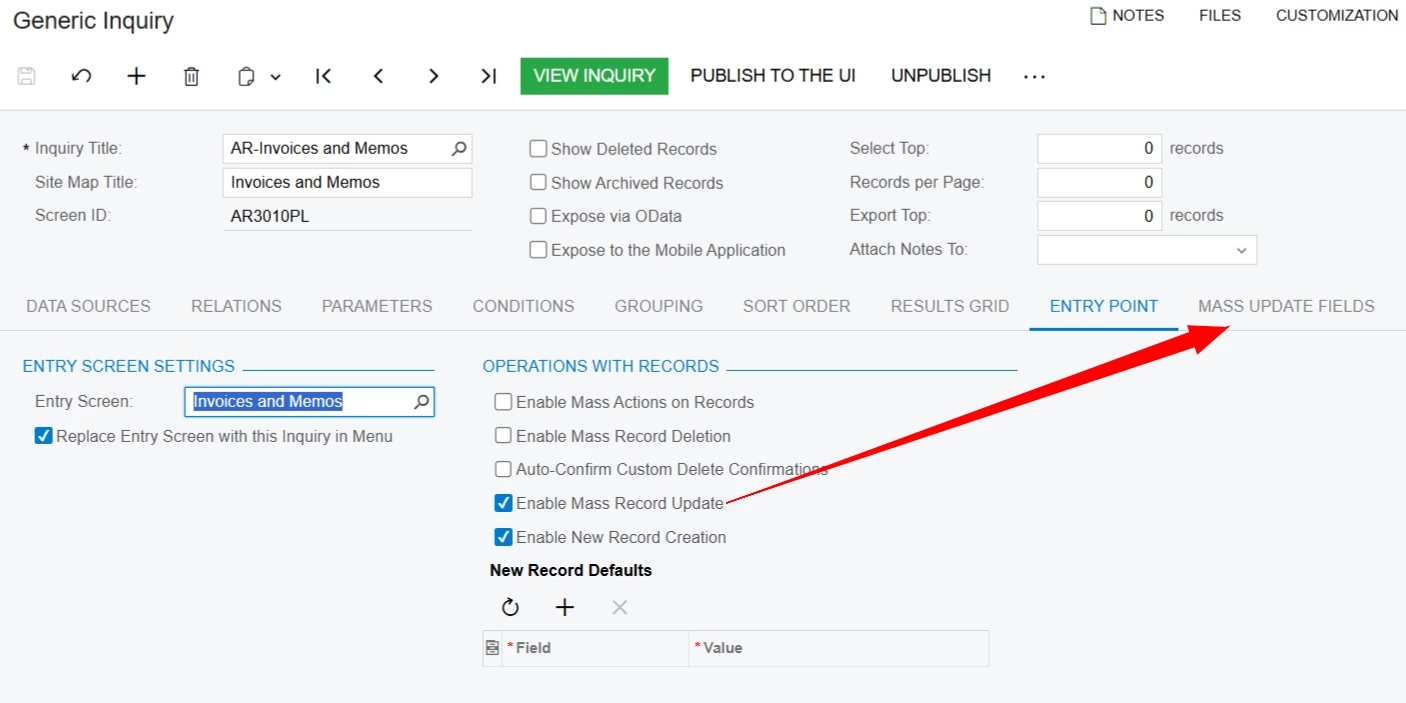
There is a way to update fields from the GI results. Saves the trouble of creating a business event and import scenario. You would just need to add the custom fields to the GI and select them as mass update fields as shown below. Here is more info: Acumatica

Would first still need the customization ​@lauraj46 shared to make the fields editable. 


  • Author
  • Freshman I
  • August 26, 2025

Good day ​@lauraj46 and ​@jhouser I would just like to thank you both for your advise and assistance. It works perfectly as I intended it to. 


jhouser
Captain II
Forum|alt.badge.img+6
  • Captain II
  • August 26, 2025

@JohanBLC That’s great to hear!